
Person swap + brand boards skill: your character on the pitch, your brand on the boards
A skill that swaps a person in a sports, street or event clip for your character, adds a prop, and rebrands the background billboards and signs. Seedance 2.5 swap, brand spelling review and the original audio, run by the AI Agent.
- Runs in
- YouViCo AI Agent · attach the skill file in chat
- Difficulty
- Intermediate
- Time
- 5 min setup, plus agent run time
Results
The person's moves, path and the camera are the original's; what changed is the person, the iPad in hand, and the board lettering.
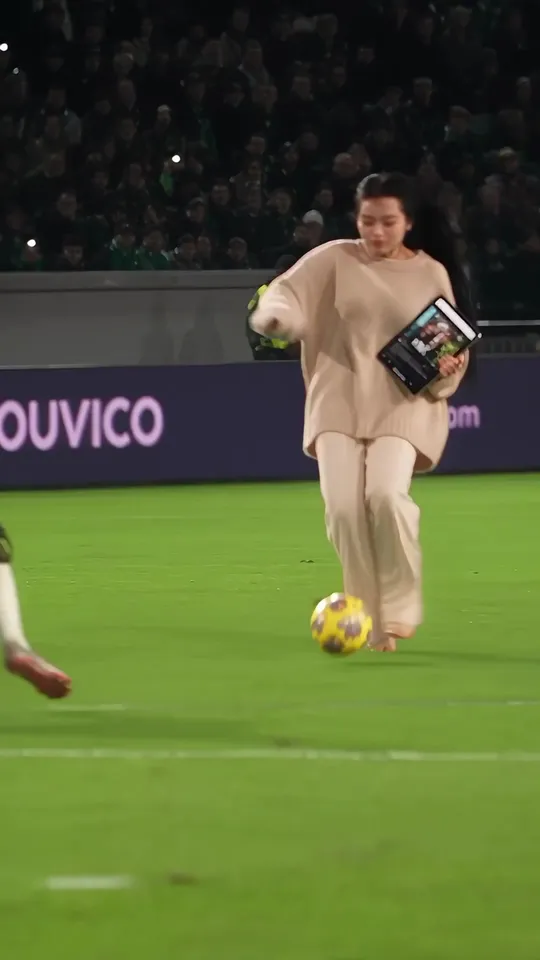
Result 0.5 s. Dribbling with an iPad in hand. The board behind now reads YOUVICO.
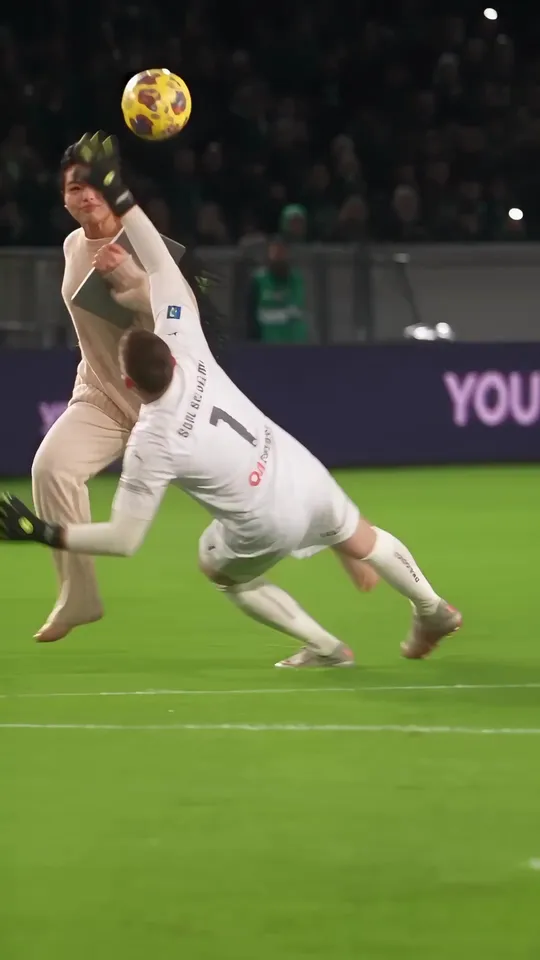
Result 2.5 s. The collision with the goalkeeper follows the original's motion and timing.
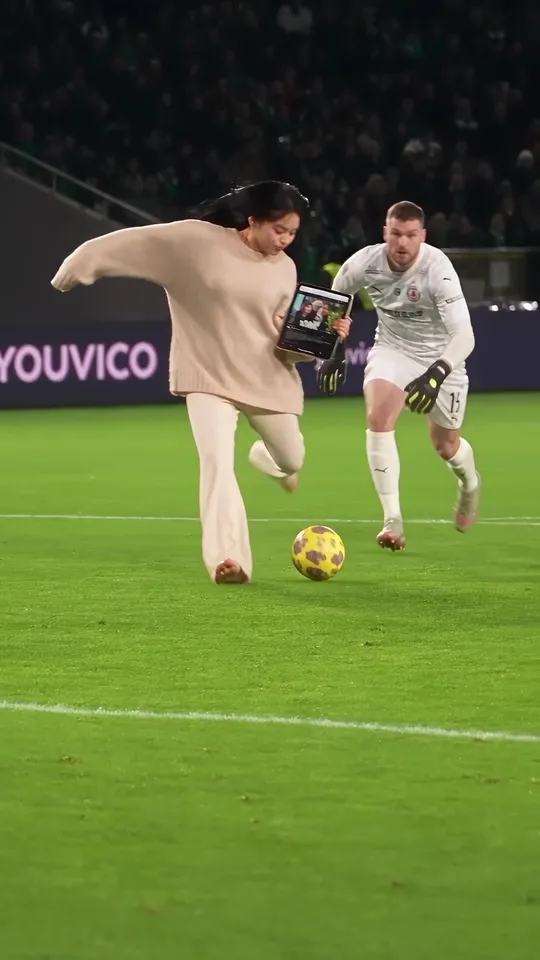
Result 9 s. Both board types (YOUVICO and youvico.com) passed the spelling review.
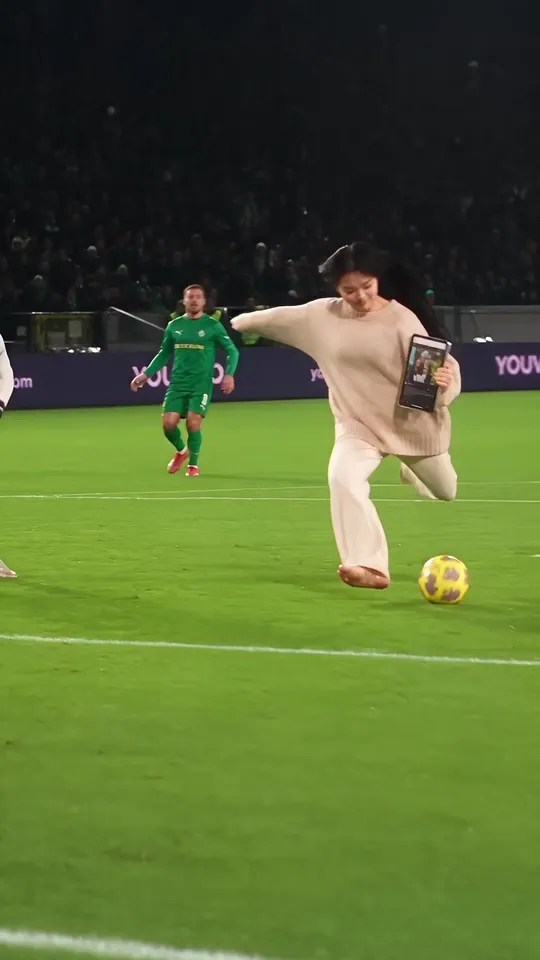
Result 13 s. The iPad stays in hand right up to the shot.
Downloads
The skill file to attach in the AI Agent chat.
- Person and brand board swap skill fileMD · 9 KB · Attach this markdown file as is in the AI Agent chat.Download
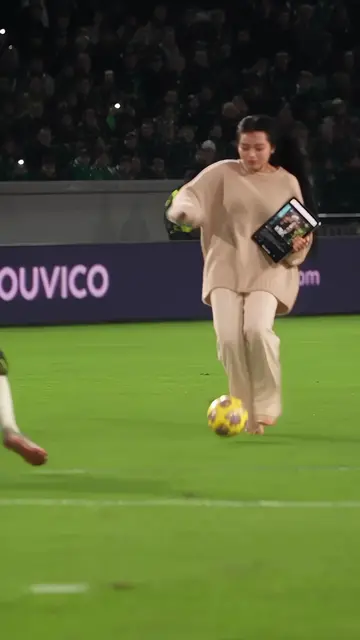 Source video (final, 9:16)MP4 · 11.2 MB · The full-size file of the final above (1080×1920, 15 s). No original of your own? Use this as the original and swap in your character and your brand. Includes the original sound.Download
What you need
This is all the skill needs. Put it in your project before you ask the agent.
One live-action clip
videoA short sports, street or event clip with billboards or signs in the background. The source video above works too.
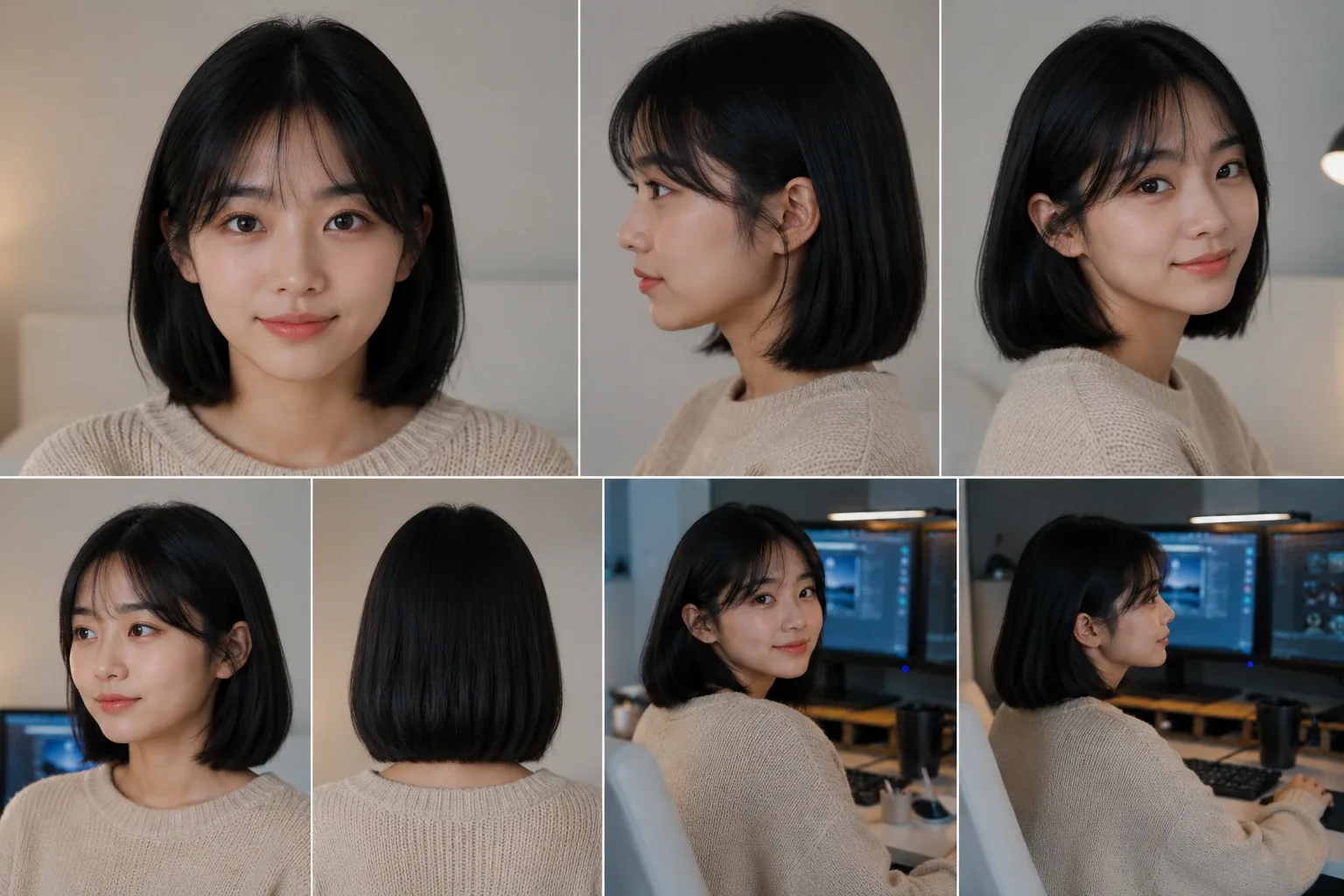
photoOne character photo
Several angles in one image is best. The example used this person sheet.
Brand spelling
textThe exact spelling, capitalization and address for the boards. The agent double-checks them on the official site. E.g. YOUVICO, youvico.com
This skill swaps a player in a match clip for your character and rebrands the stadium boards to your brand. In the example, the player on the ball became a character holding an iPad, and the pitch-side boards now read YOUVICO and youvico.com. Moves, path and camera stay as in the original, and the original audio is put back in the editor.
What this skill makes
- A 1080p video at the source’s ratio and length. The example is 9:16, about 15 seconds.
- One chosen person becomes the character, with any prop or situation you ask for added. The example adds an iPad.
- Lettering on background billboards and signs becomes the given brand. It only counts as done once it passes the spelling review.
- The sound is the original audio. Even if the generated clip comes with sound, the final uses the original audio.
How to run it
- Put the source video and the character photo in your project. No original? Use the source video from the downloads above.
- In the YouViCo desktop app, open the AI Agent with the AI button in the title bar or Ctrl/Cmd+Shift+A. The AI Agent runs in the Windows and macOS desktop apps.
- Attach the skill file in the AI Agent chat with the paperclip button at the bottom left of the input. If you will reuse it, save it to My skills with Import SKILL.md in the Skills view. What is a skill? explains how skills work with the agent.
- Say who to swap, the prop to add, and the brand for the boards.
Use this skill to swap the player on the ball for my character, holding an iPad.
Make the stadium boards read YOUVICO and youvico.com. Keep the original sound.
What the agent asks first
This skill isn’t for remaking the example; it’s for making your own. Before starting, the agent asks these together and skips anything your request already answers. Say “use the defaults” and it follows the example’s choices.
- Which source video, and who to replace? Distinguish them by clothes or position.
- Which character should they become? Point to a photo or sheet.
- Any prop or situation to add? E.g. running while holding up a tablet with the finished video Default: none.
- What brand lettering and design for the boards? Exact spelling, capitalization, address, background color Default: the official spelling, white text on a dark board.
- Keep the original sound? Default: yes.
What the agent does
| Stage | What the agent does |
|---|---|
| Check | Notes the source length and ratio and the character’s face, hair and clothes, and re-checks the brand spelling on the official site. |
| Generate | Puts the source in a new edit and generates with Seedance 2.5, attaching only the source video and the character photo. Sound on first; off if it fails. |
| Spelling review | Captures the canvas every 2–4 seconds and zooms in on the boards to compare letter by letter, then restores the original size to look again. |
| Merge | Puts the generated clip on an upper track and the original audio on A1. If the clip is 0.1–0.3 s short, the audio end is trimmed rather than the speed changed. |
| Export | Exports to the given folder, sets it to Needs review, and leaves a task log comment at 0 s. |
The heart of this skill: brand lettering must pass a spelling review
AI easily gets board lettering wrong; real runs produced typos like “youvic.com” and “YOUVICC”. So the skill sticks to this order.
- Spell the letters out one by one. The prompt lists Y, O, U, V, I, C, O and even says “the last letter is O, not C”.
- Never attach images that contain lettering. Attaching a board design image as a reference got the generation rejected (PROVIDER_REJECTED) with sound both on and off. Attach only the source video and the character photo, and describe the banner design in words.
- Zoom in to read. Distant boards are read by scaling the layer up 2–3x and comparing letter by letter; afterwards the size is restored and the final call is made again at 1x.
If generation fails with SERVICE_UNAVAILABLE, regenerate once with the same settings. If it keeps failing, a close-up of a real person’s face may be the cause: generate cut by cut, and fill a blocked cut with image-to-video from a separately made first frame.
The full skill file
Same as the download. You can also copy it into a new file.
---
name: clip-character-swap-brand-boards
description: 'Use when swapping a person in a short live-action clip (sports, street, events) for the project character (one photo) while adding a prop or situation, rebranding the background billboards and signs to our brand, then combining the original audio in the editor and exporting. Covers the Seedance 2.5 video swap, sound on → regenerate with sound off on failure, brand spelling review, and merging the original audio. Example triggers: swap the person in this clip with my character and rebrand the billboards, replace stadium banners with our brand, change only the person and keep the original sound, if generation fails turn the sound off and try again, swap the person in this video for Yujeong and make the boards our brand, keep the original audio.'
---

# Swap a person in a clip + rebrand the background boards + merge the original audio

When to follow: only for requests to swap a specific person in one live-action clip for a character (one photo), change the lettering on background billboards and signs to a given brand, and keep the original sound. For dance videos where moves and song sync are the point, use a dance swap skill and ignore this one. UI names below are given in English; if the app shows them in another language (for example Korean), find the item with the same meaning. Write reports and comments in the user's language.

## Ask the user before starting
The point of this skill is not to remake the example but to make the user's own video. Before starting, ask the questions below together, in one message.
- Skip anything the request already answers.
- If the user says "you decide" or "use the defaults", go with the defaults in parentheses.
- If the user seems to have no idea yet, briefly suggest 2–3 options that differ from the example.
- Once answered, show a one-line summary of what was decided, then start.

1. Which source video, and who to replace? Distinguish them by clothes or position.
2. Which character should they become? Point to a photo or sheet.
3. Any prop or situation to add? E.g. running while holding up a tablet with the finished video (default: none)
4. What brand lettering and design for the boards? Exact spelling, capitalization, address, background color (default: the official spelling, white text on a dark board)
5. Keep the original sound? (default: yes)

## 1. Rules
- Input: one source video + one character photo (several angles in one image is better) + the brand's spelling (check the official site).
- Output: same ratio and length as the source, 1080p, saved to the folder the user specifies. Sound is the original audio.
- Generation is a Seedance 2.5 (`seedance-2.5`) video edit with attachmentIds [source video, character photo]. durationSeconds is the source length rounded up (16 for 15.13 s).
- Sound: first generate with `generateAudio: true`; if it fails, regenerate with `false` and merge the original audio in the editor. Even if it succeeds, the final sound is the original audio.
- AI easily misspells brand lettering. Passing the spelling review is the pass criterion.
- Credits (reference; confirm with the estimate): 1080p 16 s 9:16 estimate 1,255, actual charge 1,027–1,063. Failed generations are charged 0.

## 2. Steps
1. Register the steps with `update_task_scope`: check → generate → merge → export and review.
2. Open the source with `get_project_file` and check length and ratio. View the character photo with `includeImage: true` and write down face, hair and clothes.
3. Check the brand's spelling with `web_fetch` (official site). E.g. uppercase wordmark YOUVICO, address youvico.com, base color #0A0B0E.
4. In the editor, make a `New edit`. Never touch existing edits. Putting the source on V1 with `add_clip_to_timeline` brings its sound onto A1.
5. Call `estimate_ai_generation` with the same arguments, then `start_ai_generation` (maxCredits = estimate). The prompt is §6.
6. Wait for completion. It is handy to hand `run_subagent` (sonnet, low) only the job of polling `get_ai_generation_status` every 30 seconds.
7. Rename the result with `rename_file`: `<topic>_<character>_<scene>_seedance25_1080p_[silent_]vN.mp4`.
8. Put the result on an upper track (V2 or V3) at 0 s with `add_clip_to_timeline`. A clip generated without sound gets no sound clip attached.
9. Once the spelling review (§3) passes, delete the generated clip's sound clip and the failed version clips with `delete_clips`. Trim the source V1 and A1 to the generated clip's length with `trim_clip` (includeLinked) (e.g. 15.133 → 14.867 s).
10. Check the layout with `get_timeline_layout`: the generated clip on top, the original audio on A1, and the same end time.
11. Export with `export_draft` (the specified folder, name `<topic>_<character>_<scene>_final_originalaudio.mp4`). Then confirm UPLOADED with `get_project_file`, `set_file_status` review, and `create_comment` a task log at 0 s (model, attachments, history, what needs checking).

## 3. Checks
- **Spelling review**: in the editor, move with `seek_editor` every 2–4 seconds and capture the canvas with `capture_app_screen`. Compare the board lettering letter by letter.
  - If it looks small, enlarge the generated layer with `set_layer_transform` to scale 2–3 and move x and y to zoom in on the boards to read them.
  - When done zooming, always restore scale 1, x 0.5, y 0.5.
  - Zooming crops the edges, so make the final call again at 1x.
- **Person and prop**: check that the character's face, hair and clothes match, that the prop (an iPad etc.) stays in hand, and that the original moves and path are kept.
- **Review tool limits**: reading the editor canvas with `inspect_app_media` returns a white screen, so use `capture_app_screen`. Exported mp4s can't be decoded and preview captures often fail. In that case, note in the report that a person has to play the final file to check the picture and sound sync.

## 4. When it fails
- **Misspelling** (real cases "youvic.com", "YOUVICC"): spell the letters out one by one in the prompt (Y, O, U, V, I, C, O, the last letter is O, not C). Describe the banner design in words only.
- **PROVIDER_REJECTED**: attaching a board design image (an image with brand lettering) as a reference was rejected with sound both on and off. Never attach reference images that contain lettering; attach only the source and the character photo. Then regenerate with sound off.
- **SERVICE_UNAVAILABLE**: regenerate once with the same settings and a new requestId. If it keeps happening, a close-up of a real person's face may be the cause.
  - Generate the video cut by cut.
  - For a blocked close-up cut, make a first frame with Nano Banana Pro and replace the cut with Seedance image-to-video.
- **Length difference**: the generated clip comes out 0.1–0.3 s shorter than the source. Don't change the speed; trim the end of the original audio to the generated length.
- If the same defect appears twice, stop just editing the prompt and change the attachments, range or method.

## 5. Report format
1. Result file (name, folder, length, status)
2. History (success or failure per version, and why)
3. Moments checked and the outcome (spelling, person)
4. What a person should check (play the final file, sound sync, boards that are covered or far away, rights to the source video)
5. Failed files not cleaned up
6. Credits (table of actual charges; failures are 0)

## 6. Prompt (the successful sound-off version)
Edit the attached video (first reference). Replace only the <description of the person to replace> with the young Korean woman shown in the identity photo (second reference): <hair, face, makeup>, wearing <the outfit in the photo>. She is <situation: a video editor carrying a tablet (iPad) in one hand, holding it up with a finished video on screen, hurrying across the pitch to get her work approved> — <the original moves, on the same path and timing>. Her face must stay clearly recognizable as the person in the second reference, well exposed and in sharp focus.
Replace every advertising board / LED banner around the stadium with a clean <brand> advertisement: dark navy-black board with only two pieces of white text, repeated: the large bold uppercase word "YOUVICO" — seven letters Y, O, U, V, I, C, O, the last letter is O, not C — and the smaller lowercase web address "youvico.com" — y, o, u, v, i, c, o, dot, c, o, m — with the letter o between c and the dot. Big, simple, evenly spaced letters that stay sharp and correctly spelled in every frame.
Keep everything else exactly as in the original video, frame by frame: <people to keep>, the ball, the camera movement and framing, the crowd, the stadium lighting and the pitch. Same duration, starts on the same first frame, same cuts as the original. Sharp, high-detail live-action footage. No captions, no app interface, no watermark.

configs: `{"resolution":"1080p","aspectRatio":"<source ratio>","durationSeconds":<source length rounded up>,"generateAudio":false}`

Change log: v1.0 2026-10-19 first written from the soccer work (Yujeong getting iPad sign-off + YOUVICO boards), including the close-up failure handling from the kart chase work / 2026-10-19 added questions before starting
Tips before you run it
- Check the rights to the source video. Sports broadcasts and event footage belong to rights holders and organizers, and the players and spectators on screen have portrait rights. Club crests and kit logos are other companies’ trademarks.
- Don’t let it look like a real sponsorship or ad. Rebranding the boards in real match footage can make it look like your brand sponsored that match. Use footage you shot or have cleared, and say it is AI-edited when you post it.
- Use yourself, someone who agreed, or a fictional character. The person in the example is a fictional character from the project.
- Credits. The reference in the skill is an estimate of 1,255 and an actual charge of 1,027–1,063 credits for 1080p, 16 s, 9:16. Failed generations aren’t charged.
- Play the final file yourself. The agent reviews on the editor screen, but reports that the exported file’s picture and sound sync need a person to play it.
FAQ
Wouldn’t a board design image make it more accurate?
In the example work, attaching an image with lettering got the generation rejected. So the skill gets accuracy by describing the design in words and spelling the letters out.
Can I swap just the person, with no prop?
Yes. Leave the prop out of the request and only the person and boards change. To leave the boards alone too, Drama character swap or Dance character swap fits better.
The video comes out slightly shorter than the original.
Generated clips often come out 0.1–0.3 s shorter. The skill doesn’t change the speed; it trims the end of the original audio to the generated length.
Run this skill in YouViCo
Upload a photo to your project, open the AI Agent, attach the skill file in the chat, and ask it to make the video.