
Dance character swap skill: same moves and song timing, your character
A skill that swaps the dancer in a dance video for your character. Give the AI Agent one dance video and one photo, and it makes a character sheet, runs a Seedance 2.5 swap, syncs speed to the song, and exports.
- Runs in
- YouViCo AI Agent · attach the skill file in chat
- Difficulty
- Beginner
- Time
- 5 min setup, plus agent run time
Results
The dancer's moves and beats stay exactly as in the original; only the person changes to the character from the sheet.
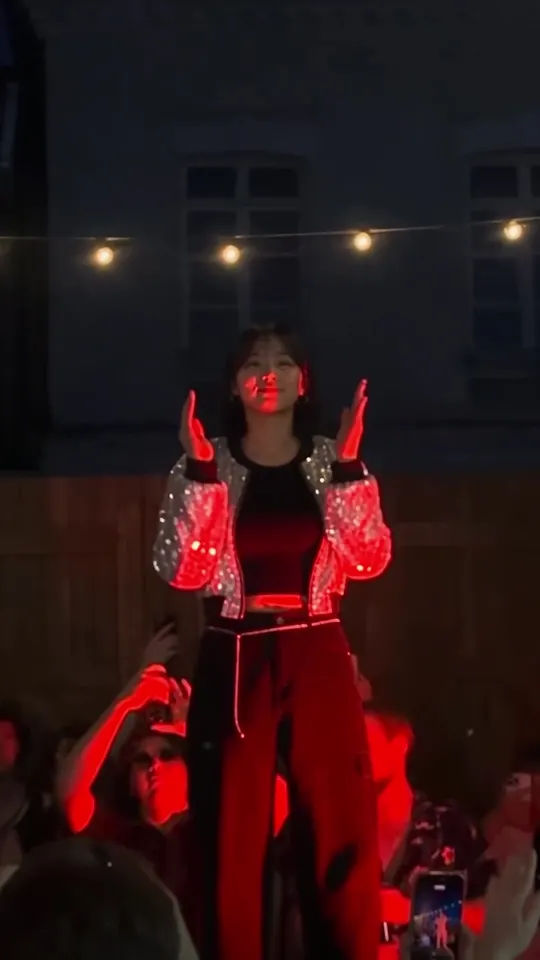
Result 1 s. The opening move, starting from the same pose as the original's first frame.
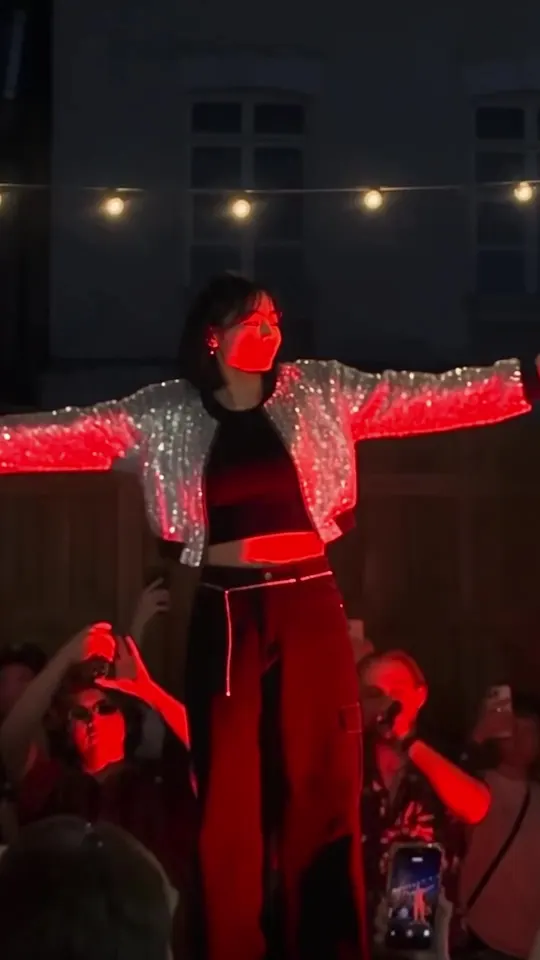
Result 6 s. Both arms spread wide.
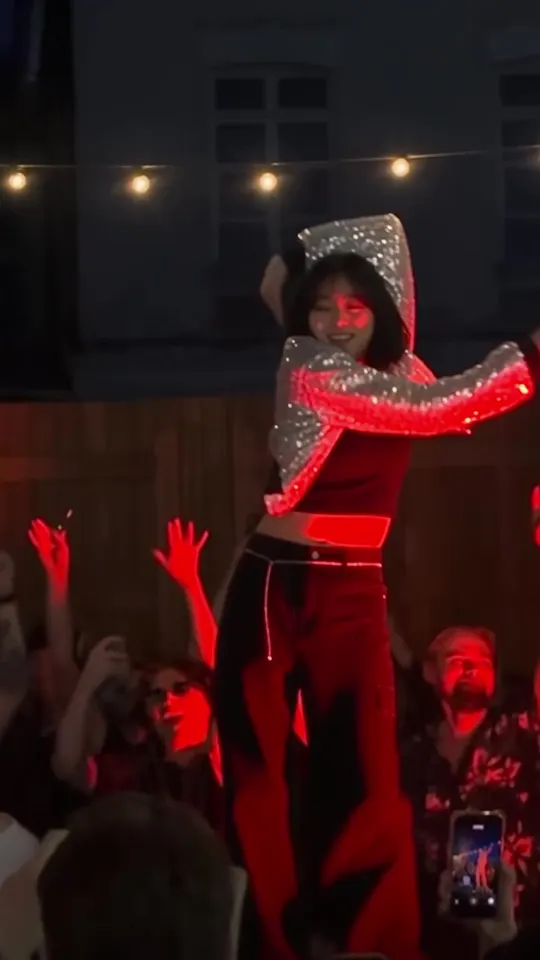
Result 11 s. One arm swept over the head.
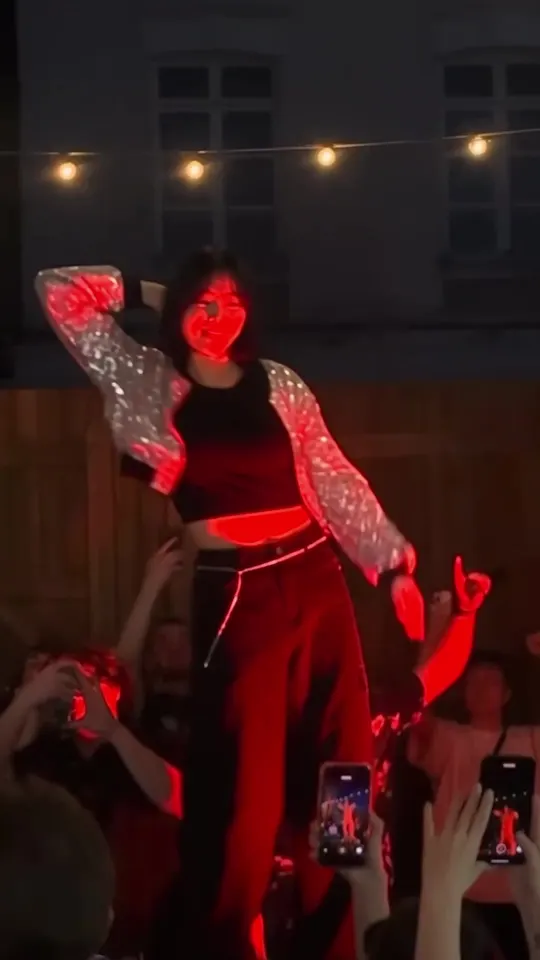
Result 20 s. The last move lands on the original beat.
Downloads
The skill file to attach in the AI Agent chat.
What you need
This is all the skill needs. Put it in your project before you ask the agent.
One dance video
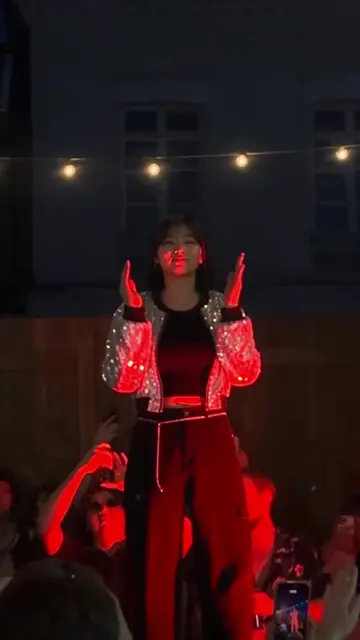
videoA screen recording from Instagram or TikTok works. The agent finds the loop, trims it, and zooms in to push buttons and account names off screen. The source video above works as is.
photoOne photo of the person
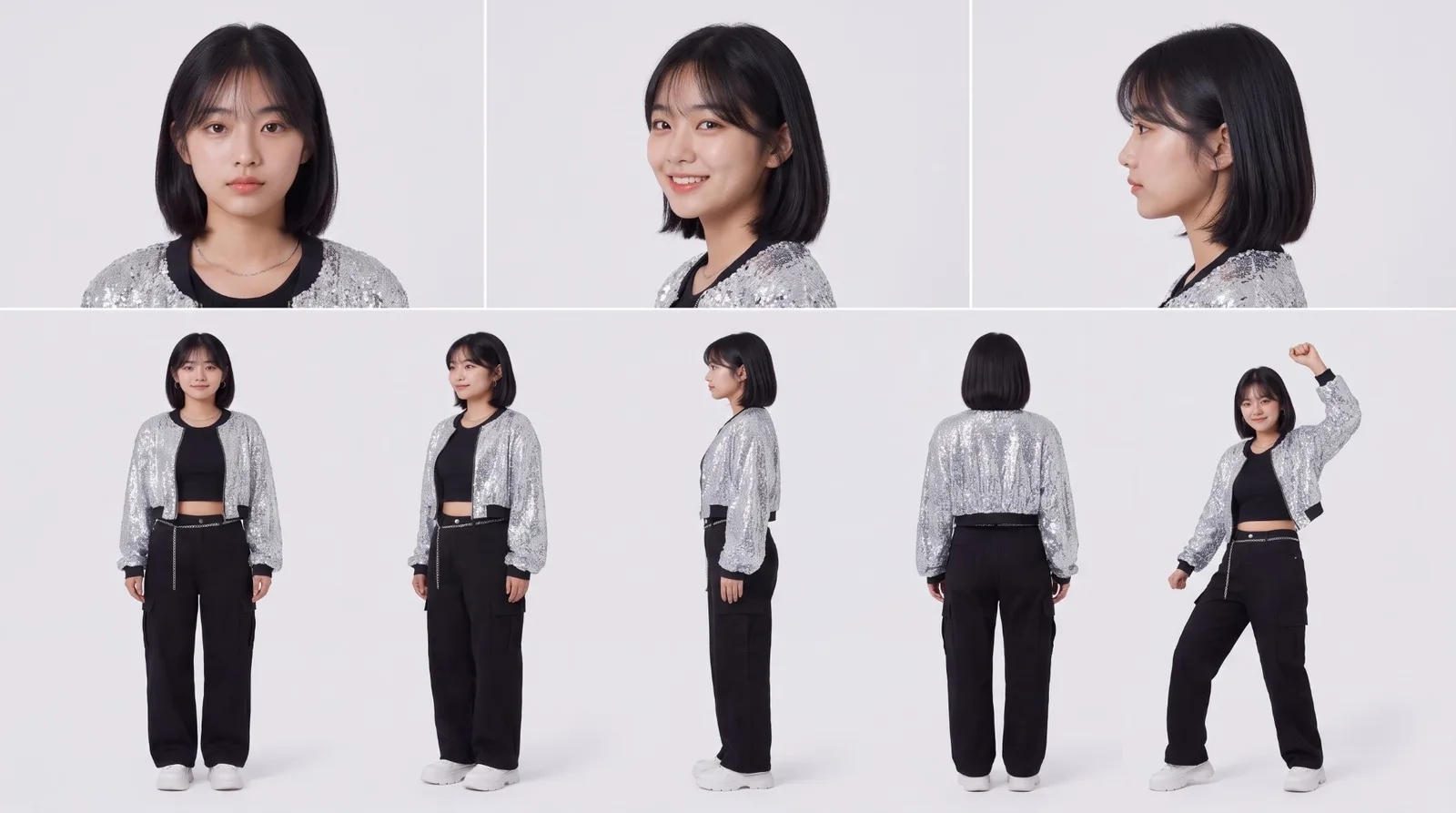
A large, clear, front-facing face works best, and several angles in one image is even better. The example used a character sheet like this; give the agent a photo and it makes one first.
This skill swaps the person in a trending dance video for your own character. The choreography, camera, stage, and crowd stay as they are, only the dancer changes, and the song is the original video’s own audio. Attach the skill file in YouViCo’s AI Agent chat, put one dance video and one photo in your project, and the agent takes it from there.
What this skill makes
- A 9:16 vertical short, 1080×1920, 30fps, with the original video’s audio.
- The dancer’s moves, beats, camera movement, stage, lighting, and crowd stay the same; only the person changes.
- Without an outfit request, the character wears the original dancer’s outfit silhouette.
- The swap is generated with Seedance 2.5 at 1080p. A 720p clip gets scaled up in the 1080 edit and looks soft.
How to run it
- Put one dance video and one photo of the person in your project. No dance video handy? Use the source video from the downloads above.
- In the YouViCo desktop app, open the AI Agent with the AI button in the title bar or Ctrl/Cmd+Shift+A. The AI Agent runs in the Windows and macOS desktop apps.
- Attach the skill file in the AI Agent chat with the paperclip button at the bottom left of the input. Nothing to install. If you will reuse it, save it to My skills with Import SKILL.md in the Skills view. What is a skill? explains how skills work with the agent.
- Send a request like this.
Use this skill to swap the dancer in the dance video for my character.
The dance video and the photo are in the project.
The agent first asks the few questions below, then gets going. When it finishes, the video lands in the 05_Final folder with review status, with a task comment at 0 s noting the range used, attachments, speed, and scale.
What the agent asks first
This skill isn’t for remaking the example; it’s for making your own. Before starting, the agent asks these together and skips anything your request already answers. Say “use the defaults” and it follows the example’s choices.
- Which dance video, and which part of it? Default: one full pass of the song.
- Who should the dancer become? Point to a person photo or character.
- If several people appear, which one changes? Default: the main dancer in the middle.
- What outfit? Share any concept you have in mind. Default: the original dancer’s outfit silhouette.
- Zoom in so the face reads larger? Default: keep the original framing.
What the agent does
| Stage | What the agent does |
|---|---|
| Setup | Creates numbered folders, from 01_Input to 05_Final. |
| Find the loop | Puts the video in the editor and captures it every second, then every 0.1 s, to find where the song comes around and starts repeating. |
| Clean the source | Trims to that range, zooms in so social media buttons, account names, and captions fall off screen, and exports a clean copy. |
| Character sheet | Makes a sheet with three face close-ups and several full-body angles from the photo, then checks face shape, eyes, nose, lips, and hair against it. Redoes it if decorations appear. |
| Swap | Attaches the clean copy, the sheet, and the original photo together and generates the swap with Seedance 2.5 at 1080p, audio off. |
| Assemble and fix | Places the result on the track above the original at the same start time and sets its speed to the ratio of the two lengths. The song stays on the original clip. |
| Finish | Trims the start if the first seconds repeat a move, exports, sets the file to review, and reports. |
The speed fix is the heart of the skill. Generated clips often come out slightly shorter or longer than the source, and left alone the dance drifts off the song toward the end. If a 23.0 s source comes back as 22.708 s, the agent sets the clip speed to 0.9873. The real case the skill describes also started as a 23 s range and ended at 20.8 s after cutting about 2.2 s of repeated motion at the start.
The agent toggles the generated layer on and off to compare poses with the original at the same moment, and checks that the face reads as the person in the photo, that no props from the original remain, and that hands are not distorted.
Make it yours
Add one line to your request.
- Change the outfit. “Dress her in a white shirt and a denim skirt” changes both the sheet and the swap.
- Use another video. Just swap the video. Screen recordings covered by app UI, like Instagram Reels, are trimmed to the loop and cleaned up.
- Bigger face. If the dancer is small in frame, say “make the face bigger.” The frame zooms in a little, trading a bit of the feet for a larger face.
- Credit estimate. The credit lines in the skill file are reference values; Seedance 2.5 at 1080p is listed at about 1,600 credits for 23 s and changes with length and resolution. The agent checks the real estimate before it generates.
The full skill file
Same as the download. You can also copy it into a new file.
---
name: dance-character-swap
description: 'Use when making, from start to finish, a 9:16 short from one dance video (screen recordings from social apps included) and one photo of a person, replacing the person in the video with that person (or a fictional character) while keeping the dance moves and the original song timing. Covers the character sheet, looping and UI cleanup of the recording, the Seedance 2.5 swap, song sync and speed correction, export and review. Example triggers: swap the dancer with my character, replace the person in this dance video using a character sheet, keep the song timing, turn this dance video into Yujeong, make a challenge video with my character.'
---

# Dance video character swap (one character sheet + original song kept)

When to follow: only for requests to replace the person in a dance or performance video with the project's person (one photo) while keeping the original song. Ignore it for any other request. UI names below are given in English; if the app shows them in another language (for example Korean), find the item with the same meaning. Write replies, comments and reports in the user's language.

## Ask the user before starting
The point of this skill is not to remake the example but to make the user's own video. Before starting, ask the questions below together, in one message.
- Skip anything the request already answers.
- If the user says "you decide" or "use the defaults", go with the defaults in parentheses.
- If the user seems to have no idea yet, briefly suggest 2–3 options that differ from the example.
- Once answered, show a one-line summary of what was decided, then start.

1. Which dance video, and which part of it? (default: one full pass of the song)
2. Who should the dancer become? Point to a person photo or character.
3. If several people appear, which one changes? (default: the main dancer in the middle)
4. What outfit? Share any concept you have in mind. (default: the original dancer's outfit silhouette)
5. Zoom in so the face reads larger? (default: keep the original framing)

## 1. Rules
- Input: one dance video (Instagram or TikTok screen recordings work) + one photo of the person (a large, clear front-facing face; several angles in one image is even better). Do not ask anything beyond 'Ask the user before starting'; then proceed. Without an outfit request, follow the original dancer's outfit silhouette.
- The person must be the user, someone who consented, or a fictional character. If they look like a real celebrity, stop and say so. The original video may be someone else's post, so note in the report that rights must be checked before publishing outside.
- Output: 9:16, 1080×1920, 30fps, the original song as is. Generate video with sound off (`generateAudio` false).
- Resolution: make the final with Seedance 2.5 at **1080p**. A 720p generation is scaled up in the 1080 edit and looks soft (real feedback: "the quality is low").
- Choosing the video: if single-color stage light (red or blue) covers the face or the dancer is small on screen, the face stays hard to see after the swap. Where possible, pick a stretch or video where the face is bright and large.
- Credits (reference; the real figure comes from `estimate_ai_generation`): character sheet about 20–65 / Seedance 2.5 1080p 15 s about 1,000, 23 s about 1,600 / 720p 23 s about 650.

## 2. Steps
1. Register the steps with `update_task_scope`. Under the result folder, `create_folder`: 01_Input, 02_CharacterSheet, 03_CleanSource, 04_AISwap, 05_Final, 99_Previous_Rejected. Split file moves and renames into `apply_changes` calls of 10 or fewer (more gives a 429).
2. Analysis edit (1080×1920): put the video on V1 with `add_clips_to_timeline`. If no linked audio appears, the source has no sound (common with screen-recorded .mov files) → note it in the report. Open the editor through the sidebar `Edit` → `Video editor` (more reliable than navigating by address).
3. Finding the range: `inspect_app_media` in the project preview often cannot read the recording's codec. Look with `seek_editor` + `capture_app_screen` at 1-second steps, then 0.1-second steps. Range to use = from the post's first frame to the first point where it starts repeating, or until a menu or swipe covers it (e.g. 0.0–23.0 s). This range is one full pass of the song.
4. Cleanup: cut with `trim_clip` (includeLinked) and zoom in with `set_layer_transform` to push the UI off screen (Instagram Reels scale 1.25 · y 0.525, recordings with margins scale 1.3 · y 0.526). Check start, middle and end captures for leftover buttons, account names or captions. `export_draft` (startSeconds · endSeconds) → 03_CleanSource, name `<prefix>_<video>_clean_<length>s_<song|silent>`.
5. Character sheet (Nano Banana Pro `gemini-3-pro-image`, reference [person photo]): the §6-A prompt. Put the result next to the photo and compare face shape, eyes, nose, mouth and hair. If the face turns round or face gems, earrings or glasses appear, it failed → remake with references [person photo, previous sheet] adding "face exactly like the photo, no decorations". Only a passing sheet goes into 02_CharacterSheet.
6. Swap generation (Seedance 2.5): attachmentIds [clean source, character sheet, person photo] — **always include the original photo too** (with only the sheet the face goes soft). configs: resolution 1080p, aspectRatio 9:16, durationSeconds = clean source length rounded up, generateAudio false. Prompt §6-B. Estimate with the same attachments and settings → `start_ai_generation`. 23 s at 1080p takes about 13 minutes. When done, `rename_file` `<prefix>_<video>_swap_seedance25_1080p_vN` → 04_AISwap.
7. Assembly: `add_clip_to_timeline` the generated clip on the track above the original (V2/V3) at the same start time. 1080p is scale 1.0 (720p would be 1.5). Keep the song as the original clip's audio (A1).
8. Speed correction (required): put the generated clip's `sourceDuration` from `get_editor_context` ÷ the clean source length into `set_clip_speed` (e.g. 22.708 ÷ 23.0 = 0.9873). After correcting, compare the pose at the end point with the original.
9. Bigger face (optional): if the dancer is small, `set_layer_transform` scale 1.1–1.15, y 0.52–0.53. The toes get cut a little and the face gets larger.
10. Repeated start check: if the same move appears twice in the first 1–3 seconds of the generated clip or the loop overlaps, cut that much off the front (real case: about 2.2 s cut from the front of 23.0 s for a 20.8 s final). Cut video and song together.
11. `export_draft` → 05_Final, name `<prefix>_<video>_<person>swap_Final_1080p` → `set_file_status` review, and `create_comment` a task comment at 0 s (range, attachments, speed, scale).

## 3. Checks
- The first-frame pose matches the original's first frame.
- Middle and end: toggle the generated layer with `set_layer_opacity` 0 ↔ 1 and compare with the original at the same moment (arm raises, crossings, pause beats).
- Face: reads as the same person as the photo; leftover original props (sunglasses etc.), distorted hands, outfit changes, leftover UI or watermarks.
- If the result file's codec cannot be read, use editor captures instead and report that song sync needs a human listen.

## 4. When it fails
- Low quality: if it was 720p, redo at 1080p. Zooming in the edit does not fix it.
- Doesn't look like the person: ① remake the sheet comparing its face with the photo ② add the original photo to the attachments ③ add a face description + "face well exposed and in sharp focus" to the prompt ④ if lighting still covers the face, remake with a sentence changing the light to neutral, or change the video.
- Moves are off: first do the speed correction in step 8. If still off, generate in pieces of about 10 seconds and join them.
- If the same defect appears twice, stop editing the prompt and change the video, range or model.

## 5. Report format
Result file (name, folder, length) → range used (seconds in the original) → attachments and settings → speed and scale → moments checked → remaining defects (for a person to look at) → credits (estimate and actual charge kept separate).

## 6. Prompts
A. Character sheet: "Character reference sheet of ONE person. Face and hair must exactly match the person in reference 1: same face shape, eyes, nose, lips, skin and hairstyle. Natural light makeup only; no face gems, no glitter, no earrings, no glasses unless the photo has them. Outfit: <outfit>. 16:9, plain light grey studio background, photorealistic, soft even light. Top row: three large head-and-shoulders close-ups (front neutral, three-quarter smiling, profile) where the face fills each panel. Bottom row: full body front, three-quarter, back, and one dance pose. Same person and outfit in every panel. No text, no labels, no watermark."
B. Swap: "Edit the attached video (first reference). Replace only the dancer with the person shown in the character sheet (second reference) and the identity photo (third reference). Her face must be clearly recognizable as the person in the third reference in every frame: <face and hair description>. No glasses, no sunglasses, nothing covering the eyes. Outfit from the character sheet: <outfit>. Keep everything else exactly as in the original video, frame by frame: the same choreography, every movement with the same timing and rhythm, the same camera movement and framing, the same set, lighting and crowd. Let the face stay well exposed and in sharp focus. Same duration, starts on the same first frame, one continuous shot with no cuts. Sharp, high-detail cinematic live-action footage. No text, no captions, no app interface, no watermark."

Change log: v1.0 2026-10-11 first version / v1.1 generated clip scale, speed correction, opacity comparison / v2.0 2026-10-11 generalized to one-photo input, 1080p default, original photo added to attachments, sheet face comparison and remake, folder structure, bigger face, cutting a repeated start, lighting and size caution, how to open the editor, apply_changes in batches of 10 / 2026-10-19 added questions before starting
Tips before you run it
- Use yourself, someone who agreed, or a fictional character. The skill stops if the photo looks like a real celebrity.
- Check the rights to the source video. Dance videos are often someone else’s post, and the song is copyrighted. The skill also reports that rights need checking before you publish.
- Bright, large faces work best. If single-color stage light (red or blue) covers the face, or the dancer is small, the face stays hard to see after the swap. The example above is on a red-lit stage, so the face is washed red in places.
- The original photo goes in too. With only the sheet attached the face gets soft, so the skill attaches both the sheet and the photo.
- Listen to the sync yourself. The agent compares moves with screen captures, but reports that the audio needs a human ear.
FAQ
Do I need anything besides the video and the photo?
No. The agent makes the character sheet from the photo and keeps the original video’s audio for the song. If the source has no audio (common with screen recordings), the agent says so in its report.
What if the swapped person does not look like the photo?
The skill has an order for that: remake the sheet and compare its face with the photo, add the original photo to the attachments, then add a face description. If lighting still covers the face, switch the lighting to neutral or pick another video.
What if the dance drifts off the song?
Check the speed fix first. If it still drifts, the agent generates in pieces of about 10 seconds and joins them. If the same defect shows up twice, it stops tweaking the prompt and changes the video, the range, or the model.
Are there other skills?
The first skill, Under the fan outfit change, turns one photo into a reel where each ceiling fan blade changes the outfit. New skills keep landing in the Skills section.
Run this skill in YouViCo
Upload a photo to your project, open the AI Agent, attach the skill file in the chat, and ask it to make the video.