
Motorcycle champagne shot skill: same flow as the original, your character
A skill that reshoots the viral night-highway clip, champagne popped and a thrown bottle shot from a motorcycle's back seat, with your character. Original analysis, GPT Image 2.5 first frame, Seedance 2.5 one-take, original song.
- Runs in
- YouViCo AI Agent · attach the skill file in chat
- Difficulty
- Intermediate
- Time
- 5 min setup, plus agent run time
Results
Time of day, background, action order and ending follow the original; only the lead changes to the character from the sheet.
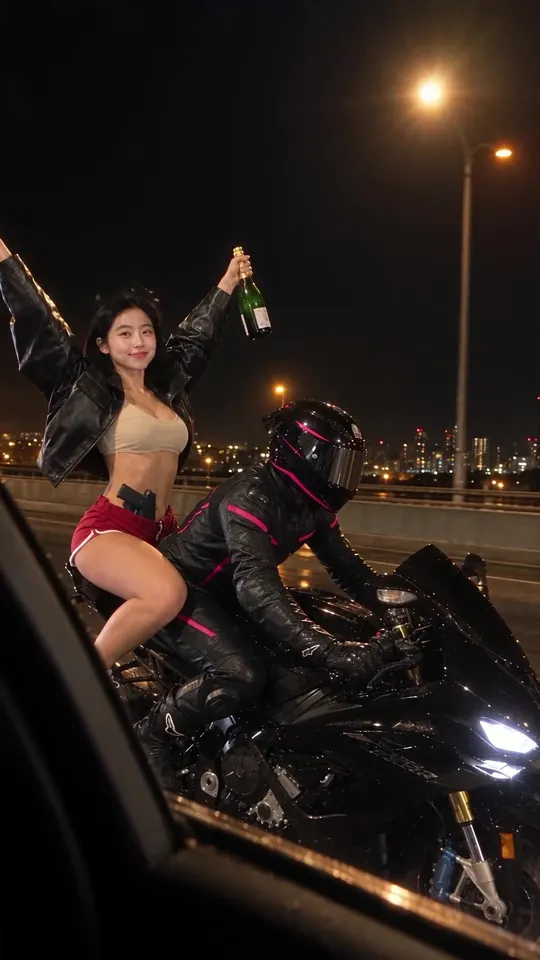
Result 0.5 s. Wet highway at night, cheering with the champagne bottle.
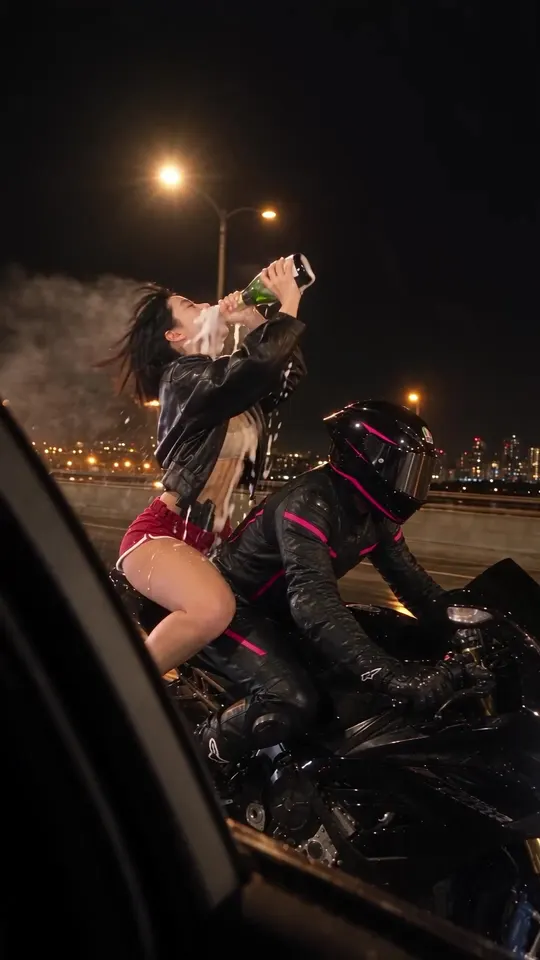
Result 3.6 s. Cork popped, drinking straight from the bottle as the wind takes the foam.
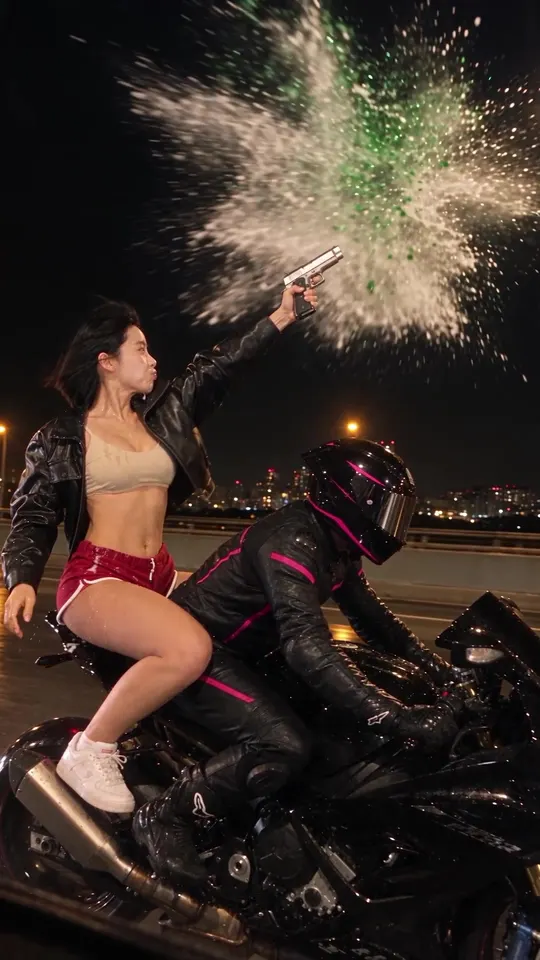
Result 6.9 s. The thrown bottle is hit: green glass and champagne burst together, with no fireworks or flashes.
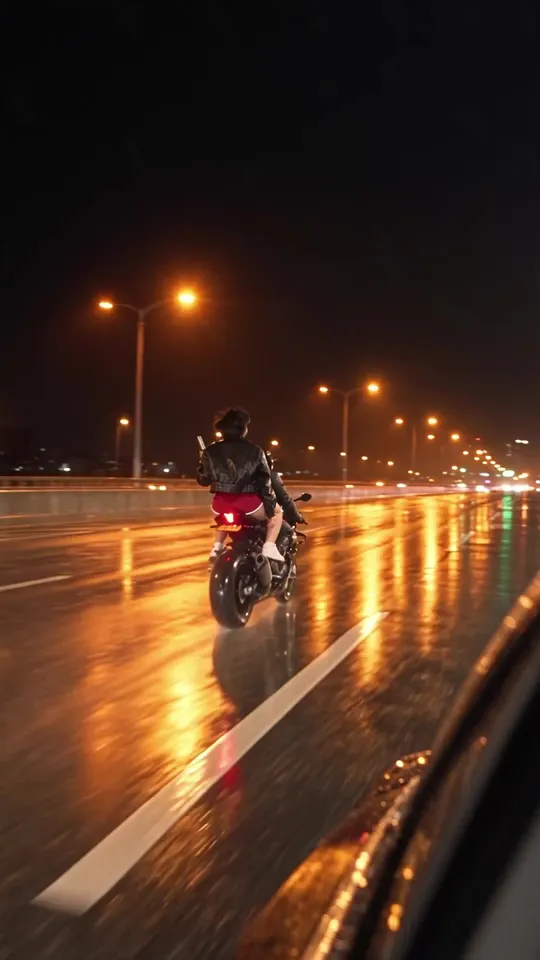
Result 9.6 s. The bike speeds off and leaves an empty road.
Downloads
The skill file to attach in the AI Agent chat.
- Motorcycle champagne shot skill file v1.0MD · 9 KB · Attach this markdown file as is in the AI Agent chat.Download
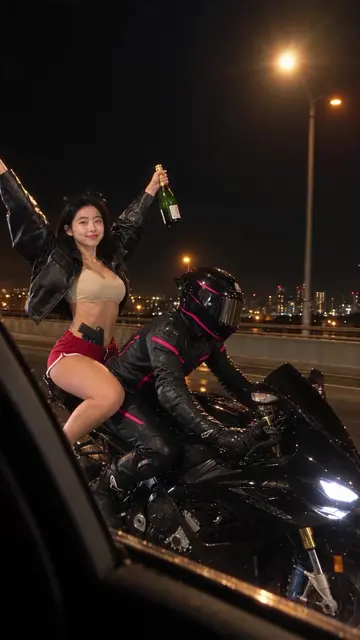 Source motorcycle videoMP4 · 7.5 MB · The full-size file of the result above (1080×1920, 10 s). No original of your own? Use this one as the original and remake it with your character. Includes the song.Download
What you need
This is all the skill needs. Put it in your project before you ask the agent.
One original motorcycle video
videoA 9:16 social clip of about 10 seconds shot from a motorcycle's back seat. The agent first logs the background, time of day, actions and ending second by second, then follows that flow. The source video above works too.
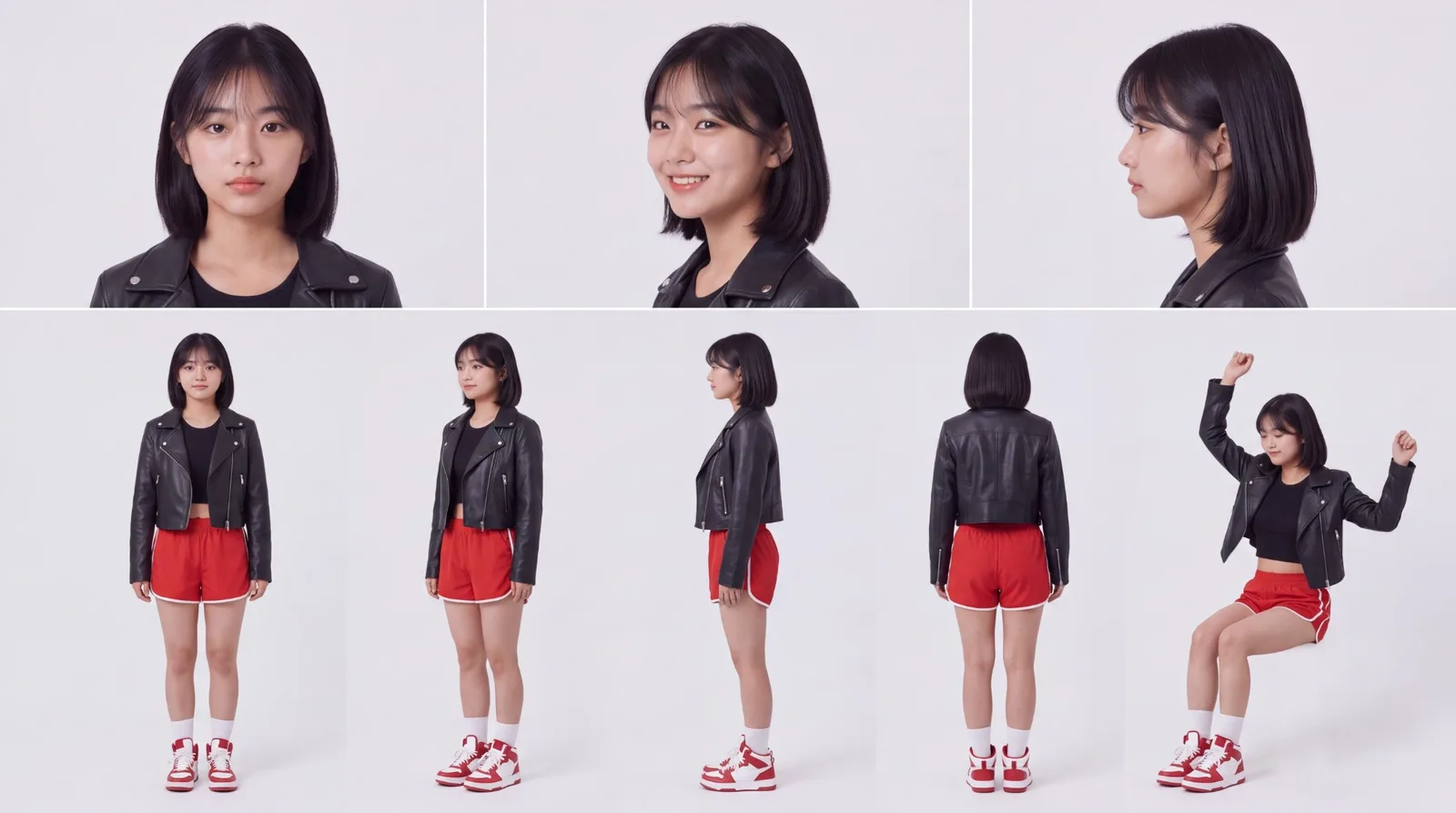
photoOne photo of the person
A clear photo of the face or a character sheet. Both the first frame and the video follow this face. The example used this character sheet.
There is a viral clip where someone on the back of a motorcycle on a night highway pops champagne, drinks, shoots a thrown bottle, and the bike speeds off. This skill reshoots an original like that with your own character. Background, time of day, action order and ending stay as in the original; only the lead changes, and the song is the original video’s own audio.
What this skill makes
- A 9:16 vertical clip, 1080×1920, 10 seconds. One take with no cuts, as if filmed from the window of a car driving alongside.
- The flow: cheer → pop the cork → drink from the bottle → toss and shoot → glass and champagne burst together → the bike speeds off and leaves an empty road.
- The first frame is made with GPT Image 2.5 and the video with Seedance 2.5. The video is generated silent and the original song is added in the editor before export.
- The rider is dressed to suit the character. The example uses black leather with hot-pink stripes and a pink-accent helmet.
How to run it
- Put the original motorcycle video and a photo of the person in your project. No original? Use the source video from the downloads above as the original.
- In the YouViCo desktop app, open the AI Agent with the AI button in the title bar or Ctrl/Cmd+Shift+A. The AI Agent runs in the Windows and macOS desktop apps.
- Attach the skill file in the AI Agent chat with the paperclip button at the bottom left of the input. Nothing to install. If you will reuse it, save it to My skills with Import SKILL.md in the Skills view. What is a skill? explains how skills work with the agent.
- Send a request like this.
Use this skill to remake the motorcycle video with my character.
The original video and the photo are in the project.
When it finishes, a video named <short name>_Final_1080p_vN lands in the 05_Final folder with Needs review status, with a task log comment at 0 s. An earlier Final is set to Closed; the agent never sets Approved.
What the agent asks first
This skill isn’t for remaking the example; it’s for making your own. Before starting, the agent asks these together and skips anything your request already answers. Say “use the defaults” and it follows the example’s choices.
- Which original video should it follow?
- Who is the lead? Point to the person photo.
- What outfit and hair? Default: as in the person photo and first frame.
- What colors for the rider, and what style of bike? Default: colors that suit the lead.
- Keep the original flow of actions, or change something? E.g. a different prop instead of champagne, a different ending Default: as in the original.
- Time of day and background? Default: same as the original.
What the agent does
| Stage | What the agent does |
|---|---|
| Analyze original | Puts the original in the editor, captures 0, 2, 4.7, 7 and 9.5 s, and tabulates background, time of day, actions and ending. |
| First frame | Makes a GPT Image 2.5 first frame from the photo (face) and an original frame (background and light), then checks face, hair and background. |
| Generate video | Attaches the first frame and the photo and makes a Seedance 2.5 1080p 10-second clip, with the second-by-second actions from the analysis in the prompt. Usually 4–7 min. |
| Review | Plays the result at 0.5x and captures frames in a row to check the drinking, the shot, the ending and the brightness. |
| Assemble | Parks earlier versions in empty stretches of the timeline and places the new clip on V3 at 0 s. The original song stays on A1. |
| Finish | Exports 0–10.033 s, updates file statuses, leaves a task log comment and replies to each feedback comment. |
The heart of this skill is analyzing the original first. Skip it and actions or the ending go missing, or the background drifts from the original. So the skill writes down what happens at which second, then carries those timings straight into the video prompt.
Rules that came from failed takes
The skill’s failure table comes from feedback on several real retakes.
- The bottle exploded like fireworks. The description was vague. Spell out a real glass shatter with no fireworks, sparks or glitter.
- The background brightened midway. Spray, foam clouds and flare caused it. State the same lighting for all 10 seconds and keep the spray to thin streams.
- The burst didn’t feel like champagne. Only the breaking was described. Add that the champagne still inside explodes outward as liquid and foam.
- The hair grew long. Name the short black bob, and tag rejected files with
_rejected_in the name.
The editor has no brightness or exposure correction, so color and exposure problems are fixed by regenerating. If the same defect shows up twice, change the first frame instead of only the prompt.
Make it yours
Add one line to your request.
- Rider colors. “Put the rider in white leather with sky-blue stripes” and the first frame is made that way.
- Another original. Any clip shot on a motorcycle or a similar ride works; swap the original and the agent re-analyzes its flow.
- Video model. The skill uses Seedance 2.5 and never uses a model you told it to avoid.
- Credits. The figures in the skill (image estimate 40, actual 8; video estimate 655, actual 593) are references, not caps. The agent checks the real estimate before it generates.
The full skill file
Same as the download. You can also copy it into a new file.
---
name: moto-champagne-shot-recreate
description: 'Use when restaging, as one take, a social video shot from the back seat of a motorcycle (9:16, about 10 seconds) with the project''s fictional character (e.g. Yujeong). Match the original''s background, action order and ending exactly, build the concept drinking champagne → tossing the bottle and shooting it → glass and champagne burst → motorcycle speeds off at the end with a GPT Image 2.5 first frame + Seedance 2.5, then add the original song as is and export as Final. Example triggers: recreate the motorcycle champagne clip with my character, motorcycle shot video same as original, redo the moto clip, make the motorcycle video with Yujeong, motorcycle video shooting champagne, same flow as the original, make the motorcycle version again.'
---

# Motorcycle champagne shot restaging

When to follow: only for requests to restage a social video of a person on a motorcycle (or a similar ride) with the project's character while keeping the original song and timing. Ignore it for plain face swaps, dance videos or image work. UI names below are given in English; if the app shows them in another language (for example Korean), find the item with the same meaning. Write replies, comments and reports in the user's language.

## Ask the user before starting
The point of this skill is not to remake the example but to make the user's own video. Before starting, ask the questions below together, in one message.
- Skip anything the request already answers.
- If the user says "you decide" or "use the defaults", go with the defaults in parentheses.
- If the user seems to have no idea yet, briefly suggest 2–3 options that differ from the example.
- Once answered, show a one-line summary of what was decided, then start.

1. Which original video should it follow?
2. Who is the lead? Point to the person photo.
3. What outfit and hair? (default: as in the person photo and first frame)
4. What colors for the rider, and what style of bike? (default: colors that suit the lead)
5. Keep the original flow of actions, or change something? E.g. a different prop instead of champagne, a different ending (default: as in the original)
6. Time of day and background? (default: same as the original)

## 1. Rules
- Models: images with GPT Image 2.5 (gpt-image-2.5-flare), video with Seedance 2.5. Never use a model the user has ruled out (e.g. Kling).
- Video settings: 1080p, 10 s, 9:16, generateAudio=false. Add the original song as sound in the editor.
- One take: no scene changes or cuts, as if filmed from a car window driving alongside.
- Person: the face must match the person reference image. Hair length and outfit must also match the first frame.
- Rider: colors that suit the person (e.g. black leather + hot-pink stripes, pink-accent helmet).
- Check the original's flow first and follow it exactly. Example original: wet highway at night, orange street lights / cheering / about 4.7 s drinking from the bottle and spilling / about 7 s shooting / at the end the motorcycle speeds forward and disappears, leaving an empty road.
- Forbidden: fireworks, sparks, glitter, flashes, the background getting brighter midway, day↔night changes.

## 2. Steps
1. Analyze the original: put the original in an edit, move to 0·2·4.7·7·9.5 s with `seek_editor`, and with `capture_app_screen` (canvas) write the background, time of day, actions and ending into a table.
2. First frame: `estimate_ai_generation`, then `start_ai_generation` (IMAGE, gpt-image-2.5-flare). References: the previous first frame (composition), person.png (face), an original frame (background and light). Use the §6-A prompt. Check face, hair and background with `get_project_file(includeImage=true)` and rename the file.
3. Video: estimate with the same arguments (attachments [first frame, person.png], configs) → `start_ai_generation` (VIDEO, seedance-2.5, maxCredits=estimate). Use the §6-B prompt. Poll `get_ai_generation_status` about every 30 seconds (usually 4–7 minutes).
4. Review: open the file, set the player speed to 0.5x and press Play, then capture the video element continuously to check each stage (§3). Right after generation the file is still encoding, so editor canvas captures may fail.
5. Edit: move clips of previous versions with `move_clips` into empty stretches (e.g. 84·96·108 s) to keep them. Put the new clip on V3 at 0 s with `add_clip_to_timeline`. Check with `get_timeline_layout` that the original song is on A1 at 0–10.033 s.
6. Export: run `export_draft` (0–10.033 s, 05_Final folder, name `<short name>_Final_1080p_vN`), confirm the upload with `get_project_file`, then capture frames of the exported file.
7. Wrap-up:
   - Set the new Final to Needs review and the previous Final to Closed. Never set Approved.
   - Leave a task log comment at 0 s.
   - For each feedback comment, `list_feedback` then `reply_comment`.

## 3. Checks (all must pass before reporting)
- 0 s: same background and time of day as the first frame, and the face matches the person reference.
- Drinking: pops the cork, drinks straight from the bottle, and it runs down the mouth and chin.
- Shooting: the bottle breaks into green glass shards while the champagne inside bursts as liquid and foam. No fireworks or flashes.
- Whole clip: background brightness and time of day stay constant.
- Ending: the motorcycle accelerates away and an empty road remains.
- In the edit, V3 at 0 s is the new clip and the original song is on A1. The exported file is 10 s, 1080×1920.

## 4. When it fails (real feedback cases)
| Symptom | Cause | Fix |
|---|---|---|
| The hit bottle explodes like fireworks | Vague description | State "realistic glass shatter, no fireworks/sparks/glitter" |
| Background gets brighter midway | Spray, foam clouds, flare | "same lighting for the whole 10 seconds, no flare/haze/bloom", spray as thin streams |
| The burst doesn't feel like champagne | Only the breaking was described | Add "the champagne still inside explodes outward as liquid and foam" |
| Background differs from the original (day↔night) | First-frame lighting differs from the original | Add an original frame as a reference and regenerate from the first frame |
| An original action or the ending is missing | Original analysis skipped | Put the second-by-second actions from the step 1 table into the prompt as is |
| Hair gets longer | Reference mismatch | State "short black bob"; add `_rejected_` to rejected file names |
- The editor has no brightness or exposure correction. Fix color or exposure problems by regenerating.
- If the same defect appears twice, don't just edit the prompt; change the first frame.

## 5. Report format
Result (file name, folder) / change table per feedback (timecode | feedback | what changed) / scenes checked and range not checked / what a person should check (face likeness, sound sync) / credits (estimate and actual charge kept separate).

## 6. Examples
A. First frame (GPT Image 2.5):
Vertical 9:16 photorealistic smartphone photo from a car window, at NIGHT on a wet city highway exactly like reference image 3 (dark sky, orange street lights, city lights, wet asphalt reflections, car window frame bottom-left). Keep composition, poses, motorcycle and outfits of reference image 1: a young woman on the back of a black sport motorcycle behind a rider in black leather with hot-pink stripes and a pink-accent helmet. The woman: face exactly like reference image 2 (same face shape, eyes, nose, lips), short black bob, open black leather jacket, beige crop top, red shorts, pistol holster, white sneakers, raising an unopened green champagne bottle, smiling. No text, no logos.

B. Video (Seedance 2.5):
Single continuous handheld shot from a car window, no cuts, 9:16, realistic night footage. Start exactly from the first reference image; it stays night for all 10 seconds with the same lighting. Woman's face must match the second reference image. Camera car drives alongside.
0-2.5s cheers with bottle raised. 2.5-4s pops the cork, foam bursts. 4-6s drinks straight from the bottle, champagne overflows and spills from her mouth and chin, wind blows foam back. 6-6.8s tosses the bottle up, draws the pistol, aims. ~7s one shot hits the bottle: green glass bursts into shards AND the champagne inside explodes outward as golden liquid and white foam, droplets raining down. Small muzzle flash only. 7.5-8.5s blows on the barrel, smiles. 8.5-10s rider twists the throttle, the bike accelerates away down the wet highway and shrinks until it disappears; camera stays on the empty road.
No fireworks, no sparks, no confetti, no fire, no text, no logos. Natural hands.

Reference (not a cap): image estimate 40 / actual 8, video estimate 655 / actual 593.

Change log: v1.0 2026-10-11 first written from the motorcycle v4–v7 work (glass shatter, fixed exposure, matching the original's flow) / 2026-10-19 added questions before starting
Tips before you run it
- Use yourself, someone who agreed, or a fictional character. The lead in the example is a fictional character from the project.
- Check the rights to the original video and song. Originals are often someone else’s post, and the song is copyrighted.
- It is a staged scene. Drinking and shooting on a moving motorcycle is an AI-made scene. It shows a firearm and alcohol, so check the policies of the platform you post to.
- Check the face and the song sync yourself. The agent checks scenes with screen captures, but reports that likeness and audio sync need a human eye and ear.
FAQ
Do I need anything besides the original video and the photo?
No. The agent makes the first frame and keeps the original video’s audio for the song. If you already have an earlier first frame, it is used as a composition reference.
What if the result differs from the original?
Say in the same chat what is different and at which second. The skill reports each round as a table of timecode, feedback and what changed.
Are there other skills?
Dance character swap keeps the moves and song timing and changes only the person, and Under the fan outfit change turns one photo into an outfit-change reel. New skills keep landing in the Skills section.
Run this skill in YouViCo
Upload a photo to your project, open the AI Agent, attach the skill file in the chat, and ask it to make the video.