
Multi-cut chase, two-person swap skill: the runner becomes you, the chaser a cartoon
A skill that swaps two people in a multi-cut chase or action clip at once, one for a live-action person and one for a cartoon character. When full generation is blocked it splits by cut, and fills a stubborn close-up with a first frame and image-to-video.
- Runs in
- YouViCo AI Agent · attach the skill file in chat
- Difficulty
- Advanced
- Time
- 10 min setup, plus agent run time (grows with the number of ranges)
Results
Each cut used a different method: most were range swaps, and one blocked close-up was filled with a new first frame and image-to-video.
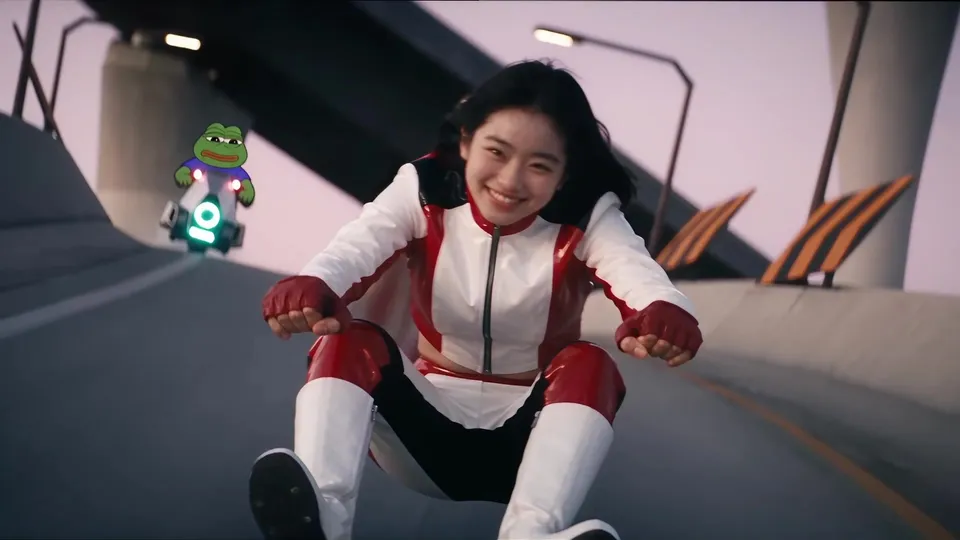
Result 4.2 s. The rider from the front with the chaser behind. Both people were swapped in one range swap.
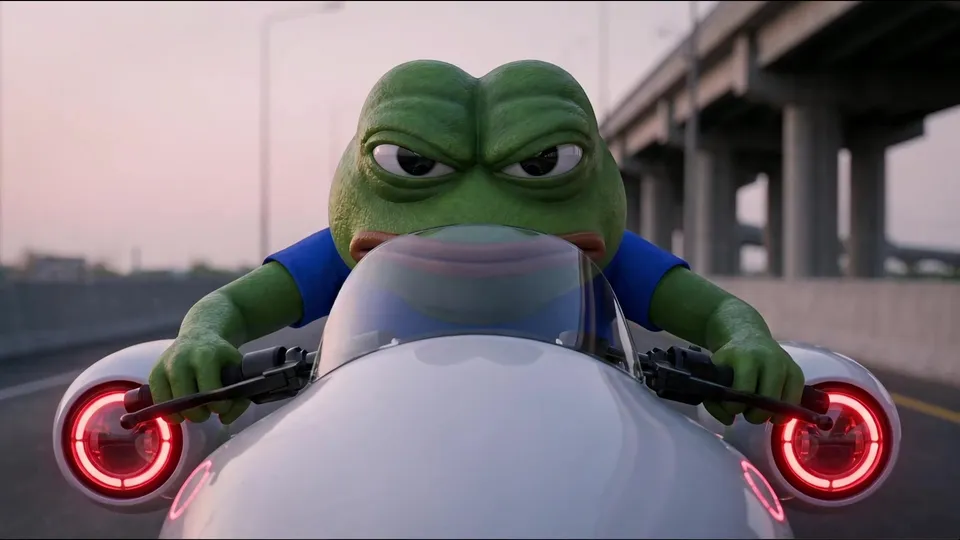
Result 5.6 s. The chaser's face close-up. The video swap kept getting blocked, so this cut was filled with a first-frame image and image-to-video.
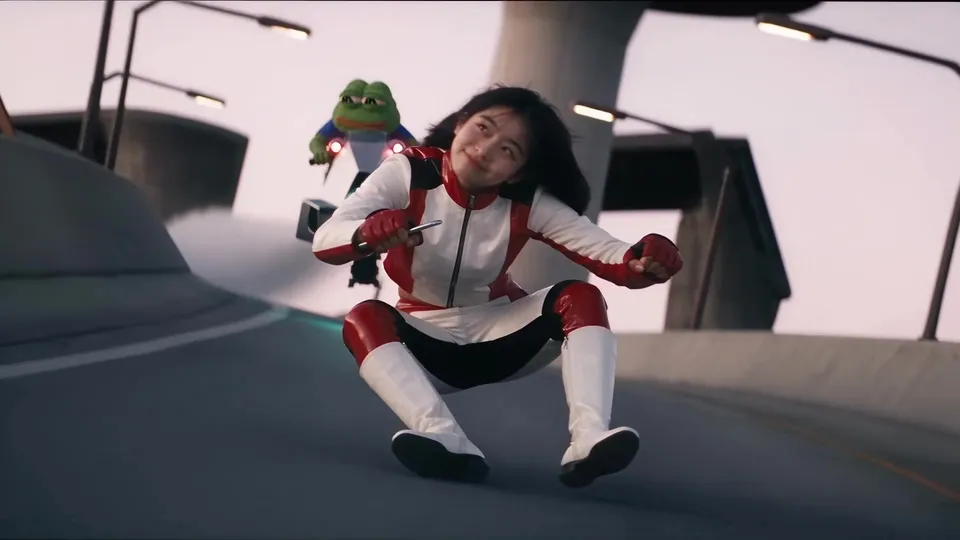
Result 7.5 s. The two racing side by side. The generated length was matched to the original at 1.0804x.
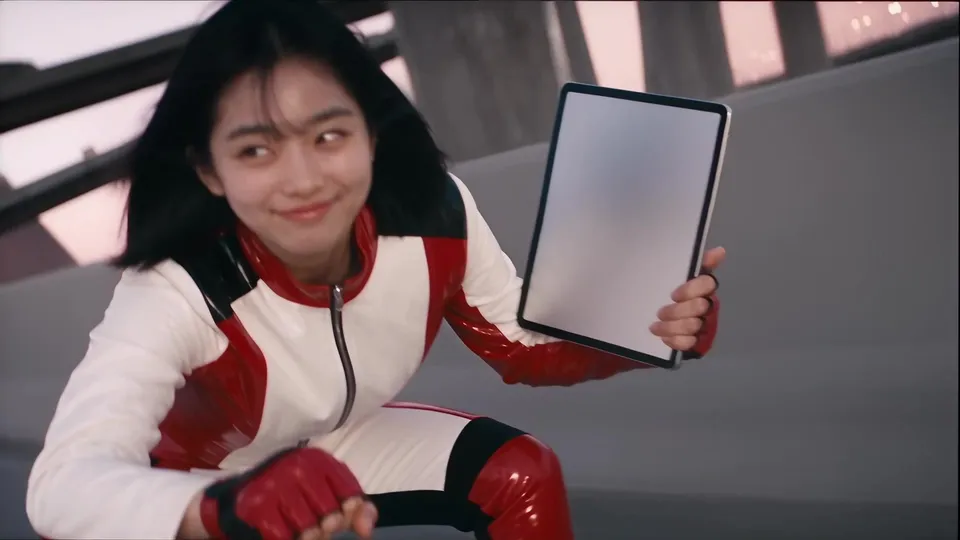
Result 17.5 s. In the last cut, the prop from the person sheet (a tablet) is in her hand.
Downloads
The skill file to attach in the AI Agent chat.
- Multi-cut chase two-person swap skill file v1.0MD · 10 KB · Attach this markdown file as is in the AI Agent chat.Download
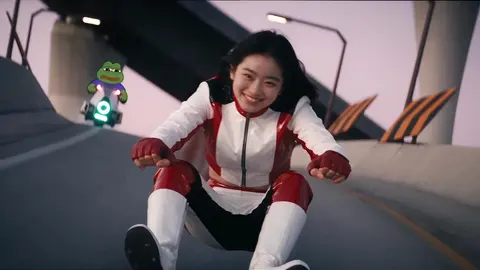 Source chase video (final, 16:9)MP4 · 13.5 MB · The full-size file of the final above (1920×1080, 18 s). No original of your own? Use this as the original and swap both people for your characters. Includes the original sound.Download
What you need
This is all the skill needs. Put it in your project before you ask the agent.
One source chase or action clip
videoA 10–20 second clip with several cuts, 16:9 or 9:16. The source video above works too.
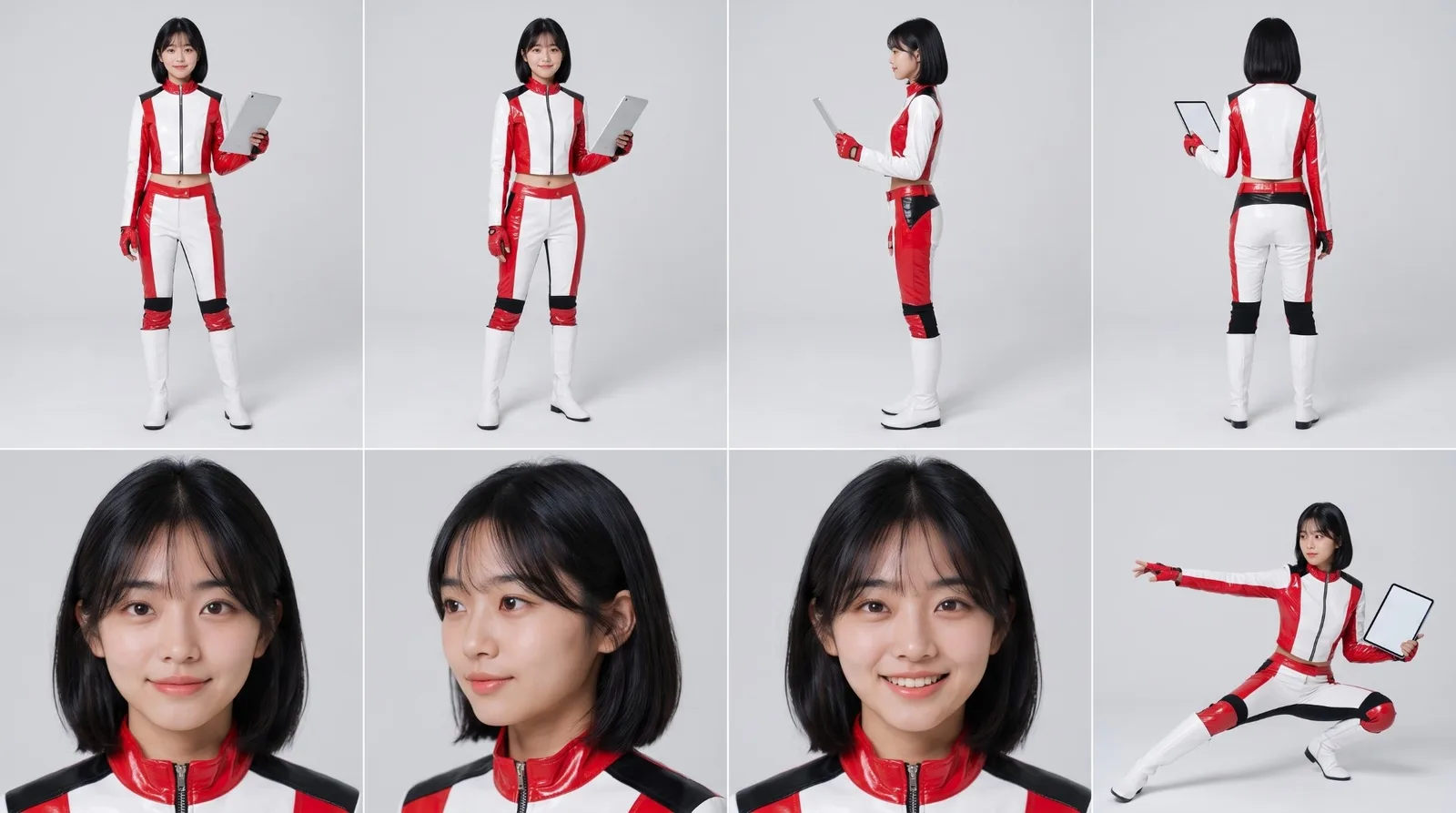
photo_aPerson sheet
The sheet for the person who becomes live action. The agent can also make one with an outfit and prop from a single photo. The example used this sheet with a racing suit and a tablet.
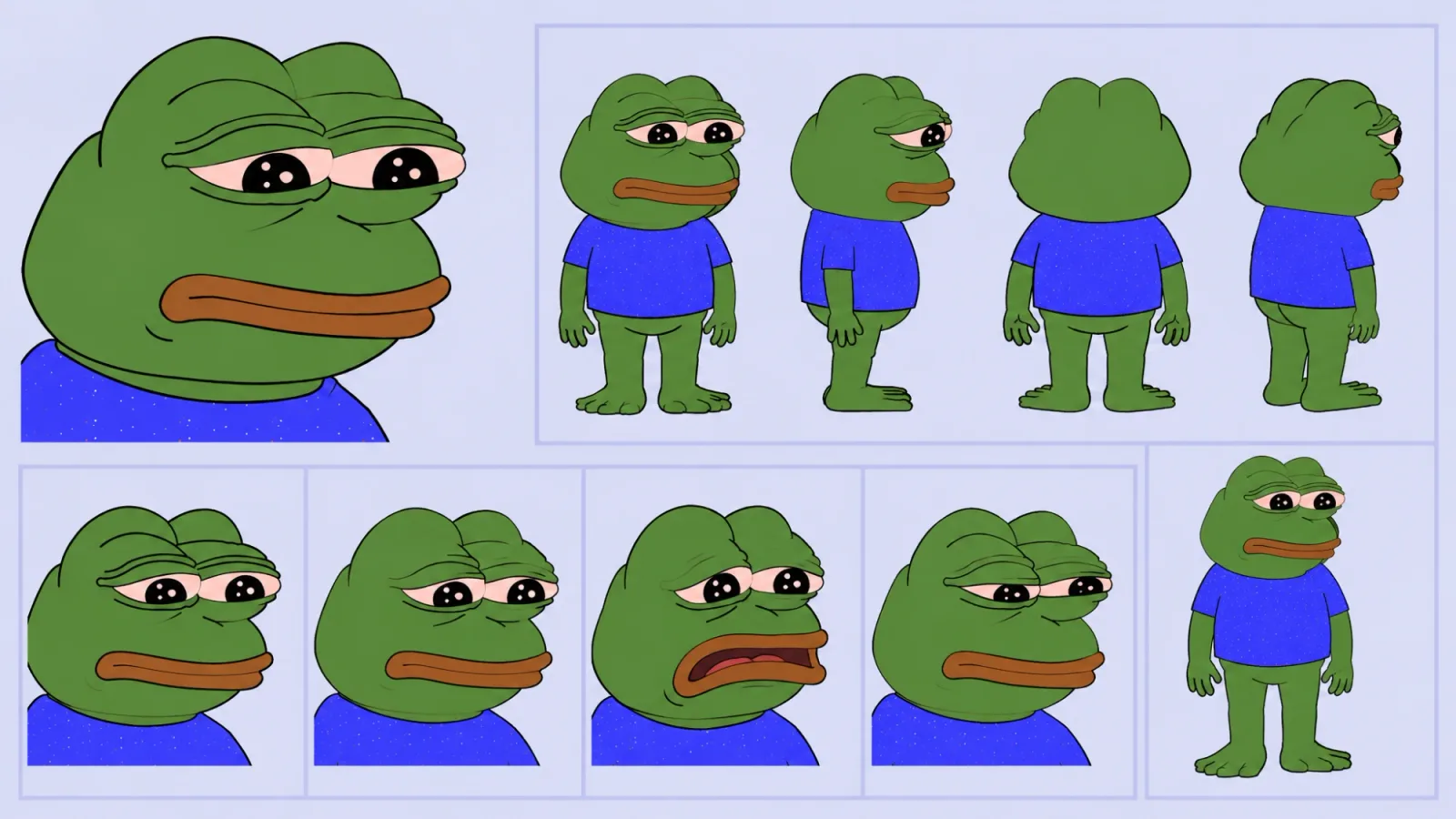
photo_bCharacter sheet
The character for the other person; a cartoon works. The example used this frog character sheet.
This skill swaps two people at once in a chase or action clip that runs across several cuts. In the example, the runner in front became a live-action person in a racing suit and the chaser became a frog character. Cut structure, camera and speed stay as in the original, and the original audio is put back in the editor.
The real value of this skill is the order it follows when generation gets blocked. Generating all 18 seconds at once failed, and the ranges containing a close-up of a real actor’s face kept getting blocked. The skill writes that experience down as it happened.
What this skill makes
- A 1080p video at the source’s ratio and length. The example is 16:9, about 18 seconds.
- Two people become two different references: one a person sheet, the other a character sheet.
- The sound is the original audio. Generation is silent and the audio is merged in the editor.
- The result arrives as
<prefix>_<person>_<character>_final_originalaudio_v1.mp4with Needs review status.
How to run it
- Put the source video, the person photo (or sheet) and the character sheet in your project. No original? Use the source video from the downloads above.
- In the YouViCo desktop app, open the AI Agent with the AI button in the title bar or Ctrl/Cmd+Shift+A. The AI Agent runs in the Windows and macOS desktop apps.
- Attach the skill file in the AI Agent chat with the paperclip button at the bottom left of the input. If you will reuse it, save it to My skills with Import SKILL.md in the Skills view. What is a skill? explains how skills work with the agent.
- Say what you want in a line or two. The agent asks first about anything you leave out.
Use this skill to swap the two people in the chase video.
The runner in front becomes my person sheet, the chaser becomes the character sheet.
What the agent asks first
This skill isn’t for remaking the example; it’s for making your own. Before starting, the agent asks these together and skips anything your request already answers. Say “use the defaults” and it follows the example’s choices.
- Which source video?
- Who does each of the two people become? E.g. the one in front a person, the one behind a character sheet
- What outfits and props? Default: the person sheet’s outfit, no prop.
- Keep the vehicles and background as in the original? Default: yes.
- Model and budget? Default: Seedance 2.5, show the estimate first.
What the agent does
| Stage | What the agent does |
|---|---|
| Check the source | Narrows cut positions to 0.1 s and tables who appears in each cut and how large. |
| Person sheet | Makes a sheet with the outfit and prop from the person photo and checks the face and hair against the photo. |
| Full generation | Tries the full length once first. Sound on; if it fails, once more with sound off; if that fails, straight to cut splitting. |
| Cut splitting | Splits the source at cut boundaries, exports range references and swaps each silently. A cut that keeps failing is separated out. |
| Blocked cut | Makes a first-frame image with the same composition from the character sheet, then a 4 s image-to-video from that single image. |
| Assembly | Keeps the original audio on A1 and places generated clips at their cut positions, matching speed within ±10% and capturing each range’s middle. |
The order when you get blocked
This is what actually happened in the example work.
- The full 18 s generation failed. With sound on or off it retried for about 12 minutes with SERVICE_UNAVAILABLE and then failed. Turning sound off alone didn’t fix it. Failed generations weren’t charged.
- The cause was a close-up of a real actor’s face. Ranges with that cut (11 s, 6 s) kept failing; ranges without it (5.1 s, 3.7 s, 7.7 s) all succeeded.
- The blocked cut was routed around with a first frame. A first-frame image with the same composition was made from the character sheet, and a single-image image-to-video filled that spot.
| Range | Content | Method | Result |
|---|---|---|---|
| 0–5.133 s | Rider front + chaser | Range swap 6 s | Success, 0.9805x |
| 5.133–6.7 s | Chaser face close-up | First frame → image-to-video | Video swap failed, replacement worked |
| 6.7–10.433 s | Side by side | Range swap 4 s | Success, 1.0804x |
| 10.433–18.133 s | Drone wide, second half | Range swap 8 s | Success, 1.0x |
Total charged was 1,371 credits (sheet 15 included); the 6 failures weren’t charged.
The full skill file
Same as the download. You can also copy it into a new file.
---
name: multicut-chase-dual-swap
description: 'Use when swapping two people at once in a multi-cut chase or action clip (16:9 or 9:16, about 10–20 seconds): one for the project person (live action) and one for a character sheet (cartoon etc.). Seedance 2.5 video swap is the default; if a full-length generation fails, generate cut by cut. Cuts that keep getting blocked, like a close-up of a real actor''s face, are filled by making a new first-frame image and then image-to-video, and the original audio is merged in the editor for the Final. Example triggers: swap both people in this chase clip, rider to my character and chaser to the character sheet, if it fails turn audio off and merge the original sound, turn the rider into Yujeong and the chaser into the character sheet, swap the people in the chase video.'
---

# Multi-cut two-person swap (Seedance 2.5 + cut splitting + first-frame replacement for blocked cuts)

When to use: requests to swap two or more people in a short clip with several cuts, each for a different reference (person photo, character sheet). For a dance video where only one person changes, use dance-character-swap. Answer and report in the user's language. UI names below are given in English; if the app shows them in another language (for example Korean), find the item with the same meaning.

## Ask the user before starting
The point of this skill is not to remake the example but to make the user's own video. Before starting, ask the questions below together, in one message.
- Skip anything the request already answers.
- If the user says "you decide" or "use the defaults", go with the defaults in parentheses.
- If the user seems to have no idea yet, briefly suggest 2–3 options that differ from the example.
- Once answered, show a one-line summary of what was decided, then start.

1. Which source video?
2. Who does each of the two people become? E.g. the one in front a person, the one behind a character sheet
3. What outfits and props? (default: the person sheet's outfit, no prop)
4. Keep the vehicles and background as in the original? (default: yes)
5. Model and budget? (default: Seedance 2.5, show the estimate first)

## 1. Bottom line (from real results)
- If the user specifies Seedance 2.5, use it. Attach for the video swap in the order [source (or range reference), person sheet, character sheet].
- **Generating the full length (18 s) at once can fail.** With sound on or off it retried for about 12 minutes with `SERVICE_UNAVAILABLE` and ended FAILED (charged 0). Turning sound off alone did not fix it.
- **The likely cause is a range that contains a close-up of a real actor's face.** Ranges containing that cut (11 s and 6 s) kept failing. Ranges without it (5.1 s, 3.7 s, 7.7 s) all succeeded.
- The fix:
  1. Split the source at cut boundaries and export range reference videos.
  2. Swap each range with Seedance 2.5 (sound off).
  3. For the blocked close-up cut, make a first frame with the same composition with Nano Banana Pro and fill it with Seedance 2.5 image-to-video.
  4. Join them in the editor and lay the original audio as is.
- Credits for reference (actual charges, 1080p 16:9, sound off):

  | Item | Estimate | Actual charge |
  |---|---|---|
  | 4 s | 370 | 250 |
  | 6 s | 495 | 356 |
  | 8 s | 670 | 497 |
  | Image-to-video 4 s | 270 | 238 |
  | Nano Banana Pro image | 50 | 15 |

  The full 18 s estimate is 1,450; failed generations are charged 0.

## 2. Steps
1. **Check the source**
   - The project preview often can't decode the codec. Put the source in the editor and look with seek_editor and capture_app_screen (canvas ref).
   - Narrow down cut positions to 0.1 s. E.g. 5.133 / 6.7 / 10.433 s.
   - Make a table of who appears in each cut and how large (e.g. rider front / chaser face close-up / both side by side / drone wide).
2. **Edit**
   - Never modify the user's edit. Work in a new edit.
   - Use a canvas with the same ratio as the source. If the ratio button isn't visible, "duplicate" an edit with the same ratio, empty its clips and use that. In that case always give it a new name and never touch the original edit.
   - If the source sits smaller than the canvas, fill it with set_layer_transform scale (1280×720 → 1920×1080 is 1.5).
3. **Person sheet** (Nano Banana Pro)
   - Attach the person photo as a reference and instruct "exactly the same face, same hair".
   - Decide the outfit and prop (e.g. racing suit, iPad) and put a turnaround, face close-ups and action poses on one sheet.
   - No lettering or logos. Compare the result's face with the photo yourself.
4. **First try: full generation** (Seedance 2.5, 1080p, source length, source ratio)
   - Sound on → if it fails, try once more with sound off. If that fails too, go straight to cut splitting. Retry the same conditions at most once.
5. **Cut splitting**
   - Export range references with export_draft range settings. Name example: `<prefix>_sourceref_A1_0.000-5.133s.mp4`.
   - If a large range fails, split it smaller. Separate out the cut that keeps failing (the face close-up).
6. **Per-range swap** (Seedance 2.5, sound off)
   - Length is the reference length rounded up (at least 4 s).
   - Use the §5-A prompt. In each range, describe the people in the order they appear in that cut (the one in front is number 1).
7. **Replace the blocked cut**
   - Attach the character sheet as a reference to Nano Banana Pro and make a first frame with the same composition, lighting and vehicle as the source cut (§5-B).
   - Attach only that one image to Seedance 2.5 and make a 4 s image-to-video (§5-C).
8. **Assembly**
   - Keep the source video on V1 (hidden) and the original audio on A1 as is.
   - Place generated clips on V2/V3 at their cut positions. If they overlap, use another track.
   - If a generated length differs from the reference, match it with set_clip_speed. Measured examples: 5.03 s → 0.9805x, 4.03 s fit to 3.73 s → 1.0804x. Within ±10% looks natural.
   - Trim replacement clips at the cut's end with trim_clip.
   - Capture the middle of each range to confirm the swap happened.
9. **Export and wrap-up**
   - Export to the same folder as the source (or the specified folder). Name: `<prefix>_<person>_<character>_final_originalaudio_v1.mp4`.
   - Change set_file_status to review.
   - Leave a task note comment at 0 s (range table, file IDs, speeds, items to check).
   - Rename generated files so the range, model and version show.

## 3. Checks
- Person sheet: face and hair match the photo; no lettering or logos.
- Each range: face, outfit and prop (iPad etc.) are visible. The character replaced the right position on the vehicle, and no original person remains.
- Boundaries: frames before and after each cut boundary connect, and the original audio's sound effects line up.
- Only some moments of the final file may be capturable because of codec limits. Report that the range not captured and the sound sync need a person to check.

## 4. When it fails
- Even with `SERVICE_UNAVAILABLE` attached while the status is PROCESSING, the server may still be retrying. Wait until it ends FAILED, and don't send the same request again.
- If the same range fails twice, split it smaller or switch that cut to first-frame replacement. Don't repeat with only prompt changes.
- The prop (iPad) disappearing: it drops out easily in cuts where the original pose uses both hands. If it's essential, remake only that cut with a first frame and image-to-video.
- Attaching an image with brand lettering can give PROVIDER_REJECTED. Instruct lettering in the prompt or add it as editor text.
- Failed generations stay in the folder as empty entries with no video. Ask the user before deleting them.

## 5. Prompts
A. Range swap:
"Video edit of reference video 1. Keep everything from reference video 1 exactly the same: every camera move, every cut, the timing, the location, lighting, speed, motion blur and <vehicle and background>. Replace only the people.
1) The <description of the person who appears first> is replaced by the young Korean woman from reference image 2 — exactly the same face, <hair>. She wears <outfit> from reference image 2. She holds <prop> in one hand, keeping the same pose, arm movements, expressions and head turns as the original. Her face stays clearly identical to reference image 2.
2) The <description of the other person> is replaced by the <character description> from reference image 3 — <character traits>, riding/doing the same thing in the same pose with the same motion.
No text, no subtitles, no logos, no watermark."

B. First frame for a blocked cut (Nano Banana Pro, reference: character sheet):
"Cinematic live-action film still, 16:9 landscape, photorealistic. <the source cut's composition as is: camera position, vehicle shape, light color, hand positions>. The rider is the <character> from reference image 1 — the same <traits>, rendered as a realistic 3D character, <expression>. <background and time of day>, slight motion blur. Match a movie action shot. No text, no logos, no watermark."

C. Image-to-video (Seedance 2.5, attachment: one first frame):
"Start from the attached image as the first frame. Cinematic live-action action shot: <composition>. The camera moves <direction> with the bike, slight handheld shake, background rushes past with motion blur. The <character> keeps the same face and outfit, <action>. One continuous shot, no cuts. No text, no logos, no watermark."

## 6. Reference measurements (kart chase 18.13 s, 16:9)
| Range | Content | Method | Result |
|---|---|---|---|
| 0–5.133 | Rider front + chaser behind | Range swap 6 s | Success, 0.9805x |
| 5.133–6.7 | Chaser face close-up | First frame → image-to-video 4 s | Video swap failed, replacement succeeded (first 1.57 s used) |
| 6.7–10.433 | Racing side by side | Range swap 4 s | Success, 1.0804x |
| 10.433–18.133 | Drone wide and second half | Range swap 8 s | Success, 1.0x |
Total charged 1,371 (sheet 15 included), 6 failures at 0.

Change log: v1.0 2026-10-19 first written from the kart chase work / 2026-10-19 added questions before starting
Tips before you run it
- Check the rights to the source video and the characters. Chase scenes from films or broadcasts belong to their producers. The frog character in the example is Pepe the Frog, a copyrighted character by the artist Matt Furie; commercial use needs the rights holder’s permission.
- Use yourself, someone who agreed, or a fictional character for people. The person in the example is a fictional character from the project.
- Retry the same conditions only once. If the same range fails twice, don’t just edit the prompt; split it smaller or switch to first-frame replacement.
- Props drop out in cuts where both hands are used. If it matters, remake just that cut from a first frame.
- Listen to the sound sync yourself. The agent checks the picture, but reports that the original audio’s sound-effect timing needs a person to play it back.
FAQ
Why split instead of generating everything at once?
Because in the example the full generation kept failing. Once the close-up cut that seemed to cause it was separated, every other range succeeded, and only that cut needed another method.
Can both people become live-action people?
Yes. Put another person sheet where the character sheet goes. For more people or dance-led videos, see Multi-cut dance, multi-person swap.
What happens to failed generations?
They aren’t charged and stay in the folder as empty entries with no video. The agent asks before deleting them.
Run this skill in YouViCo
Upload a photo to your project, open the AI Agent, attach the skill file in the chat, and ask it to make the video.