
Multi-cut dance, multi-person swap skill: two dancers, two characters, original music
A skill that swaps two or more people in a multi-cut dance video, each for their own character sheet. Silent per-range generation, original audio, layered main and backup takes, and replacing drifting stretches.
- Runs in
- YouViCo AI Agent · attach the skill file in chat
- Difficulty
- Advanced
- Time
- 10 min setup, plus agent run time (grows with the number of ranges)
Results
As cuts change and the dancers' distance and size shift, the left and right person keep their assigned sheets to the end.
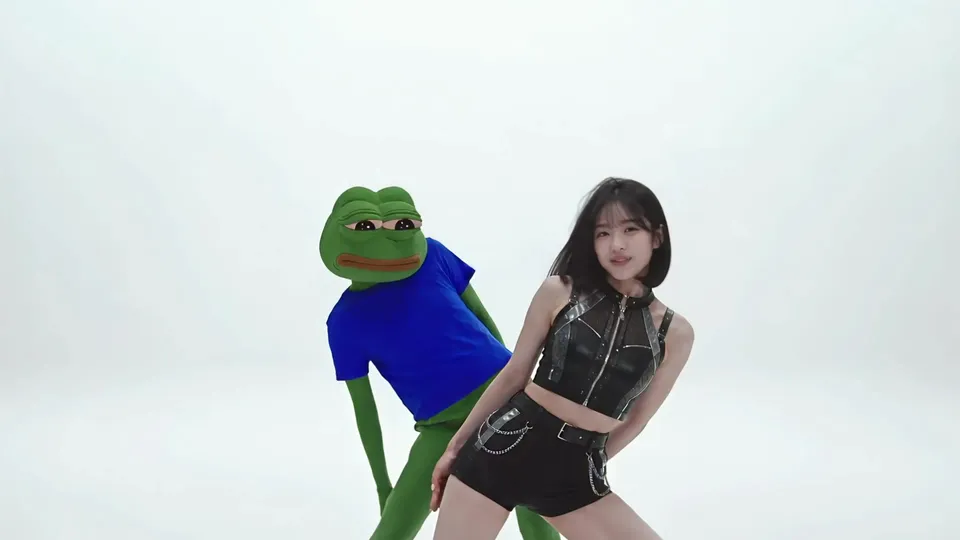
Result 2 s. A cut with the two dancing close together: the left one became the frog character, the right one the character from the person sheet.
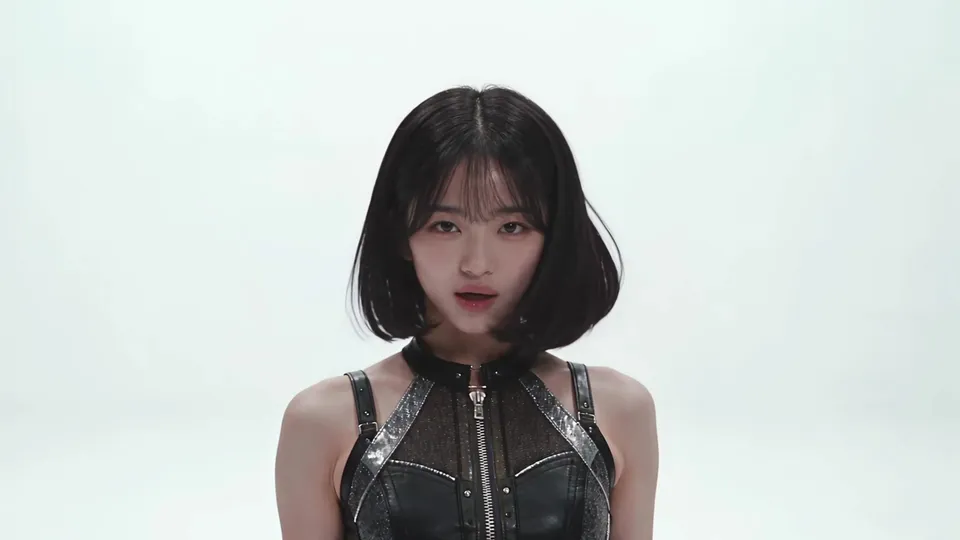
Result 5.3 s. A single-person close-up also follows the sheet's face and outfit.
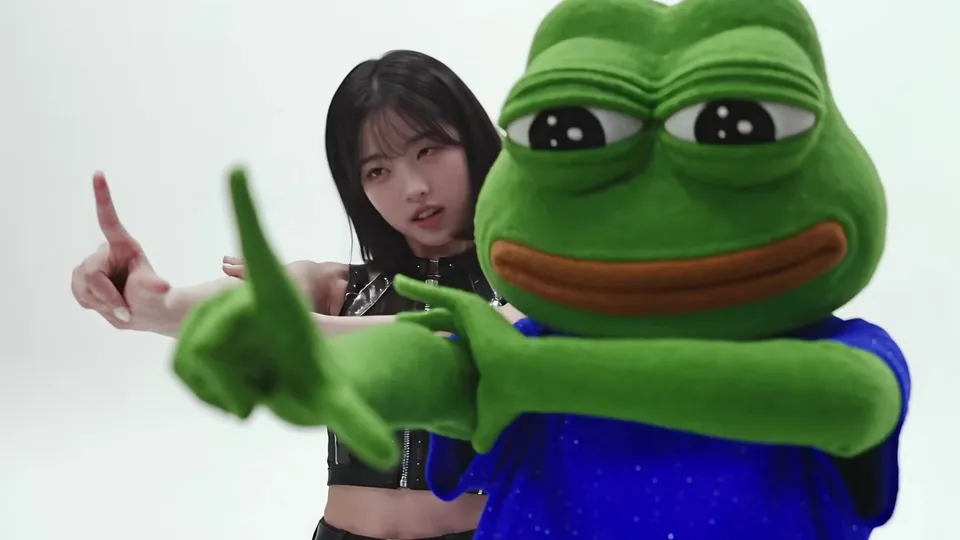
Result 6.2 s. Both point at the camera. In the case recorded in the skill, 4.733–6.7 s was replaced with the backup take.
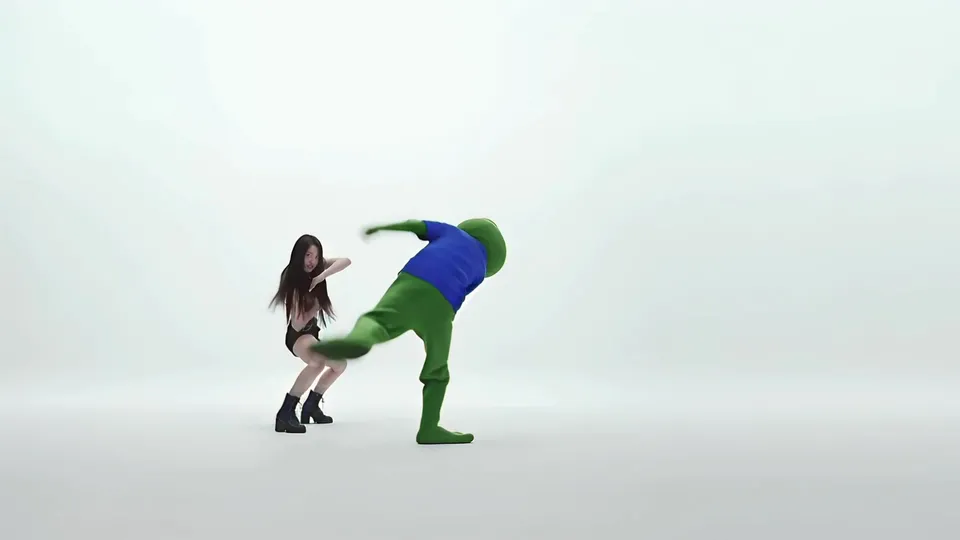
Result 11 s. In a wide shot from far away, the left/right assignment and the moves still match the original.
Downloads
The skill file to attach in the AI Agent chat.
- Multi-cut multi-person swap skill file v1.1MD · 6 KB · Attach this markdown file as is in the AI Agent chat.Download
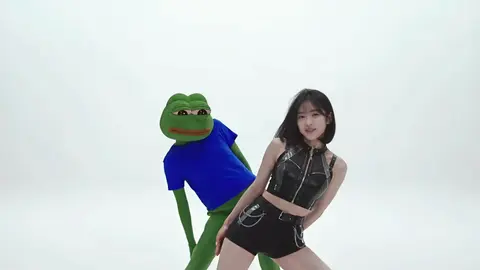 Source dance video (final, 16:9)MP4 · 10.4 MB · The full-size file of the final above (1920×1080, 15 s). No original of your own? Use this as the original and swap both dancers for your characters. Includes the music.Download
What you need
This is all the skill needs. Put it in your project before you ask the agent.
One source dance video
videoA dance or performance video with several cuts. Cut structure, choreography and music stay as in the original. The source video above works too.
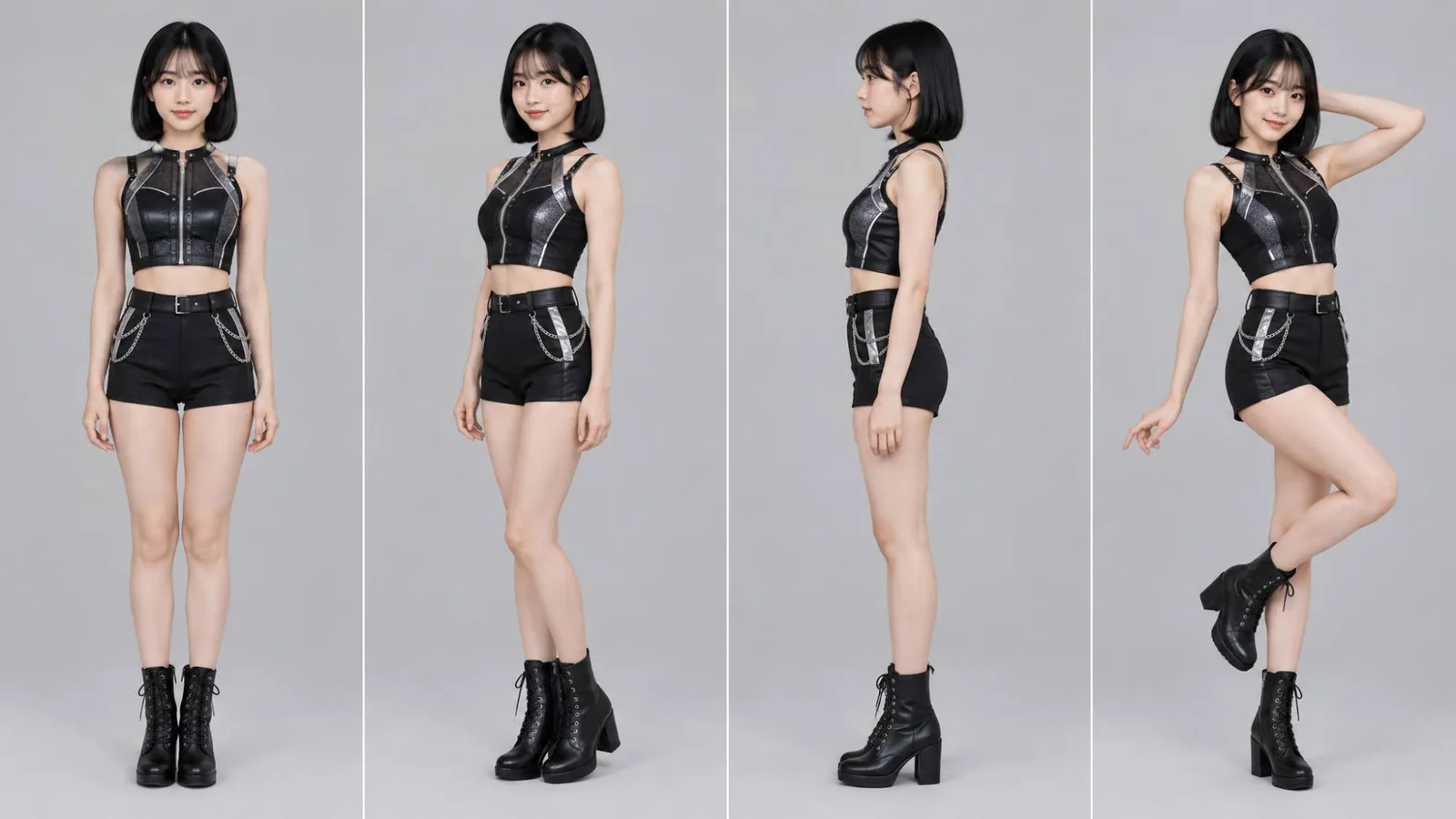
photo_aPerson sheet
Prepare one sheet per person to swap. The example swapped the person on the right for this person sheet.
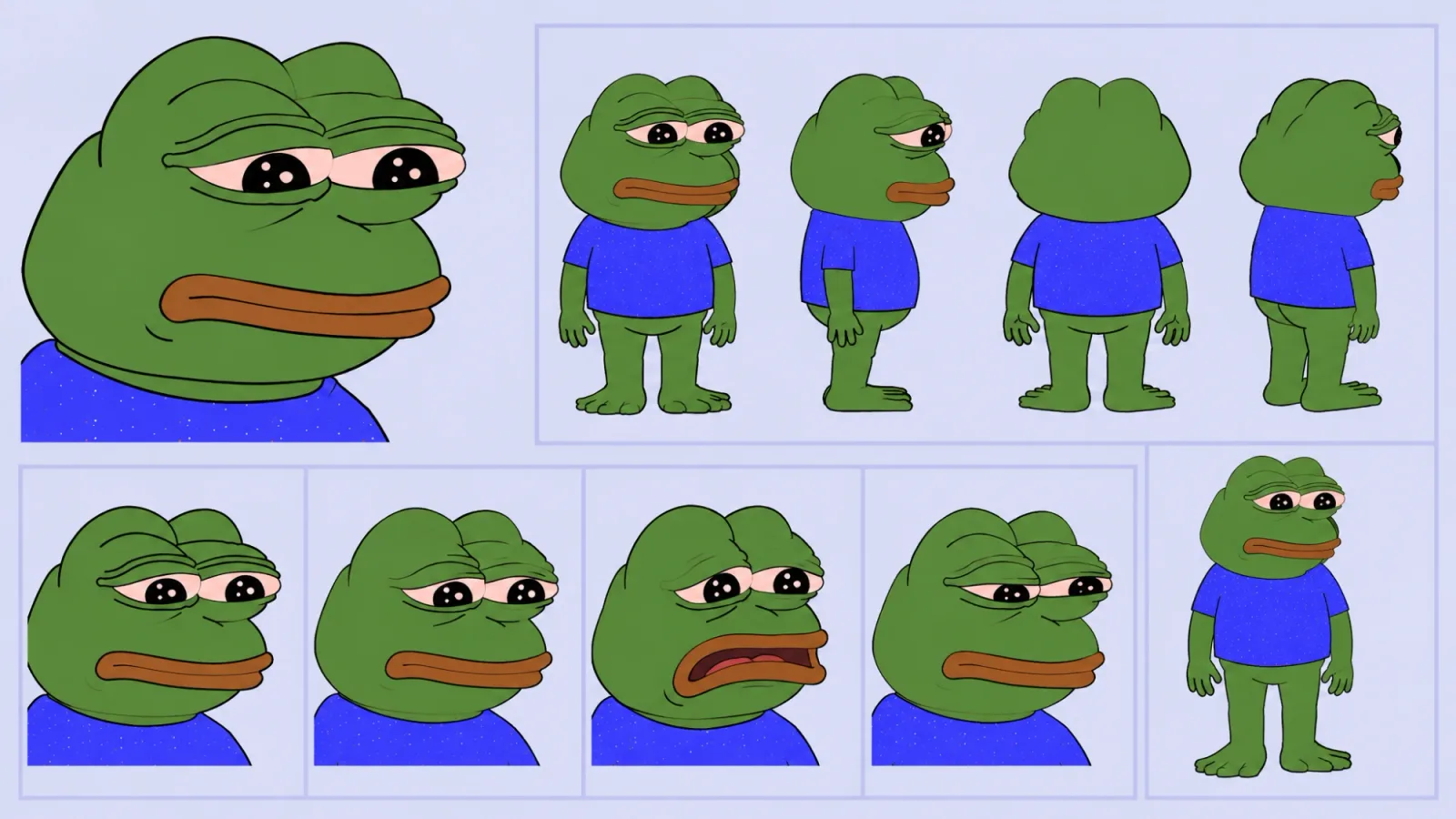
photo_bCharacter sheet
It doesn't have to be a person. The example swapped the person on the left for this character sheet, with front, side, back and expressions on one page.
This skill swaps two people in a dance video that runs across several cuts, each for a different character: one for the character on a person sheet, the other for a cartoon frog, for example. Cut order and length, choreography and camera stay as in the original, and the music is the original audio put back in the editor. It extends Dance character swap, which swaps one person, to several people and several cuts.
What this skill makes
- A 16:9 1080p video like the original. The example is 15 seconds.
- Each person turns into their assigned sheet. When cuts move the two around, the assignment is written down per cut and followed.
- AI generation is silent; music and voice come from the original clip’s audio.
- The result arrives as
{project}_personswap_final_originalaudio_vN.mp4with Needs review status.
How to run it
- Put the source dance video and one sheet per person to swap in your project. No original? Use the source video from the downloads above.
- In the YouViCo desktop app, open the AI Agent with the AI button in the title bar or Ctrl/Cmd+Shift+A. The AI Agent runs in the Windows and macOS desktop apps.
- Attach the skill file in the AI Agent chat with the paperclip button at the bottom left of the input. If you will reuse it, save it to My skills with Import SKILL.md in the Skills view. What is a skill? explains how skills work with the agent.
- Say who becomes which sheet, plus the model and budget. If you leave out the model and budget, the agent asks first.
Use this skill to swap the two people in the dance video.
The person on the left becomes the frog character sheet, the person on the right the person sheet.
Use Seedance 2.5 and stay within 1,500 credits. Keep the original music.
What the agent asks first
This skill isn’t for remaking the example; it’s for making your own. Before starting, the agent asks these together and skips anything your request already answers. Say “use the defaults” and it follows the example’s choices.
- How many people change, and which character (sheet) does each become?
- Who is who in the source, by position or outfit?
- Anything to change about outfits or props? Default: the sheets’ outfits as they are.
- Model and budget? Default: Seedance 2.5, show the total estimate first.
- Keep the original audio? Default: yes.
What the agent does
| Stage | What the agent does |
|---|---|
| Check inputs | Reads length, frame rate and cut boundaries, and writes down which person becomes which sheet, per cut where people switch places. |
| Split into ranges | Splits the source into ranges of about 7 s that overlap by 0.5–1 s, with boundaries near cut boundaries, and exports each range as a reference video. |
| Generate | Generates each range silently with its reference video and the sheets attached. Other takes of the same range are kept, not deleted. |
| Assemble | Stacks V1 source (opacity 0, alignment reference), A1 source audio, V2 backup take, V3 main take. Generated clips cut about 5 frames early, so they are shifted back. |
| Match speed | Default is position matching at 1.0x. Only long drifting stretches are split and corrected within 0.94–1.06x. |
| Replace | Trims the main take where it starts to drift from the source, so the backup take underneath shows through. |
| Review | Compares 15–20 moments, cut boundaries and mid-range points, against the source, checks for black empty frames, then exports. |
The heart of this skill: layer a main take over a backup take
Generated ranges drift from the source more toward their end: the left/right assignment flips or the moves fall apart. So the skill never throws away other takes of the same range; it lays them on the lower track (V2).
- Find where the main take on the upper track (V3) starts to drift from the source.
- Trim the main take there, and the backup take underneath shows through in the gap.
- For a short stretch of about 2 seconds, use the take whose moves and assignment match the source even if its speed isn’t 1.0 (e.g. about 1.26x).
- Only when every take drifts, generate that stretch again; that costs credits, so check the estimate first.
The case recorded in the skill joins the main take for 0.167–4.733 s, the backup take for 4.733–6.7 s, and the main take again after 6.7 s.
Large speed changes make the video look choppy or stuttering. So the default is position matching at 1.0x, and stretches that don’t fit within 0.94–1.06x are fixed by replacing takes or regenerating, not by changing speed.
The full skill file
Same as the download. You can also copy it into a new file.
---
name: multicut-dance-multi-swap
description: In a multi-cut dance video, replace two or more people, each with their assigned person or character sheet; generate the AI video silent, then combine it with the original audio in the editor to make the final.
version: 1.1
---

# Multi-cut dance video, multi-person swap (silent generation + original audio)

UI names below are given in English; if the app shows them in another language (for example Korean), find the item with the same meaning. Write replies, comments and reports in the user's language.

## When to use
- There is one source dance or performance video + two or more reference sheets (person sheets, character sheets), one per person to replace.
- Requests like "swap the people", "turn them into characters", "keep the original audio".
- The voice and music must be the original's (no audio output from the model).
- Otherwise, do not use this skill.

## Ask the user before starting
The point of this skill is not to remake the example but to make the user's own video. Before starting, ask the questions below together, in one message.
- Skip anything the request already answers.
- If the user says "you decide" or "use the defaults", go with the defaults in parentheses.
- If the user seems to have no idea yet, briefly suggest 2–3 options that differ from the example.
- Once answered, show a one-line summary of what was decided, then start.

1. How many people change, and which character (sheet) does each become?
2. Who is who in the source, by position or outfit?
3. Anything to change about outfits or props? (default: the sheets' outfits as they are)
4. Model and budget? (default: Seedance 2.5, show the total estimate first)
5. Keep the original audio? (default: yes)

## Check the inputs
1. Source video fileId, length, frame rate (get_editor_context frameRate), cut boundary times.
2. Assignment: who in the source (left/right, outfit etc.) → which sheet. If people switch screen positions in some cuts, write down the assignment per cut.
3. Model and budget. If not specified, ask the user.

## 1. Split the source into ranges
- Split the source into ranges of about 7 seconds (e.g. 0–7, 6.2–13.2, the last 4 seconds). Let ranges overlap by 0.5–1 second.
- Put range boundaries near cut boundaries. Never cut in the middle of a move.
- Turn each range into a reference video file with a range export in the editor (export_draft start/end).

## 2. Generate per range (silent)
- Model: the model the user specified (e.g. Seedance 2.5).
- configs: resolution 1080p, aspectRatio 16:9 (the source ratio), duration = range length, **generateAudio: false**.
- attachmentIds: [range reference video, sheet A, sheet B].
- Prompt: "Keep the reference video's camera, cuts, choreography and timing frame by frame. Left person (or the one in the ○○ outfit) → sheet A, right person → sheet B. Keep background, lighting and camera. Do not change the order or length of cuts. No audio."
- Estimate → start with maxCredits = the estimate. If the estimate tool fails, you can pass a small maxCredits and read the estimate from the rejection response (nothing is generated).
- **Keep other takes of the same range (earlier generations, a one-shot full generation etc.); do not delete them.** Step 5 uses them as replacement sources.

## 3. Timeline assembly (layer structure)
- V1: source video, opacity 0. The alignment reference; not visible on screen.
- A1: source audio at 1.0. Never use the generated clips' sound.
- V2: backup take (earlier generations etc.). It shows through wherever V3 has a gap.
- V3: main take (per-range regenerations).
- Set the scale of every generated clip so the black border at the edges disappears (e.g. 1.0032).
- Generated clips tend to cut about 5 frames early. Shift them back about +5 frames to match the source's cut boundaries (move_clips deltaFrames).

## 4. Speed matching
- The default is **position matching at 1.0x speed**. Large speed changes look choppy or stuttering.
- Only for long stretches that drift from the source, split with split_clip and correct within 0.94–1.06x.
- Stretches that can't be matched within that range are fixed by step 5 replacement or by regenerating, not by changing speed further.

## 5. Cut out problem stretches and replace them (added in v1.1)
- Generated ranges **drift from the source more toward their end** (left/right assignment swapped, moves falling apart etc.).
- Compare with the source (raise V1 opacity briefly, or use source file frames) and find where it starts to drift.
- Trim the V3 clip at that point with trim_clip. The V2 backup take shows through in the cut-out gap.
- For short stretches (about 2 seconds), use the take whose moves and assignment match the source even if its speed isn't 1.0 (e.g. about 1.26x).
- Only when every take drifts, generate that stretch again (costs credits → estimate first).
- Example: 0.167–4.733 s main take, 4.733–6.7 s backup take, after 6.7 s the main take again.

## 6. Review
- In the editor, compare 15–20 moments, including cut boundaries and the middle of each range, against source frames (inspect_app_media times).
  - Check: cut timing (±2 frames), assignment (left/right), matching moves, face and outfit matching the sheet, edge borders.
- If a moment drifts, fix it with steps 4–5 and check again.
- Check with timeline numbers that there are no empty frames (black screen) between generated clips.

## 7. Export and wrap-up
- Export an MP4 with export_draft into the result folder, and check several moments again on the result file.
- Name: `{project}_personswap_final_originalaudio_vN.mp4`.
- Status Needs review (review). Only a person sets Approved.
- Task note comment: model, settings, prompt, ranges, references, replaced stretches, actual charged credits, what is left to check.
- If the tools can't listen to sound sync (song and moves), note in the report that a person should listen.

## Cost log
- Record each range's estimate and actual charge (get_ai_generation_status billedCredits) separately.
- Reference: 1080p 7 s about 462, 4 s about 250 credits (as of 2026-10; the real estimate takes priority).

## Change log
- 2026-10-19 added questions before starting.
- v1.1: reflects the user's final (final v1) method. Track structure layering main and backup takes, a step (step 5) to cut out problem stretches and replace them with the backup take, and a stated speed exception for short replacement stretches.
- v1.0: per-range generation + position matching at 1.0x + review against the source (based on agent v3).
Tips before you run it
- Check the rights to the source video and the characters. Broadcast and performance videos belong to broadcasters and producers, and the music is copyrighted. The frog character in the example is Pepe the Frog, a copyrighted character by the artist Matt Furie. When you use an existing character, check what use is allowed; commercial use needs the rights holder’s permission.
- Use yourself, someone who agreed, or a fictional character for people. The person in the example is a fictional character from the project.
- Make the assignment unambiguous. Telling people apart by outfit rather than left/right causes less confusion in cuts where they switch places.
- Credits grow with the number of ranges. The reference in the skill is about 462 credits for 7 s and 250 for 4 s at 1080p (as of October 2026). The agent checks the real estimate first.
- Listen to the song-and-move sync yourself. The agent compares moves on screen but reports that sound needs a human ear.
FAQ
Can it swap three or more people?
Yes. Attach one sheet per person and say who becomes which. The more people, the easier it is for assignments to flip, so add more review moments.
What if I only want to swap one person?
For a dance video with one person to swap, use Dance character swap; for live action with dialogue, use Drama character swap.
Can I delete earlier takes?
Don’t. This skill uses earlier takes as replacement sources for drifting stretches. The more takes you have of a range, the more often you can fix it without regenerating.
Run this skill in YouViCo
Upload a photo to your project, open the AI Agent, attach the skill file in the chat, and ask it to make the video.