
Doubling series short-form skill: “What if it doubled every time?” absurd voxel-animation shorts
The cat doubles every time you give it a treat; the mosquitoes double every time you miss one. A skill that makes 30–45 second 9:16 voxel-animation shorts that start from a question hook and grow to planet scale, from the script math through narration, keyframes, video, editing and the end card.
- Runs in
- YouViCo AI Agent · attach the skill file in chat
- Difficulty
- Advanced
- Time
- 5 min to pick a topic + agent run time (7 images, 7 videos)
Results
Both episodes use the same block format: a question hook at the top, a round label, counter and badge on the left, yellow subtitles at the bottom, and a 4.5-second end card tailored to the episode. The on-screen text in these frames is Korean.
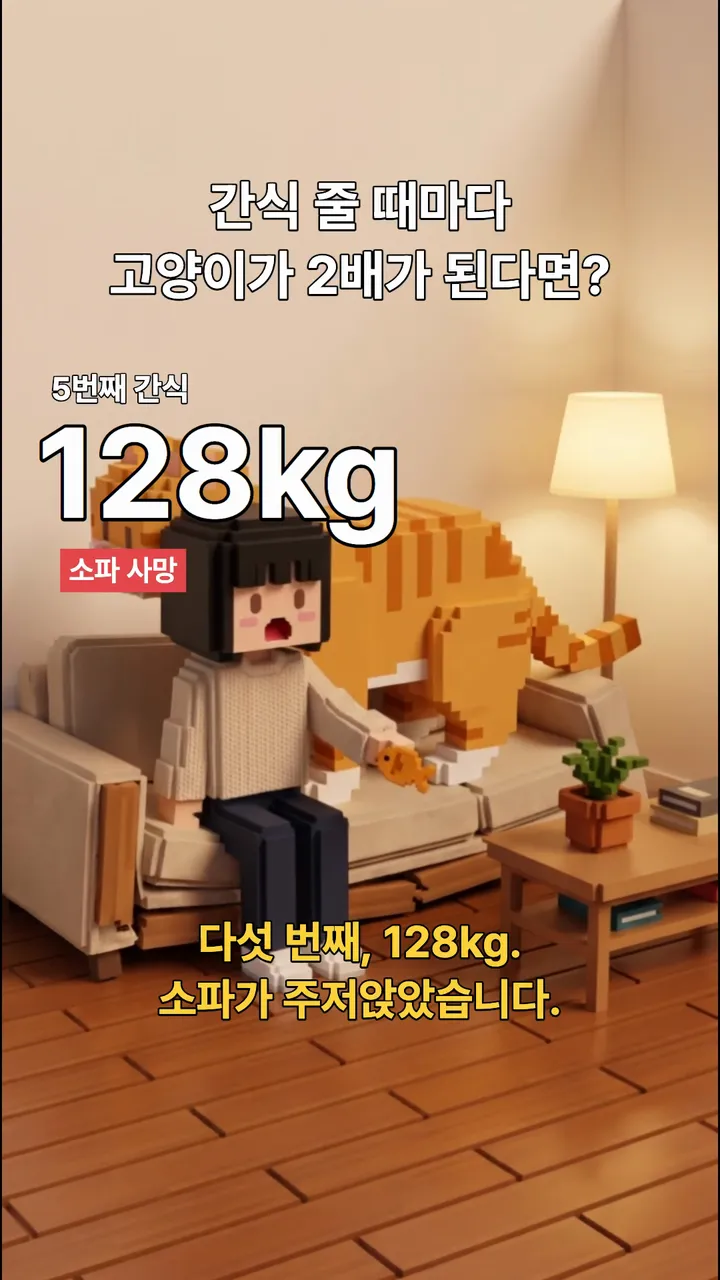
Result Cat episode, 10 s. The fifth treat, 128 kg. The sofa has caved in.

Result Cat episode, 17.5 s. The fifteenth, 131 tons. The comparison grows from an elephant to a blue whale.
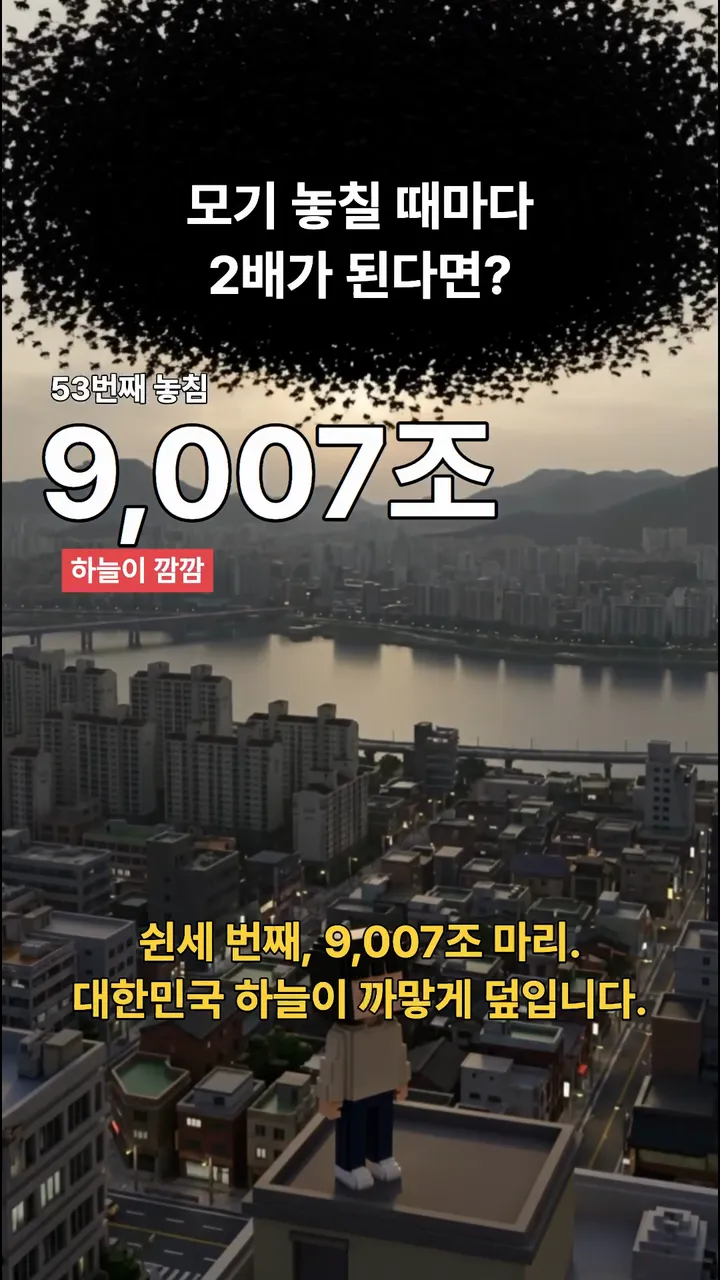
Result Mosquito episode, 22.5 s. The fifty-third miss, 9 quadrillion mosquitoes. The whole sky over Korea goes black.

Result Mosquito episode end card. The strikethrough chip (9 quadrillion → 1) and the tagline are rewritten for each episode.
Downloads
The skill file to attach in the AI Agent chat.
- Doubling series short-form skill file v1.2MD · 10 KB · A Markdown file you can attach to the AI agent chat as is.Download
 Cat treats doubling episode (result, 9:16)MP4 · 24.7 MB · The original file of the result above (1080×1920, 38 s, with sound and Korean text). Use it as a reference for the block format and transition timing.Download
 Mosquito doubling episode (result, 9:16)MP4 · 23.1 MB · A second episode made with the same skill (1080×1920, 36 s, with sound and Korean text).Download
What you need
This is all the skill needs. Put it in your project before you ask the agent.
A one-line doubling topic
textOne line like “What if ~ doubled every time you ~?” is enough. With no idea yet, the agent suggests 2–3.
Lead character reference image
photoThe character image for the first keyframe. The example used a voxel-style character named Yujeong.
It starts with one question, like “What if the cat doubled every time you gave it a treat?” The number then swells from sofa to elephant, blue whale and aircraft carrier, until one line from real life ends it. This skill is the production line that stamps out that format. Every episode comes out in the same frame: a blocky voxel-animation character, male narration, a question hook at the top of the screen, a growing counter on the left, and an end card tailored to the episode.
Both example episodes were made with the same skill. The cat treats episode is the video above; the mosquito episode is below.
What this skill makes
- One 30–45 second 9:16 short: a 25–40 second main part plus a 4.5-second end card.
- Structure: hook → round 1 (still fine) → 4–6 steps of escalation → twist punchline → end card.
- The scene changes every 2.5–4 seconds, with no still-image shots at all. Every shot is video.
- Whatever the narration names is on screen at that moment. Scene changes land within 0.2 seconds of the line starting.
- The brand appears only on the end card.
How to run it
- Upload a reference image of your lead character to your project.
- In the YouViCo desktop app, click the AI button in the title bar or press Ctrl/Cmd+Shift+A to open the AI agent. The AI agent is available in the Windows and macOS desktop apps.
- Attach the skill file in the AI agent chat with the paperclip button at the bottom left of the input box. If you’ll use it often, save it to your skills with Import SKILL.md on the Skills screen. How skills work with the agent is covered in What is a skill?.
- Send a line or two about what you want. The agent asks first about anything missing.
Use this skill to make the next episode of the doubling series.
Topic: "What if your coffee doubled every time you drank it?"
What the agent asks first
This skill isn’t for remaking the example; it’s for making your own. Before starting, the agent asks these together and skips anything your request already answers. Say “use the defaults” and it follows the example’s choices.
- What doubles? One line: “What if ~ doubled every time you ~?” With no idea yet, the agent suggests 2–3.
- Which lead character and art style? Point to the character reference image. The file IDs in this skill belong to the example project. Default: the project’s character sheet, voxel style.
- Who delivers the punchline? Default: someone who fits the topic (mom, team lead, vet and so on).
- Narration voice and language? Default: male narration in the user’s language.
- Which brand and tagline go on the end card? Default: a tagline tailored to the episode; if the original end card can’t be loaded, render a new one with the same layout.
- Length and budget? Default: 30–45 s, show the estimate first.
What the agent does
| Step | What the agent does |
|---|---|
| Script | Actually calculates each round as 2ⁿ, converts units as it grows, and matches real comparison objects (bathtub, pool, lake, ocean) to measured values. |
| Narration | Feeds the whole script in as one line to make male narration, then transcribes it for segment times and builds a beat table. |
| Keyframes | Makes the first image from the character reference; each next image uses the previous one as reference and changes only what changes. Seven per episode, all at once. |
| Video | Pairs consecutive images as first and last frames for 5-second clips; the hook shot is 8 seconds. |
| Transition points | Lays every clip out on one frame sheet and measures, per clip, the source second when the next scene is complete. |
| Edit | Duplicates the previous episode’s edit, swaps only the text, and sets each clip’s speed (0.75–1.6×) so transitions land at line start +0.1 s. |
| End card | Renders a 4.5-second end card with a strikethrough chip and a two-line tagline matched to the episode, and lines up the BGM and sound effects. |
| Check | Uses a magenta-background frame sheet to catch black borders and line–picture mismatches, then reports estimated and actual credits separately. |
Why this format works
- The numbers are real. Double a 4 kg cat 25 times and it really is over 130,000 tons. The math has to be right for “no way” to turn into “wait, really” and a laugh. The skill builds the calculation table before the script.
- The comparisons climb like stairs. Sofa → elephant → blue whale → aircraft carrier. Each step is a weight class above the last, so a new picture arrives every 2.5–4 seconds.
- The punchline goes back to the starting value. A short line from the vet, mom or team lead pulls the exaggeration back to reality. The end card’s strikethrough chip (9 quadrillion → 1) does the same job.
- Words and pictures change at the same moment. When the narration says “the tenth, 1,024 mosquitoes”, 1,024 mosquitoes have to be on screen. That’s why the skill sets a speed on every clip. A next scene that shows up before the line counts as a failure too.
The full skill file
Same content as the download. You can also copy it and save it as a new file.
---
name: yujeong-2x-shortform
description: 'Use when making a new "What if X doubled every time you ...?" absurd-escalation short (9:16 block format, voxel character, male narration, end card tailored to the episode) or fixing an existing episode. Example triggers: next episode of the doubling series, absurd escalation short, new Yujeong episode, fix the 2x episode, next doubling episode, fix the 2x episode pacing.'
---

# Yujeong doubling series short-form production

When to use: follow this only when making a new exaggeration-gag short where "X doubles each time" or fixing an episode of this series. For general ads or other formats, ignore it and follow youvico-production-pipeline. Answer and report in the user's language. UI names below are given in English; if the app shows them in another language (for example Korean), find the item with the same meaning.

## Ask the user before starting
The point of this skill is not to remake the example but to make the user's own video. Before starting, ask the questions below together, in one message.
- Skip anything the request already answers.
- If the user says "you decide" or "use the defaults", go with the defaults in parentheses.
- If the user seems to have no idea yet, briefly suggest 2–3 options that differ from the example.
- Once answered, show a one-line summary of what was decided, then start.

1. What doubles? One line: "What if ~ doubled every time you ~?" With no idea yet, the agent suggests 2–3.
2. Which lead character and art style? Point to the character reference image. The file IDs in this skill belong to the example project. (default: the project's character sheet, voxel style)
3. Who delivers the punchline? (default: someone who fits the topic (mom, team lead, vet and so on))
4. Narration voice and language? (default: male narration in the user's language)
5. Which brand and tagline go on the end card? (default: a tagline tailored to the episode; if the original end card can't be loaded, render a new one with the same layout)
6. Length and budget? (default: 30–45 s, show the estimate first)

## 1. Standards (EP1 "feedback doubles" = the benchmark episode)
- Length 30–45 s = main part 25–40 s + end card 4.5 s. An end card over 10 s is a failure.
- Structure: hook (0–4 s, a question like "What if ~ doubled every time you ~?") → round 1 (still fine) → 4–6 steps of rapid escalation (the real-world comparison keeps getting bigger) → twist punchline (a short line from mom / team lead / vet etc.) → end card.
- One scene change every 2.5–4 s. If a shot looks frozen for more than 5 s, it fails. Zero still-image shots (all video).
- Line–picture match: the thing the narration names must be on screen at that moment. Scene change complete = start of that line +0–0.2 s. A next scene that appears before the line also fails.
- Fill the frame (required): a 720p video clip left as is on a 1080×1920 canvas gets a black border around it. Set every video clip to set_layer_transform scale 1.5. The end card (rendered at 1080×1920) stays at scale 1.
- The brand (YOUVICO) goes only on the end card. No brand mention in the main part's lines or picture.
- End card copy is tailored to the episode: a strikethrough chip "exaggerated final value → real value ✓" + a two-line tagline "Not 〈final exaggeration〉, / finish it with 〈solution〉."
- Block format (1080×1920): hook 80px white, centered, y0.19 (14 characters or fewer per line) / label "Nth ○○" 48px y0.305 / counter 190px y0.375 / badge 44px white text on #E5484D background y0.447 / subtitle 66px #FFD43B y0.76. Left-aligned elements x=(63+width/2)/1080 (width approximation: counter digit 110 · Korean character 190 · space 50px, label digit 29 · Korean character 48px, badge Korean character 44px + 56px side padding; for Latin letters, about 0.6× the font size per letter). The top 30% is the hook's place, so specify "top 30% plain wall" in keyframe prompts.
- Sound: video clips 60% (changing volume on a clip with no audio fails → ignore), BGM 22%, pop SFX 45% (when the counter changes), logo SFX 60% (start of the end card).

## 2. Steps
1. Script: actually calculate each round's number and make a table (2^n, unit conversions, measured values of the comparison objects). The punchline is a line that brings it back to the first target's original value. End with the end card tagline sentence.
2. Narration: ElevenLabs "Yong Gyu" (Eleven v4). Enter the whole script as one line (with line breaks it generates only the first paragraph). After entering it, reread for typos. external_page show → Download → wait_for_downloads → upload_project_attachment.
3. Timing: get segment times with run_local_ai transcribe(attachmentId, saveToProject=false) and make a beat table. If numbers are transcribed wrong, correct them from the script and calculation table.
4. Keyframes: Nano Banana Pro (gemini-3-pro-image), 9:16, first image + character reference FXUXCNL73FWD9PHI. Each next image takes the previous one as the first reference: "Keep EXACTLY the same … change only …". "No text, no letters, no logos". Submit an episode's 7 images at once (14 at once for two episodes).
5. Video: Kling 3.0, 720p, 9:16, generateAudio=false. Consecutive scenes use a [Ki, Ki+1] first/last-frame chain (5 s; the hook shot 8 s); the last reaction shot is a single image, 5 s. Submit them all at once.
6. Measure transition points (required): render all clips as one frame sheet (row = clip, column = source 0.3–4.9 s) and note for each clip the "source second when the next scene is complete". Kling chains usually finish the transition at source 1.5–3.4 s.
7. Edit (the fast way): "Duplicate this edit" on the previous episode's edit (a duplicate keeps the same clip IDs) → delete video, narration and end card → change only the text content with update_layer_text and reposition to the beats with trim_clip (start/end) (from the last scene backward). Recalculate the left-aligned x with set_layer_transform.
8. Video placement (recommended method): append to V1 in order with add_clip_to_timeline, then put set_clip_speed (0.75–1.6) on each clip so that "transition complete = next line start + 0.1 s". If needed, cut the front of the source with trim_clip. move_clips locks after 5 overlap errors, so don't use it to move clips. Then set all video clips to scale 1.5.
9. Audio · end card: narration on A3, logo SFX at the end card start, BGM cut at the end card's end. The end card is render_motion_graphics (1080×1920, 4.5 s) — load the original renderId b4095171-8c2a-4e75-8029-5a1038d07300 (app icon FXWNMILXT8AUWZ2G) with get_motion_graphics_source, reuse the sourceId and replace only the copy. The end card starts right after the last line ends (punchline end +0.2 s). The back part of the narration (the tagline) overlapping the end card is intended.
10. Export: export_draft to the finished folder. The new version is review; previous and failed versions get the reason at the end of their name (e.g. _screen-border) and closed.

## 3. Checks
- Frame sheet of the result video: keep the 9:16 ratio, 10–14 points — 0.5 s, each line start +0.5 s, the punchline, the middle of the end card. Use a loud background color like magenta (#f0f) and draw with object-fit:fill so black borders show.
- Pass: no border, each point's picture matches what that moment's line names, hook and counter not cut off, end card 4.5 s with copy matching the episode, brand only on the end card.
- Render 1–2 suspicious scenes large at 540×960 and read the text.

## 4. When it fails
- Black border → change V1 video clips to scale 1.5 and re-export as v(n+1). Costs no credits.
- Next scene appears before the line → realign the transition points with steps 6–8.
- When reusing a finished file with baked-in text, punch in 1.05× or less.
- If update_layer_text doesn't work through apply_changes, use individual update_layer_text calls.
- If stuck on "Waiting for the service lookup response", make the failed lookup succeed again with the same requestId. For 429, rest a few seconds and go one at a time.

## 5. Report format
Per episode: file name · ID · length / beat table / points checked / what still needs a person to check / credits (separate estimate and actual charge, sum of billedCredits from get_ai_generation_status). Actual charges for reference: image 15, Kling 720p 5 s 32 · 8 s 51 → one episode (7 images + one 8 s + six 5 s) ≈ 348. Estimates come out higher than this.

## 6. Examples (absurd topics)
- Ramen water doubles: 1.1 L → 4.4 L pot → 282 L bathtub → 2,307-ton swimming pool → 9.45-million-ton Seokchon Lake → 1.3 billion km³ of Earth's oceans → mom: "The noodles are all soggy." End card "Let the noodles get soggy, / but finish work on time."
- 5-minute alarm doubles: 10 min → 2 h 40 min → two days → a month → 1 year 3 months → 319 years → team lead: "You're 5 minutes late." End card "Not five more minutes, / finish it now."
- Cat treats double (4 kg×2ⁿ): 8 kg → 128 kg sofa collapses → 4-ton elephant → 131-ton blue whale → 130,000-ton aircraft carrier → a line from the vet. End card "Not 25 times, / finish it in one go."
- Laundry mountain doubles (30 cm×2ⁿ): 60 cm → 2.4 m chair height → 19 m apartment → 307 m Han River bank → above 9.8 km Everest → a single-sock punchline. End card "Not Everest, / finish it today."

Change log: v1.0 2026-10-28 first written / v1.1 added transition-point measurement, edit duplication and x width approximation from EP8·9 production / v1.2 2026-10-28 added from EP10·11 production and the EP8·9 border fix: scale 1.5 required, matching timing with speed (no move_clips), border check method, end card original renderId, one-episode cost / 2026-10-30 added questions before starting
Tips before you run it
- The file IDs in the skill belong to the example project. The character reference (FXUXCNL73FWD9PHI) and the end card’s original renderId exist only in the project that made this series. In your project the agent asks about the character and end card first, and builds a new one with the same layout if the original isn’t there.
- The narration voice comes from ElevenLabs. ElevenLabs is an external service with its own account and terms. Swapping in another voice keeps the format as is.
- Keep the brand on the end card only. A brand in the main part makes it look like an ad, and people stop watching. Change the end card to your own brand or channel name.
- One episode actually cost about 348 credits. That’s 7 images, one 8-second video and six 5-second videos. Estimates come out higher, and the agent reports estimate and actual charge separately.
- Black borders are fixed without credits. A 720p clip left as is on a 1080×1920 canvas gets a border. Scale the clips up 1.5× and export again.
FAQ
Does it have to be a voxel character?
No. The character reference in the first keyframe sets the art style. Switch to clay, 2D illustration or a live-action character and the block format and timing rules stay the same.
How do I pick a topic?
Pick one small thing you do every day and one thing that grows a little each time. The more universal it is, like ramen water, a 5-minute snooze, laundry or mosquitoes, the better the punchline lands. With no idea yet, the agent suggests 2–3.
Can it fix just one episode?
Yes. Ask something like “fix the 2x episode”, and the agent rechecks borders, transition points and subtitle positions on a frame sheet, fixes only what’s needed and exports a new version.
Run this skill in YouViCo
Upload a photo to your project, open the AI Agent, attach the skill file in the chat, and ask it to make the video.