
Why a Chucky with a knife isn't scary at all
Enjoy Halloween 1000%! No need to go costume shopping: one photo turns your baby into the star of Halloween. A prompt for a shot of your pet in a Chucky costume on a city street at night.
- Model
- YouViCo AI generation · New file ▸ AI, output format Image
- Difficulty
- Beginner
- Time
- 5 min, plus a minute or two per image
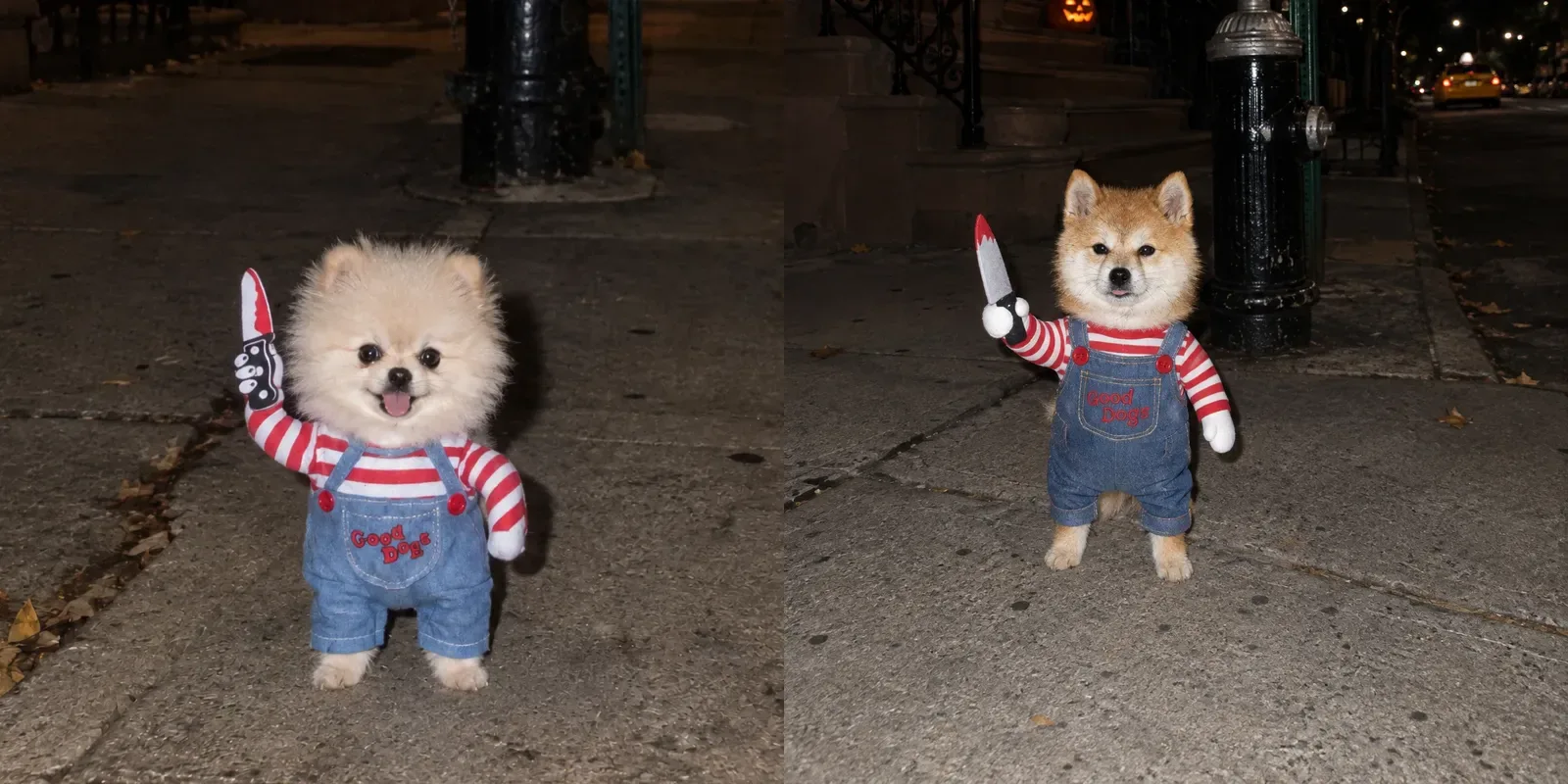
Before and after
One photo in, one still out. Same prompt every time.
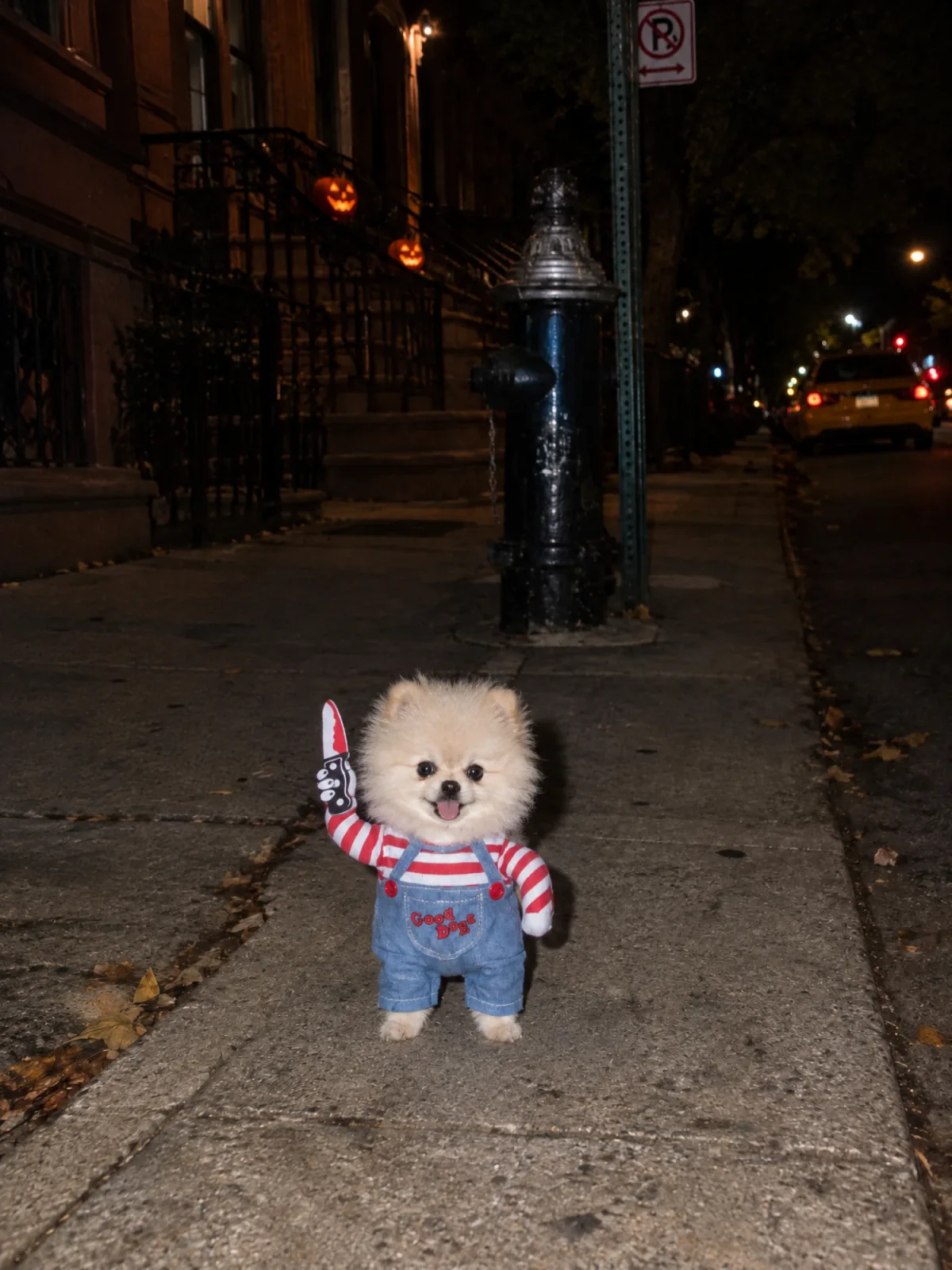
Result Louis · Pomeranian
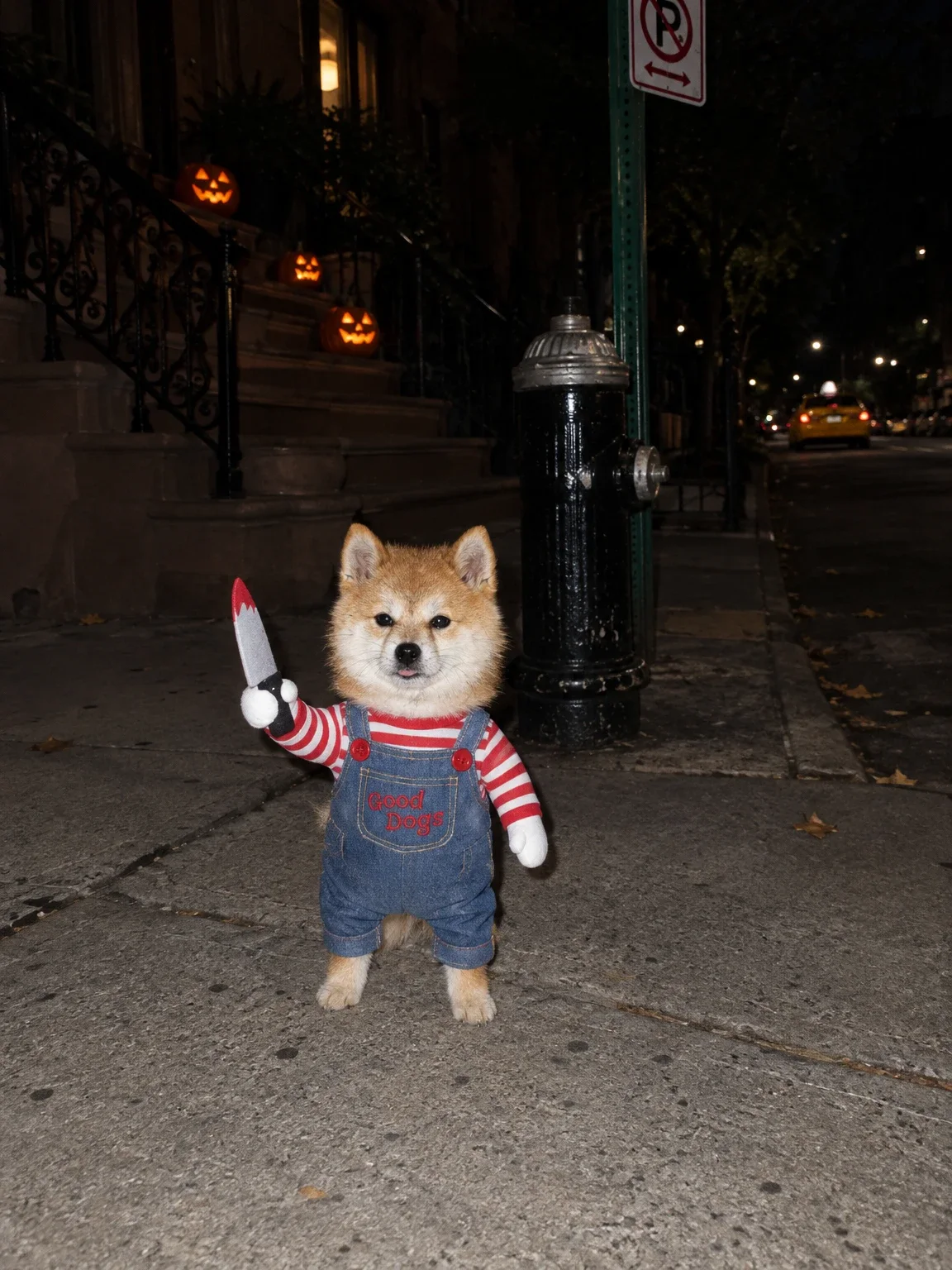
Result Shiba Inu
What you need
Prepare these before you start. Slot names map to the placeholders in the prompt.
One photo of your pet
photoFace, fur color and ear shape should be clearly visible. This photo goes in as the reference where the prompt says @LouisSheet.
Enjoy Halloween 1000%!
No need to go costume shopping: one photo turns your baby into the star of Halloween. Louis turned into Chucky and hit the streets at night. He’s even holding a knife, but with that little tongue sticking out he isn’t scary at all. Copy the prompt and try it with a photo of your own baby.
What we are making
Halloween night on a sidewalk in an American city, with your baby standing alone in a Chucky doll costume: a red and white striped shirt, denim overalls with a red “Good Dogs” print on the pocket, and a toy knife in one stuffed doll arm. Behind them are a brownstone stoop with glowing pumpkins, a black fire hydrant, and a yellow taxi far down the street.
The fun of this prompt comes from two things: the size gap and the old-phone look.
- Your baby stays tiny, small enough for two cupped hands, while the hydrant and stoop keep their real size. So even with a knife, it’s cute instead of scary.
- It looks like a 2017 iPhone 8 shot at night with the flash on. Your baby is lit bright and flat while the background falls into darkness. It isn’t too clean, so it looks like a real snapshot.
Three steps
Step 1. Upload one photo
Upload a photo of your pet to a YouViCo project. A clear face and fur color are enough. A sheet with several angles makes the likeness even closer.
Step 2. Choose Image in New file ▸ AI
Click New file, then the AI tab. Set Output format to Image, pick a model from the list, and add the photo under References.
Step 3. Change three spots in the prompt and generate
Before pasting the prompt below, change three spots to match your baby.
Louis, a Pomeranian from @LouisSheet→ your pet’s name, breed and the name of the photo you added as a referencecream fur color→ the real fur colorPomeranian puppy, about 20 cm tall … about 2 kgin the scale paragraph andReal Pomeranian anatomyin the last paragraph → your pet’s breed and real size
For a cat or a bigger dog, be sure to change the size numbers. Left as is, your pet shrinks to a Pomeranian’s build.
Photorealistic candid snapshot, vertical 3:4 (1536x2048), save as PNG. The reference image is Louis, a Pomeranian from @LouisSheet: keep his exact face, cream fur color, eyes, ears and proportions from the reference.

Louis wears a tiny pet costume of the Chucky doll: a red and white striped long-sleeve shirt and overalls made of blue denim with two red buttons on the straps and a red "Good Dogs" print on the front pocket. The costume has stuffed doll arms: his left costume arm is raised with a cartoonish toy knife prop with a fake red blood tip held in a black and white doll hand, and his right costume arm hangs angled down with a white doll hand. The costume is a real pet costume sitting on top of his fur, fur sticking out around the collar and cuffs, with natural wrinkles, not stiff.

Real-life scale is critical: Louis is a tiny baby Pomeranian puppy, about 20 cm tall when standing on his hind legs and about 2 kg, small enough to sit in two cupped human hands. Everything around him keeps its true real-world size, so he looks very small in the scene. His outfit and gear are tiny custom-made doll-sized versions that fit his small body. Never enlarge him to child or human size.

Scene: an American city sidewalk at night, shot from a low angle slightly above his eye level with lots of empty space around him. He stands on the pavement, and his whole head is shorter than the first step of the brownstone stoop and shorter than the lower half of the black fire hydrant beside him; the hydrant and the green street sign pole with a no-parking sign tower far above him. Glowing Halloween pumpkins sit on the stoop behind him, the building has an iron railing, and a yellow taxi is parked far down the empty street. No cars near the front of the frame. He stands briefly on his hind legs like a real small dog, natural weight balance, with a real contact shadow and slightly pressed fur on the ground. Expression: nearly blank, calm, tongue slightly sticking out.

Shot on an old iPhone 8 at night, unedited camera roll snapshot from 2017. Dark, moody, slightly underexposed image with dense rich colors, punchy contrast and deep blacks; the background falls off into darkness, no lifted shadows. The phone's built-in flash fires straight on: the animals are lit bright and flat with natural colors, a small hard shadow right behind them, and everything beyond the flash range drops into darkness. Limited dynamic range with no HDR: lights blow out to small glowing spots. Very subtle natural light falloff toward the corners, no strong vignette. Visible smartphone noise and grain in the dark areas, slight JPEG compression, slightly soft lens. Not bright, not airy, not crisp, not cinematic, no HDR, no oversharpening, no modern iPhone night mode. Real Pomeranian anatomy with short legs, round body and small paws, not a mascot costume, not a big head on a small body. Fluffy, fine, slightly messy individual fur strands, realistic texture, not smooth or plastic. No text overlay, no captions, no watermark, no people, no other animals. 3:4 vertical.
Tips before you run it
- Don’t delete the scale paragraph. Without “small enough to sit in two cupped human hands” and “everything around him keeps its true real-world size”, your baby grows to the size of a child, and then the knife really does look scary.
- Keep the old-phone paragraph too. Without it the result looks like a slick ad photo and loses the snapshot charm. Dark, straight-on flash and a bit of noise are what make it look real.
- Generate three or four and pick one. The expression, tongue and stance change every run. The blank face with the tongue just poking out is the least scary of all.
- The “Good Dogs” lettering sometimes comes out wrong. If the letters smear, generate again. To use other words, change only what’s inside the quotes.
- Chucky is a movie character. The character and name belong to their rights holder, so keep it to fun on your personal social media and don’t use it for ads or products.
FAQ
Does it work for cats?
Yes. Change the breed and name in the first paragraph, the height and weight in the scale paragraph, and the anatomy sentence in the last paragraph to fit a cat. If “stands briefly on his hind legs” feels off, change it to “sits on the pavement”.
Can they hold something other than a knife?
Yes. Replace “cartoonish toy knife prop with a fake red blood tip” in the costume paragraph with a candy basket or a little pumpkin for a less spooky Halloween shot.
Can I add another pet?
The prompt says “no other animals” so only one appears. For two, delete that phrase, add both as reference photos, and rewrite the costume paragraph for two pets.
Make your own version
Open your project in YouViCo, attach the references, paste the prompt, and share what you make.