
Breaking news! A giant version of your pet is loose downtown
One walk with your pet and the city is in chaos. A prompt that turns one photo into news-helicopter footage of a hundred-foot pet walking between skyscrapers.
- Model
- YouViCo AI generation · New file ▸ AI, output type Video
- Difficulty
- Beginner
- Time
- 5 min, plus generation time
What you need
Prepare these before you start. Slot names map to the placeholders in the prompt.
One photo of your pet
photoThe face, fur color, and ear shape need to be clear. The original pose, background, angle, and lighting are not carried over.
One walk with your pet, and the city is in chaos.
Feed in a single photo and your pet comes back a hundred feet tall, walking between skyscrapers. Not as a movie trailer, but as the shaky footage a news helicopter grabs while chasing a live emergency. Copy the prompt and try it with a photo of your own pet.
What we are making
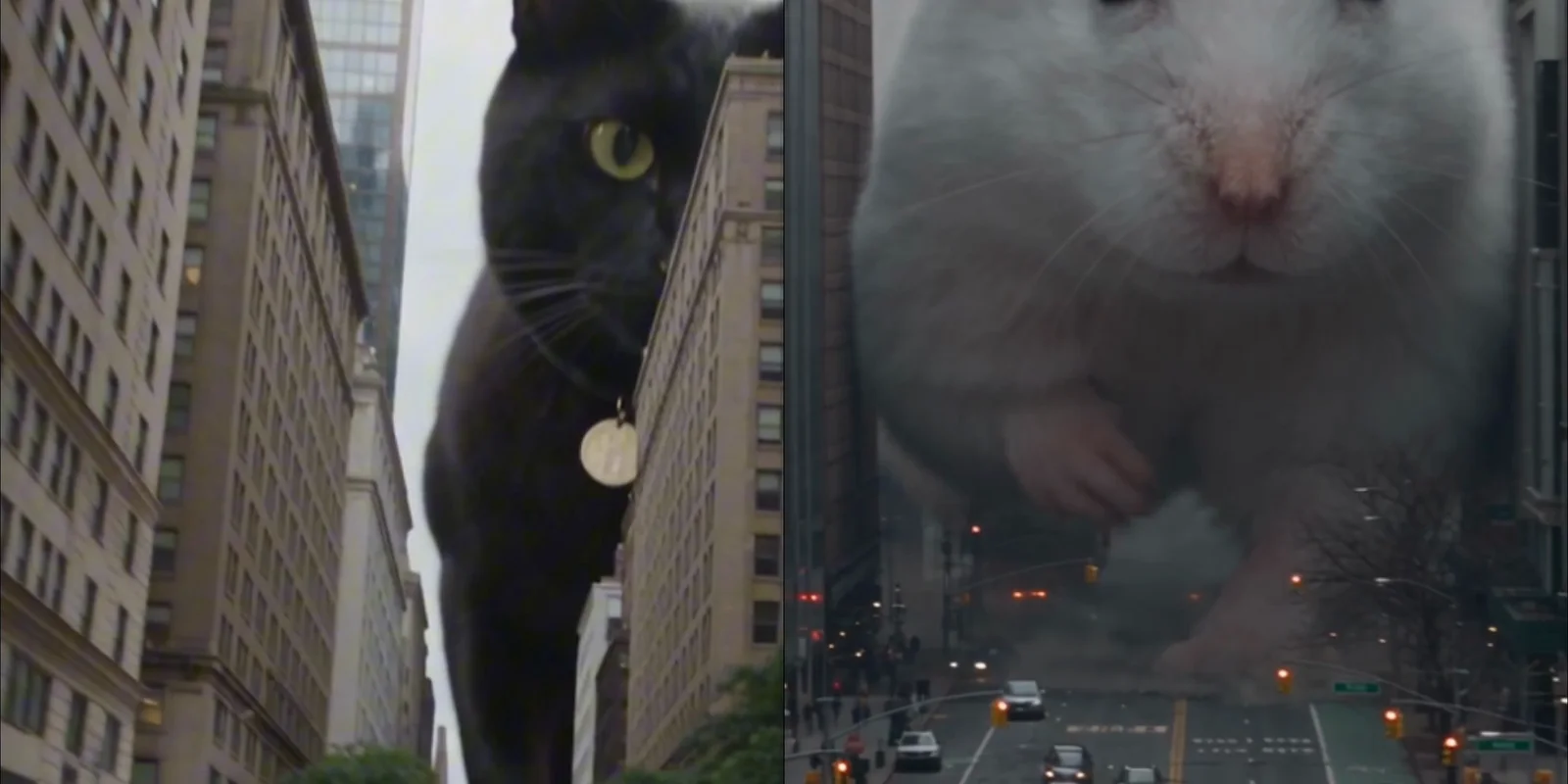
A vertical video that looks like a broadcaster’s helicopter covering an emergency over downtown. A giant pet walks between high-rises, dust rises with every step, and the cars and people below read as small as they do on real news footage.
The prompt takes only identity from the original photo: breed, fur color, face, eyes, ear shape, and build. Pose, background, camera angle, and lighting are set by the prompt, so a living-room photo and a walk photo both end up in the same downtown.
Half the prompt is spent on “do not look like a movie.” No trailer, no game cutscene, no CGI test, and a camera that pans in a hurry to keep the subject in frame rather than settling into a beautiful composition. Those sentences are what create the mood of the result.
Three steps
Step 1. Upload one photo
Upload a photo of your pet to a YouViCo project. A sharp face and true-to-life fur color are enough. It does not have to be a frontal shot.
Step 2. Choose Video in New file ▸ AI
Click New file, then the AI tab. Set the output type to Video, pick a model from the list, and add the photo you just uploaded as a reference file. Aspect ratio and length live in the advanced settings behind the button next to the model. The example above is 15 seconds.
Step 3. Paste the prompt and create
Paste the prompt below as is and click Create file. Walking speed and camera movement change every run, so generate two or three and keep the most convincing one. Each run is a new file.
Use the uploaded pet photo only as a reference for appearance and identity.
Keep the pet's breed, fur color, facial features, eyes, ear shape, build, and overall impression naturally intact, but do not reproduce the original photo's pose, background, composition, camera angle, or lighting.

The final video must be extremely realistic news-helicopter live coverage that looks as if this pet has actually grown into a giant animal tens of meters tall and appeared in the middle of a modern city.
The scene must not look like a movie trailer, a game cutscene, animation, or a CGI test.
It must look like a real broadcaster's news helicopter covering an emergency live from above downtown.

The giant pet is really walking between high-rise buildings, interacting very realistically with the city's roads, vehicles, traffic lights, street trees, signs, and building facades.
With every step the ground shakes, cars stop abruptly, people run, dust and debris rise, and some structures shake or break.

The pet's movement must never be light or smooth like animation.
The weight, inertia, muscle movement, fur reaction, shadow direction, and effect on the surroundings of a genuinely enormous living creature must feel highly convincing.
The fur must not look like plastic; it must be fine and natural like real animal fur, reacting realistically to wind and movement.

Treat the camera as an aerial live feed shot from a news helicopter.
A viewpoint looking down at the city from high altitude while following the giant pet,
shots hurriedly zoomed in from far away with a telephoto lens,
a slight shake in the frame from the helicopter's fine vibration,
and realistic broadcast camera movement that pans or zooms in a hurry so as not to lose the subject.

The composition must not be an overly beautiful, calculated cinematic frame, but a slightly rough, realistic live feed captured in a hurry while following an actual disaster.
If needed, a little compressed telephoto perspective, minor exposure shifts, camera shake, and the realistic judder of aerial photography are welcome.

The important thing is that this scene must be believable not as "a staged video of a giant animal destroying a city," but as footage someone is hurriedly shooting as a news bulletin about a disaster that is actually happening.
People look small as they do on real news footage, traffic is paralyzed, the city is chaotic, and the giant pet must feel enormous in scale even against the whole city.

Overall:
ultra photorealistic, hyper realistic, live-action realism, breaking news helicopter footage, aerial emergency coverage, realistic fur, realistic body weight, realistic destruction physics, believable city scale, real broadcast camera movement, documentary realism, no CGI look

9:16 ratio.
Dogs, cats, hamsters
The prompt only says “pet.” Breed and looks come from the photo, so the animal does not matter. Here is the same prompt with a photo of a hamster.
The smaller the animal, the bigger the contrast in scale. Details you normally only see up close, the pink inside an ear or a whisker, blown up to the size of a building is the point of this prompt.
Tips before you run it
- The original is used for identity only. Skip looking for a nice pose or background; pick the photo with the most accurate face and fur color.
- Generate two or three, then choose. Walking speed, the direction the camera follows, and how much dust rises differ every run.
- Do not delete the “not a movie” sentences. Without them and the helicopter camera paragraph, you get a smooth CGI trailer.
- The ratio is 9:16. It fits Reels and Shorts as is. Keep the last line of the prompt and the aspect ratio in advanced settings in agreement.
- You can dial the destruction down. If a collapsing city feels like too much, drop “some structures shake or break” and keep only the reactions of cars and people.
- Use photos of your own pet. Avoid photos of other people’s pets, and do not put human faces in.
Frequently asked questions
The face came out a little off.
The photo probably carried too little identity. Swap in one where the face is larger and better lit, then regenerate. A full-body shot from far away carries little facial information.
It looks like a smooth movie trailer.
Check that the camera paragraph survived. The helicopter’s vibration, the hurried panning, and the telephoto feel are what make it read as rough live coverage. If it stays smooth, regenerating is the fastest fix.
Can I make it horizontal?
Change the ratio on the last line to 16:9 and match the advanced settings. That said, the vertical frame wedged between buildings is what sells the scale.
Make your own version
Open your project in YouViCo, attach the references, paste the prompt, and share what you make.