
What Is Browser-Based Video Editing? Pros, Limits, Uses
Browser-based video editing lets you cut video in a web browser with no install. How it works, how it compares with desktop editors, and when it is the right tool.
Browser-based video editing is editing video on a timeline inside a web browser, with no software to install. You open a link, your footage is already in a shared workspace, and the cut you make is saved online where the rest of the team can see it.
Key Takeaways
- No install, no file transfers. The editor and the footage both live online.
- Modern browsers can handle real editing. Built-in browser APIs now decode and render video well enough for multi-track timelines.
- It shines for fast, collaborative work: social cuts, revisions from feedback, rough cuts and quick versions.
- Desktop editors still win on heavy finishing: color grading, large RAW files, plugins and offline work.
- Most teams use both. The browser for speed and collaboration, desktop for the final polish.
How does video editing in a browser work?
A few years ago, a browser could play video but not really edit it. That has changed. Modern browsers expose low-level APIs for decoding and encoding video frames and for drawing graphics on the GPU, which is what a timeline editor needs.
A browser-based editor typically works like this:
- Footage stays in the cloud. You work with files already uploaded to a workspace, often through lighter preview copies that stream quickly.
- Editing happens on your machine. Cutting, trimming and previewing run in the browser tab, so the timeline feels responsive.
- Projects save online. The edit is stored with the project, not on one computer.
- Export renders the final file from the full-quality sources.
Browser vs. desktop video editing
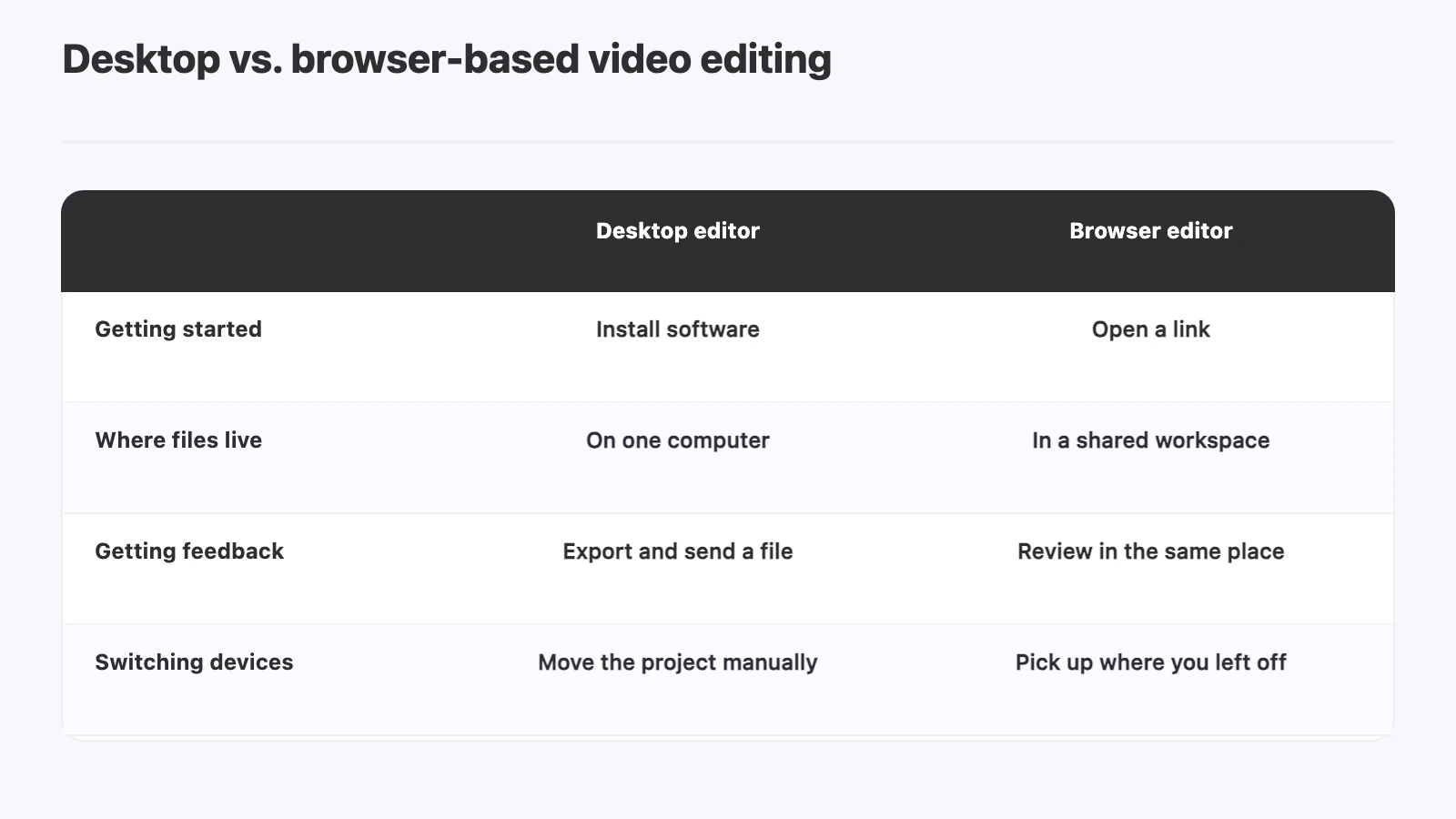
| Desktop editor | Browser editor | |
|---|---|---|
| Getting started | Install software | Open a link |
| Where files live | On one computer or drive | In a shared workspace |
| Getting feedback | Export and send a file | Review in the same place |
| Switching devices | Move the project manually | Pick up where you left off |
| Heavy finishing | Strong: grading, plugins, RAW | Limited |
| Working offline | Yes | Usually no |
When is a browser-based editor the right choice?
Good fits:
- Cutting short social versions from footage that is already uploaded
- Applying reviewer feedback without sending files back to an editor’s machine
- Rough cuts and assembly edits a producer wants to try quickly
- Teams spread across locations who need to see the same timeline
Better on desktop:
- Final color grading and finishing
- Very large or RAW camera files
- Workflows that depend on specific plugins
- Editing without a reliable internet connection
What should you look for in a browser video editor?
- A real multi-track timeline, with separate video and audio tracks
- Standard edits such as trimming, splitting, ripple edits and gap removal
- Aspect ratio options for vertical, square and widescreen versions
- Review in the same place, so feedback doesn’t have to travel by email
- Export to a standard file you can deliver
How does YouViCo’s browser editor work?
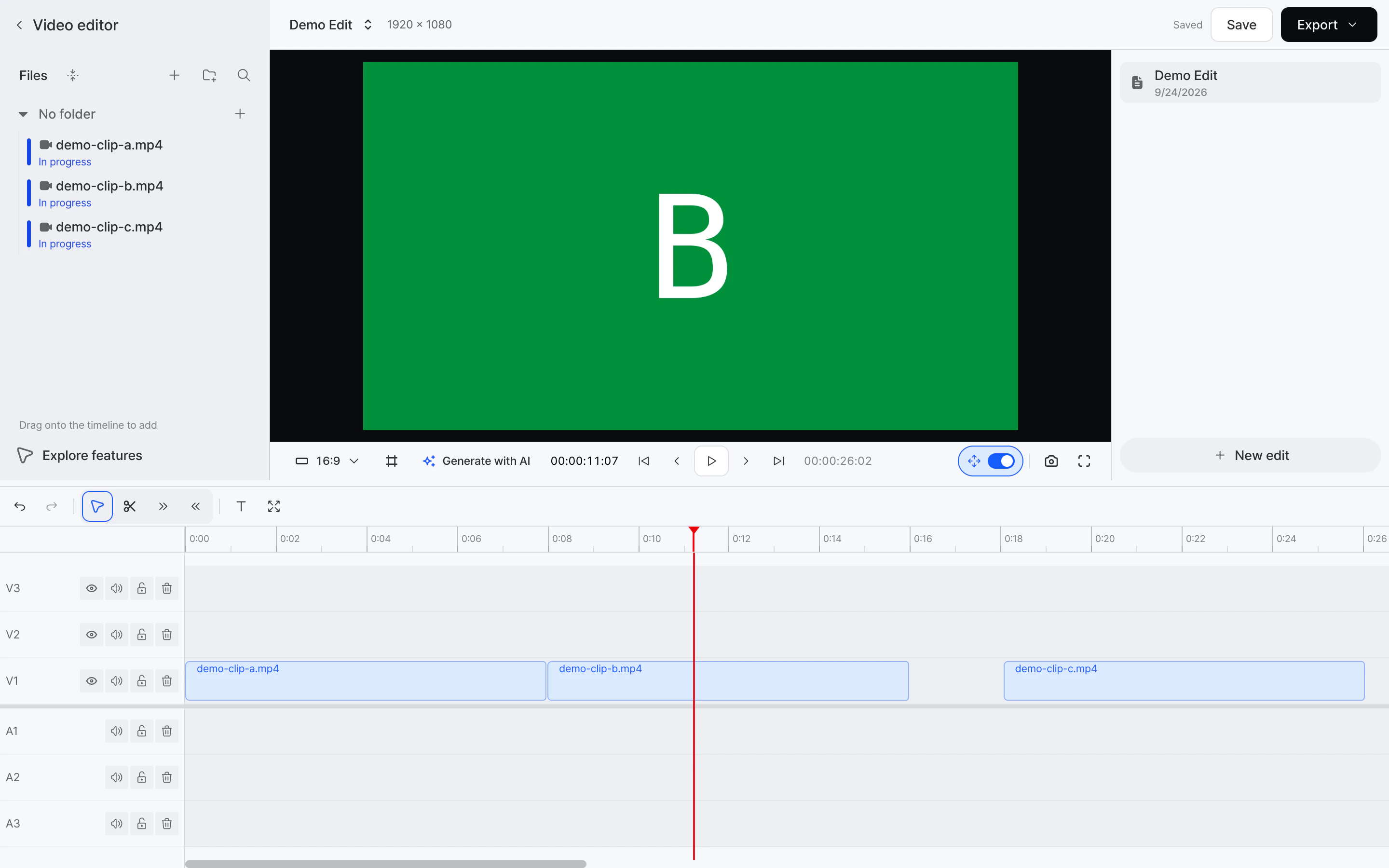
YouViCo, a video collaboration platform for creative teams, includes a video editor that runs in the browser, inside the same project where footage is uploaded and reviewed.
- Files from the project appear in the editor’s file list, ready to drag onto the timeline.
- The timeline has separate video and audio tracks, with ripple editing, multi-clip trim and gap removal.
- You can switch the aspect ratio for different formats, and generate clips with AI from inside the editor.
- Edits save to the project, and the finished video is exported from the same screen.
Frequently Asked Questions
Can you edit video in a web browser?
Yes. Modern browsers can decode, preview and render video well enough for multi-track timeline editing, with no software to install.
Is browser-based video editing as good as Premiere Pro or DaVinci Resolve?
For cutting, trimming and fast versions, it covers most everyday needs. For color grading, heavy effects, RAW footage and plugins, desktop editors are still stronger. Many teams use both.
Do I need to download my footage to edit in the browser?
No. Browser editors work with footage already uploaded to the workspace, so there is nothing to download before you start.
Does browser video editing work offline?
Usually not. Footage and projects live online, so a stable internet connection is needed.