
A sci-fi cinematic skill that makes you the marine from one photo: The Last Line of Defense
Put in one portrait photo and that person becomes a space marine guarding a transport with 3,000 civilians aboard, in an 87-second 16:9 live-action-style sci-fi cinematic. The agent makes the character sheet, keyframes, scenes, radio voices, mono HUD, title and ending.
- Runs in
- YouViCo AI Agent · attach the skill file in chat
- Difficulty
- Advanced
- Time
- 5 min to prepare a photo + agent run time (6 scenes, voices, edit)
Results
The story beats are fixed; only the hero's face and name change. All system text on screen goes in as a monospace HUD. The on-screen text in these frames is Korean.
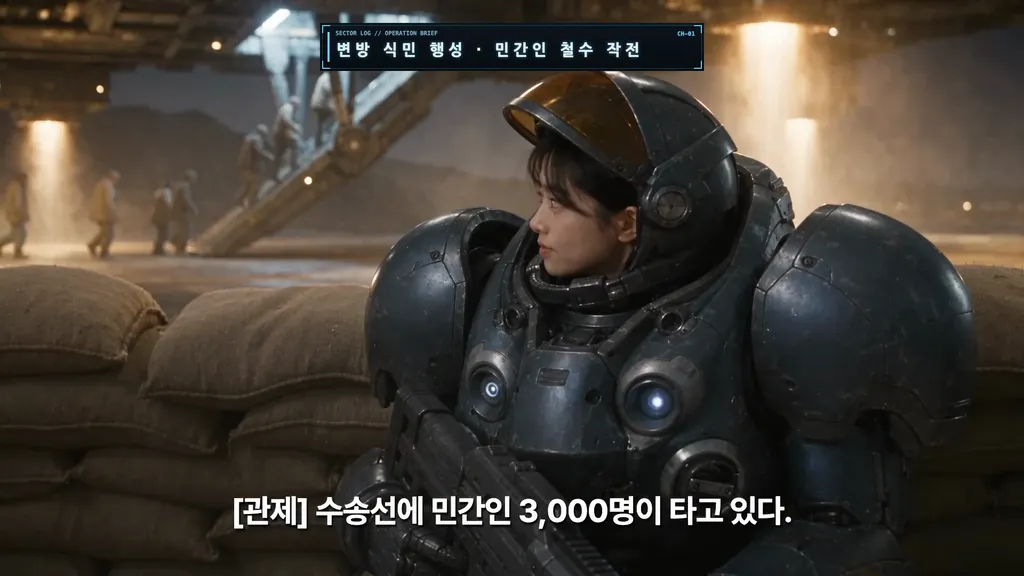
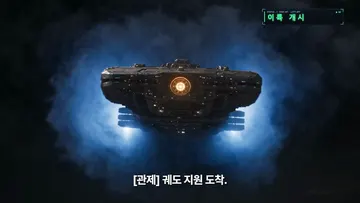
Result 3.5 s. The prologue, with an operation-name HUD at the top and control's radio subtitle at the bottom.
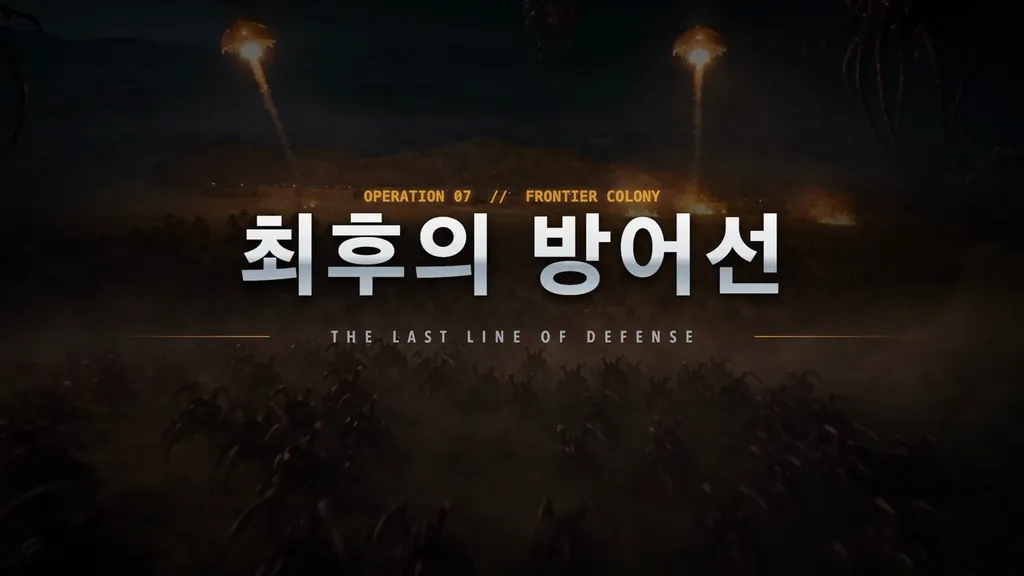
Result 16 s. The title card rises for 2.4 seconds over the shot where the swarm appears.
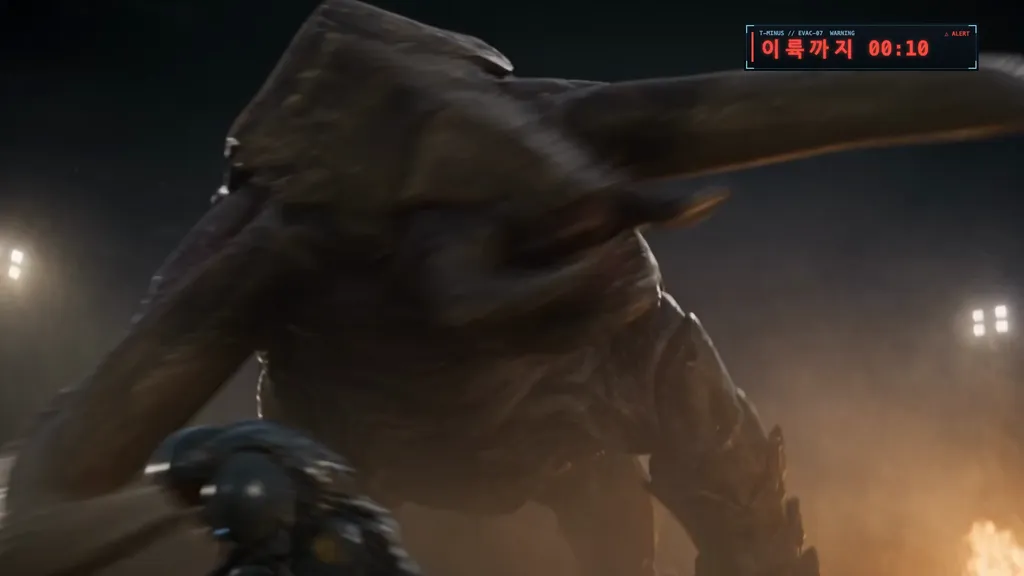
Result 50 s. The face-off with the giant creature. The red countdown at the top right counts the time left to lift-off.
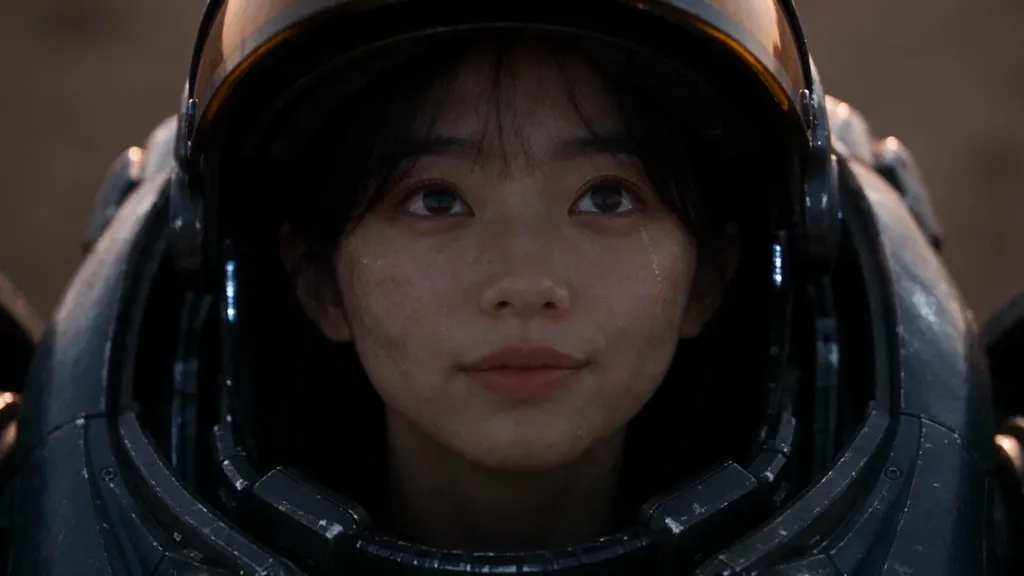
Result 79 s. Dawn: the transport is gone and the hero smiles. The face stays the same as the photo in every shot.
Downloads
The skill file to attach in the AI Agent chat.
- The Last Line of Defense skill file v1.0MD · 12 KB · A Markdown file you can attach to the AI agent chat as is.Download
 The Last Line of Defense result (16:9)MP4 · 60.1 MB · The original file of the result above (1920×1080, 87 s, with sound and Korean text). Use it as a reference for beat timing and HUD placement.Download
What you need
This is all the skill needs. Put it in your project before you ask the agent.
One portrait photo of the hero
photoA photo with one sharp face, frontal or at a 3/4 angle. Tell the agent the name to show on screen too.
Put in one photo and that person becomes a space marine. Forty-five seconds until a transport with 3,000 civilians aboard lifts off. A swarm of creatures pours over the ridge, and the hero holds the line. With this one skill, the agent makes an 87-second live-action-style sci-fi video that looks like a game cinematic, from the plan all the way to the end card.
The hero in the example is Yujeong, a virtual character from the project. The story beats are fixed, so swapping in a photo and a name gives you the same video starring you.
What this skill makes
- One 16:9 video at 1920×1080, 30 fps, 85–90 seconds: about 80 seconds of story and a 7-second end card.
- Seven beats: prologue → swarm and volley fire → ally down and stim pack → face-off with a giant creature → orbital support → dawn.
- Each line from control and the hero becomes its own audio file, and each subtitle starts on the same frame as its voice.
- System text on screen, like the operation name, the countdown and “Lift-off”, is rendered separately as a monospace HUD and laid on top.
- It includes a title card and a terminal-typing end card.
How to run it
- Upload one portrait photo of the hero to your project.
- In the YouViCo desktop app, click the AI button in the title bar or press Ctrl/Cmd+Shift+A to open the AI agent. The AI agent is available in the Windows and macOS desktop apps.
- Attach the skill file in the AI agent chat with the paperclip button at the bottom left of the input box. If you’ll use it often, save it to your skills with Import SKILL.md on the Skills screen. How skills work with the agent is covered in What is a skill?.
- Send a line or two about what you want. The agent asks first about anything missing.
Use this skill to make The Last Line of Defense starring the person in this photo.
Show the name "Alex" on screen, with English voices and subtitles.
What the agent asks first
This skill isn’t for remaking the example; it’s for making your own. Before starting, the agent asks these together and skips anything your request already answers. Say “use the defaults” and it follows the example’s choices.
- Who is the hero? Point to one portrait photo and give the name to show on screen.
- Keep the example beats (defend the transport → giant creature → orbital support), or change what is protected, the place or the lines? Default: the example beats as they are, only the name swapped.
- Which language for lines, subtitles and on-screen text? Default: the user’s language.
- Which voices for control on the radio and for the hero? Default: a radio-style control voice + a voice matching the person’s gender and age.
- Which brand, logo and copy go on the end card? Default: the skill’s end card layout with the user’s brand or channel name.
- Length and budget? Default: about 87 s, 6 scenes, show the total estimate first.
What the agent does
| Step | What the agent does |
|---|---|
| Photo check | Checks there is one face, frontal or 3/4, with sharp eyes. If there are several faces, it asks which one. |
| Character sheet | Makes a sheet of the same face in powered armor (front, 3/4, side, face close-up) from the photo and compares it side by side. |
| Keyframes | Makes one first-frame image per scene, with no letterbox and no text. |
| Scenes | Makes five 15-second scenes and one 10-second scene with Seedance 2.5, each cut into 3–4 shots of 2–4 seconds. It shows the estimate first. |
| Voices and music | Makes one audio file per line and puts a phone-quality filter on the radio. Music drops to 10% under the radio. |
| Assembly | Places scenes, voices and subtitles at the beat times and trims any shot where a creature’s design changes mid-cut. |
| HUD and ending | Renders the operation panel, countdowns, title and end card as motion graphics and lays them in fixed positions. |
| Check | Reviews the exported file on frame grids for the face, subtitle sync, countdown continuity, end card copy and loudness. |
Why it looks like a game cinematic
- The beats are fixed. The timeline, scenes and lines are set, so the tension survives no matter who stars. The countdown shrinking from “45 seconds to lift-off” to “10 seconds” carries it to the end.
- The cuts change inside a scene. Each 15-second scene is split into 3–4 shots of 2–4 seconds, with the action continuing across cuts. That’s where the trailer-like rhythm comes from.
- System text is never generated. The operation name, countdown and end-card terminal are all rendered separately as a monospace HUD, because text baked into a generated video breaks.
- The face stays the same to the end. The character sheet goes into every scene as a reference, and if the face drifts, the agent shortens the shot or remakes the close-up as the first frame.
The full skill file
Same content as the download. You can also copy it and save it as a new file.
---
name: "starcraft-marine-hero"
description: "Use when planning, making and checking a StarCraft-style live-action cinematic (16:9, about 90 s) where the person in one portrait photo stars as a Terran marine: character sheet, keyframes, Seedance scene generation, radio voices, mono HUD, title and YouViCo ending. Example triggers: make me a StarCraft marine, put this person in a StarCraft cinematic, last-line-of-defense video with my photo, a StarCraft video starring me, the last line of defense with someone else, make me the hero of a game. Japanese and Korean requests with the same meaning also apply."
---
# StarCraft-style "You are the Marine" cinematic from one photo

Applies when: the user gives (or points to) one portrait photo and wants that person to star as a Terran-style marine in a live-action, StarCraft-like cinematic built the way the example project's "Marine Yujeong · The Last Line of Defense v10" was built. If the request does not match, ignore this skill.
Language: understand requests in any language. Reply, write comments, file names and reports in the user's language (or the team's language if the project already uses one). Text inside images or videos follows the deliverable's language, not the chat language.

Proven reference in the example project (observed, not limits): plan `SC_MarineYujeong_plan_v2_90s.md`, final `MarineYujeong_LastLineOfDefense_16x9_v10_87s_title-fix_monoHUD.mp4`, folders `SC_0`–`SC_5`. The example's on-screen text and voices are Korean; the lines below are given in English and are written in the deliverable's language.

## Ask the user before starting
The point of this skill is not to remake the example but to make the user's own video. Before starting, ask the questions below together, in one message.
- Skip anything the request already answers.
- If the user says "you decide" or "use the defaults", go with the defaults in parentheses.
- If the user seems to have no idea yet, briefly suggest 2–3 options that differ from the example.
- Once answered, show a one-line summary of what was decided, then start.

1. Who is the hero? Point to one portrait photo and give the name to show on screen.
2. Keep the example beats (defend the transport → giant creature → orbital support), or change what is protected, the place or the lines? (default: the example beats as they are, only the name swapped)
3. Which language for lines, subtitles and on-screen text? (default: the user's language)
4. Which voices for control on the radio and for the hero? (default: a radio-style control voice + a voice matching the person's gender and age)
5. Which brand, logo and copy go on the end card? (default: the skill's end card layout with the user's brand or channel name)
6. Length and budget? (default: about 87 s, 6 scenes, show the total estimate first)

## 1. Standard
- 16:9, 1920×1080, 30 fps, 85–90 s: story ≈ 80 s + end card ≈ 7 s.
- Hero = the photo person, face kept identical in every shot. Name on screen = the user's name or nickname (ask once only if unknown; default: first name from the file name, else "Hero").
- Story (fixed beats, swap only names):
  | Time | Beat | Lines (subtitle text = spoken text) |
  |---|---|---|
  | 0–14 | Prologue: transport ship + refugees → hero close-up → arm radar fills with red dots → visor closes → swarm on ridge | [Control] Attention, all units. / 3,000 civilians are aboard the transport. / 45 seconds to lift-off. Hold the line. · Hero: Understood. |
  | 14–29 | Swarm aerial, volley fire, title card | Hero: Here they come! All units, open fire! |
  | 29–44 | Spine attack → ally down → medic → stim pack → charge | Hero: Stim pack! |
  | 44–59 | Giant tusked beast breaks wall → dodge → ship ignites → face-off | [Control] Warning. Large organism approaching. 10 seconds to lift-off. · Hero: We stop it here. To the end! |
  | 59–74 | Battlecruiser arrives → main cannon → explosion → ship lifts | [Control] Orbital support has arrived. / Yamato cannon, fire. / Transport lift-off complete. 3,000 survivors, all safe. |
  | 74–80 | Dawn, ship in sky, hero smiles | Hero: Sector secured. Awaiting further orders. |
  | 80–87 | Mono terminal end card → YOUVICO | (no voice) |
- On-screen system text (place names, countdown, "Lift-off", end card) must be monospace: Latin/digits Menlo, Korean (Hangul) Nanum Gothic 800 forced to 2 cells. Never use the editor font "mono" for Korean (user rejected it).
- Dialogue subtitles: `set_text_style` pretendard, weight 700, 60 px, #FFFFFF, letterSpacing -0.02, plus Properties > Effects > Shadow preset; bottom center (y≈0.88).
- End card copy (user rule): "From planning to editing. The agent sees it through." + "AI video generation · editing · agent auto-editing" + "youvico.com", in the deliverable's language. Never use the "scattered feedback" angle. Logo = project file `YOUVICO_logo_square.svg` (invert to white on dark).
- Forbidden: real StarCraft logos/names on screen ("Korhal" etc.), copied game UI. Use generic "FRONTIER COLONY", "OPERATION 07".

## 2. Steps
1. **Scope**: `update_task_scope` with steps 2–12. Create folder `SC_<name>_Marine` with sub-folders `0_previous-versions, 1_references, 2_character-sheets_keyframes, 3_scene-videos, 4_voice_music, 5_review` (`create_folder`).
2. **Photo check**: `get_project_file includeImage=true` (or `inspect_local_media` for an attachment; upload with `upload_project_attachment` first so it has a fileId). Need: one face, frontal or 3/4, sharp eyes. If several faces, ask which one.
3. **Character sheet** (image model from `list_ai_models`; gpt-image-2 observed ≈5 credits): reference = the photo. Prompt core: "Photorealistic character sheet of THIS EXACT PERSON (keep face, age, hairstyle identical to the reference) as a Terran-style space marine: bulky dark steel-blue powered armor, glowing blue chest lights, amber visor helmet shown open, heavy gauss rifle. Front, 3/4, side, and close-up face with visor open; neutral grey background; no text, no logos." Check face match side by side; regenerate once if not similar.
4. **Shared asset sheets** (reuse this project's if present: `SC_CS2_Medic`, `SC_CS3_Zergling`, `SC_CS4_Hydralisk`, `SC_CS5_Ultralisk`, `SC_CS6_Battlecruiser_Transport`, `SC_KF8_ZergSwarm_scale`). Only the hero sheet is new.
5. **Keyframes**: one first-frame image per scene with the hero sheet + matching asset sheet as references, 16:9, no letterbox, no text (`SC_KF7` failed due to letterbox).
6. **Scenes**: Seedance 2.5, ADVANCED, 1080p, 15 s ×5 + 10 s ×1 (observed: 15 s estimate 960 / billed 889 each). Each prompt = one beat block above, written as 3–4 hard cuts of 2–4 s with action continuing across cuts; first frame = keyframe; references = hero sheet (+ creature sheet). Never reference an existing video. Always `estimate_ai_generation` first and state the total before starting.
7. **Voices**: one audio file per line.
   - ElevenLabs (user preference for radio, via `external_page`): Eleven v4, control = "SC3 Radio Command KR" style voice, hero = a voice matching the person's gender/age; radio lines get Audio effects filter "Low Quality Phone". Write numbers as words in the script (e.g. "three thousand", "forty-five seconds"; in Korean, Hangul numerals).
   - Fallback local: `run_local_ai narrate` (control Ono_Anna, hero Sohee for female; Ryan failed Korean).
8. **Music**: one orchestral track ≥ 90 s; duck to 10% under radio lines in loud sections (`split_clip` + `set_clip_volume`).
9. **Assemble** (new edit, `set_editor_size` 1920×1080): `add_clips_to_timeline` scenes on V1 in order; voices on A3 at their beat times; subtitles with `add_text_clip` = same start and duration as each voice clip, then style (step 1 standard). Trim any shot where a creature design changes mid-cut (observed fix: removed 2.9 s at 59.1 s).
10. **Mono HUD + title + end card** with `render_motion_graphics` (see `## 6`), upload with `upload_project_attachment` to `3_scene-videos`, place: place-name panel V3 0.3–4.5 s (x 0.5, y 0.0815, scale 0.5), orange countdown 8.9–11.9 s and red countdown 49.1–59.1 s → green "Lift-off" to 60.7 s (x 0.841, y 0.0815, scale 0.5), title on V2 at the swarm cut for 2.4 s ending before the first combat subtitle, end card V2 last 6.9 s.
11. **Save + export** to the project folder: `<name>_LastLineOfDefense_16x9_v1.mp4`; status `review`; comment listing scene times and credits.
12. **Memory**: record file IDs, credits, issues in project memory.

## 3. Checks (on the exported file, not the editor)
- Grid frames with `render_motion_graphics` + `inspect_local_media` (16 cells per page, ≤ 4 pages per render; hundreds of seeks hang).
- Face matches the photo in every hero shot; no extra people with the hero's face.
- No letterbox, no burned-in text from generation, no logo/real game names.
- Every subtitle starts on its voice clip (frame-exact) and has no typo; numbers in subtitles in digits (3,000) while audio says them as words.
- Countdown digits continuous (45→43, 10→00) and boundary frames show no leftover old text.
- End card copy letter-perfect; logo white.
- Loudness: `inspect_local_media measureAudio=true`; no 0 dB clipping. Tell the user which seams to listen to.

## 4. When it fails
- Face drifts: shorter shots, put the face close-up as first frame, retry once; then cut around it.
- Creature changes design between cuts: trim the shot rather than regenerate.
- CONTENT_BLOCKED for a minor's face: use back/hand shots.
- Writes blocked after a failed lookup: do one successful allowed read (`read_local_file` on an attached file), then retry.
- `move_file` 429: 3 changes per `apply_changes`, wait ~20 s.

## 5. Report format
Final file + folder, scene list with times, credits (estimate vs billed per scene), what was verified (frames/times), what the user must listen to, IP note: StarCraft is Blizzard's IP; review rights before public release.

## 6. Mono HUD motion-graphics recipe
- Panel 880×180 (place-name 1440×180), background #04070b→#0c141c, 2 px frame rgba(95,214,255,.28), cyan corner brackets 30 px, scanlines 2/5 px, small label row 22 px Menlo.
- Split text into spans: `.m{display:inline-block;width:.602em}` for Latin/space, `.h{display:inline-block;width:1.204em;font-family:'Nanum Gothic';font-weight:800}` for Korean characters; main size 76 px (countdown) or 58 px (typing).
- Colors: normal #ffb547, warning #ff4a3d with red flash on the last 0.2 s of each second, lift-off #4dffa0.
- Countdown: remaining = floor(C − t); measure C so the digit changes match the original edit.
- Title: background = the scene clip itself (asset), dark radial vignette, the title "The Last Line of Defense" in the deliverable's language (Korean in the example) Apple SD Gothic Neo 800 176 px silver gradient, blur→sharp + letter-spacing 0.3→0.06 em in 0.6 s, one light sweep, mono kicker above, "THE LAST LINE OF DEFENSE" Avenir Next Condensed below with gold lines; fade out 1.8–2.2 s.
- End card: mono terminal typing "> Mission complete." → "> Enter your next order." → input box "One line of instruction, one finished video." → collapse flash → logo + YOUVICO + copy + youvico.com.
- Seek must be deterministic: compute everything from frame index; video assets seek with `currentTime` and await `seeked`.

## Finding controls in any UI language
The app UI can be in 11 languages (English, Korean, Japanese, Simplified Chinese, Traditional Chinese, Spanish, French, German, Vietnamese, Hindi, Arabic), and labels change between releases. This skill names controls by their English label. To act on one:
1. Prefer a dedicated tool over the screen whenever one exists.
2. Read the screen with the screen tool and look for the control by meaning, not by exact text: same role (button, tab, menu item, field), same place, same icon. Use `references/ui-labels.md` for the label in the current UI language.
3. If no label matches (renamed, new release, or a language not in the table), choose the control whose purpose matches the step, then confirm with a screenshot before any change that costs credits, deletes, or exports.
4. Do not change the user's UI language to make matching easier.
5. In Arabic the layout is mirrored: "left panel" may be on the right. Find panels by name and role, not side.
6. Error messages are localized. Decide by `code`, `status` and `details`, not by message text.

Change log: v1.0 2026-11-06 first version from Marine Yujeong v1–v10 (font fix, title redesign, seam trim). / 2026-11-06 added questions before starting
Tips before you run it
- Check the rights to the original game. This skill follows a StarCraft-style look. StarCraft is Blizzard Entertainment’s intellectual property, and names like marine, stim pack and Yamato cannon, as well as the creature designs, come from it. The original logos and place names never appear on screen, but review the rights before public or commercial use.
- Only use yourself, people who agreed, or virtual characters. The hero in the example is a virtual character from the project. A minor’s face may be blocked from generation, in which case the agent switches to back or hand shots.
- This is a credit-heavy job. In the example one 15-second scene was estimated at 960 and actually billed 889 credits. Six scenes come to about 5,000 credits. The agent shows the total estimate before starting.
- File names in the skill belong to the example project. Reusable asset sheets like the medic, creatures and battlecruiser exist only in the example project. In your project the agent makes new ones.
- Make the end card yours. The end card copy and logo in the skill are YouViCo’s. Swap in your own brand or channel name.
- The radio voices come from ElevenLabs. It’s an external service with its own account and terms.
FAQ
Can I change the story?
The skill is built to use the same beats. Before starting, the agent asks whether to keep the story as is. If you want a different thing to protect, a different place or different lines, say so then. Keep the beat timeline and the HUD and subtitle positions still work.
Can I make it in English?
Yes. On-screen text and voices follow the deliverable’s language. Make it with English lines and the subtitles and HUD come out in English too.
Does it work vertically?
The skill is built for 16:9. HUD positions and shot composition are set for a landscape frame, so a vertical version needs everything repositioned.
Run this skill in YouViCo
Upload a photo to your project, open the AI Agent, attach the skill file in the chat, and ask it to make the video.