
What is Video Collaboration? A Complete Guide for Content Teams
Video collaboration is how teams review, give feedback on, and approve video content together. Learn how it works, why it matters, and which tools content teams actually use in 2026.
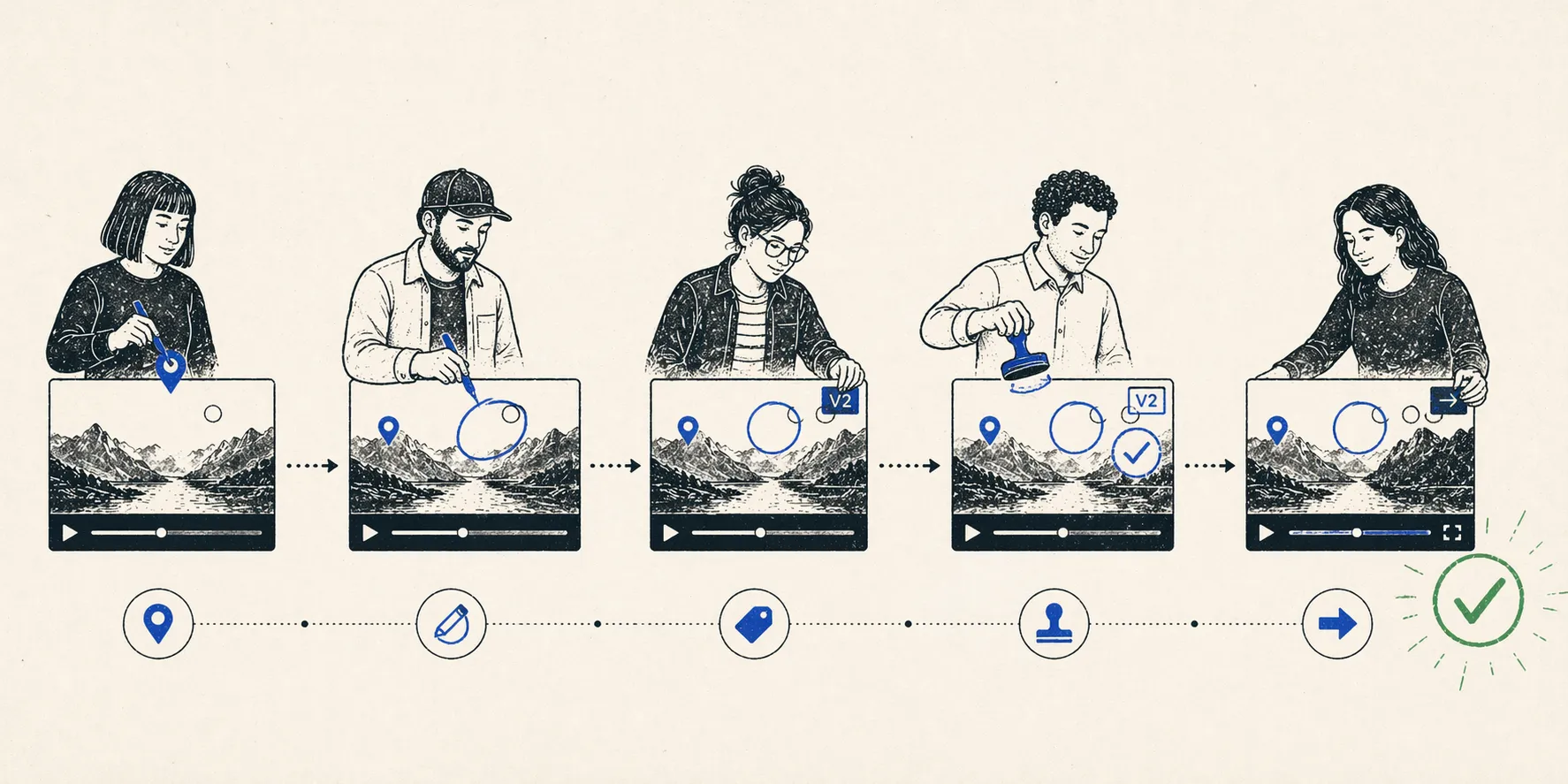
Video collaboration is the process of working together on video content — from reviewing rough cuts and giving feedback to managing approvals and delivering the final version. It replaces scattered email threads, vague screenshots, and “can you check at around 2 minutes?” messages with structured, timestamped workflows that keep every stakeholder aligned.
Key Takeaway: Video collaboration isn’t just about watching videos together. It’s a system that connects feedback, revisions, and approvals into a single workflow — so content moves from draft to publish without things falling through the cracks.
Why Video Collaboration Matters for Content Teams
Ten years ago, video production was a niche skill. Today, nearly every marketing team, brand, and creator produces video content at scale. YouTube channels, TikTok campaigns, product demos, training materials — the volume of video being produced has grown exponentially, but the way teams give feedback on video hasn’t kept up.
Here’s what typically happens without a proper video collaboration workflow:
An editor finishes a rough cut and exports it. They upload it to Google Drive or Dropbox and share a link. A producer watches it and sends feedback over Slack: “The intro feels slow. Also, can you change the font at the beginning?” The editor asks which font, at what timestamp. The producer screenshots it but the timecode isn’t visible. Meanwhile, a client sends a separate email with conflicting notes. The editor spends more time decoding feedback than actually editing.
This isn’t an edge case. Teams that produce more than a few videos per month consistently report that feedback communication — not the actual editing — is the biggest bottleneck in their pipeline. For a team managing multiple YouTube channels, the problem compounds quickly. Each video might involve a scriptwriter, editor, motion designer, channel manager, and sometimes an external client, all needing to review and approve at different stages.
Video collaboration tools solve this by giving everyone a shared space to watch the same video, leave feedback tied to exact timestamps, and track what’s been addressed and what hasn’t.
How Video Collaboration Works in Practice
Modern video collaboration typically happens in two modes: asynchronous review and real-time co-review. Most teams use both, depending on the situation.
Asynchronous Review
This is the more common mode. An editor uploads a video to a review platform. Reviewers watch on their own time and leave comments pinned to specific timecodes. The editor sees all feedback organized by timestamp and works through it like a checklist.
The key features that make async review work:
- Timestamped comments — Feedback is tied to the exact frame, not described in vague terms. “Reduce the lower third opacity at 1:23” instead of “the text thing is too strong somewhere near the beginning.”
- Version control — When the editor uploads a revised cut, previous comments stay attached to their original version. No confusion about which round of feedback a note belongs to.
- Approval status — Each reviewer can mark their review as complete, giving the editor a clear signal that a round of feedback is done.
Real-Time Co-Review
For faster turnaround or more complex creative decisions, teams jump into a live session. Everyone watches the same timeline simultaneously. Comments appear in real time. Some tools let reviewers draw directly on frames during the session.
This mode works especially well when:
- Multiple stakeholders need to align on a creative direction quickly
- The feedback involves subjective judgments that are hard to articulate in text (“the pacing feels off in this section” is easier to discuss live)
- You’re on a tight deadline and can’t afford a 48-hour async feedback loop
The Full Workflow
In practice, a typical video collaboration workflow looks like this:
- Upload — Editor exports and uploads the cut to the review platform
- Review — Stakeholders leave timestamped feedback (async or live)
- Revise — Editor works through feedback, checking off comments as addressed
- Re-review — Stakeholders review the updated version, comparing it against the previous cut
- Approve — Final sign-off from all required approvers
- Deliver — Approved version is exported or published
The entire cycle might repeat 2-4 times per video. Without a dedicated tool, each cycle adds hours of communication overhead. With one, the feedback-to-revision loop tightens dramatically.
What to Look for in a Video Collaboration Tool
Not all video collaboration tools are created equal. Here’s what separates a good tool from a frustrating one:
Frame-Accurate Feedback
The most important feature. Comments should attach to exact frames, not approximate timecodes. When an editor opens a comment, the video should jump to precisely the right moment.
No-Friction Reviewer Access
If your client or stakeholder needs to download an app, create an account, or sit through a tutorial before they can leave a comment, adoption will be low. The best tools let external reviewers access a review link and start commenting immediately — no login required.
NLE Integration
For editors, the ideal workflow is to receive feedback without leaving their editing software. Integrations with Adobe Premiere Pro, DaVinci Resolve, and Final Cut Pro let editors see comments as markers on their timeline and action them directly.
AI-Powered Features
Newer video collaboration tools are adding AI capabilities that go beyond basic review:
- Auto-transcription — Searchable text from spoken content, making it easy to find specific moments
- Feedback summarization — AI that groups and summarizes comments from multiple reviewers, flagging conflicts
- Smart categorization — Automatically sorting feedback by type (visual, audio, pacing, copy)
These features become especially valuable when a video receives feedback from 5+ stakeholders across multiple rounds.
Video Collaboration Tools and Solutions
The market has matured significantly. Here are the main categories and tools to consider:
| Tool | Key Strength | Best For | Pricing |
|---|---|---|---|
| Frame.io | Native Adobe integration, Camera-to-Cloud | Post-production teams in Adobe ecosystem | From $15/user/mo |
| Wipster | Clean interface, unlimited reviewers | Agencies and client-facing teams | From $15/member/mo |
| YouViCo | Real-time co-review, AI feedback analysis (coming May 2026) | Multi-channel teams with high-volume output | Free tier available |
| Filestage | Multi-format review (video, docs, design) | Marketing teams reviewing mixed content | From $119/mo |
| Vimeo Review | Built into Vimeo hosting | Teams already using Vimeo | Included in paid plans |
| Ziflow | Enterprise approval workflows | Large organizations with compliance needs | Custom pricing |
Choosing the Right Tool
The right choice depends on your team’s workflow:
- If you live in Premiere Pro and need the tightest editor integration, Frame.io’s native Adobe connection is hard to beat.
- If your reviewers are external clients who need zero friction, Wipster’s no-account-needed approach works well.
- If you manage multiple channels and need to move fast with many stakeholders, tools with real-time co-review and AI-powered feedback management — like YouViCo — reduce the coordination overhead significantly.
- If you review more than just video (design files, documents, web content), a multi-format tool like Filestage covers more ground.
Video Collaboration vs. Video Conferencing
A common point of confusion: video collaboration is not the same as video conferencing.
Video conferencing (Zoom, Google Meet, Microsoft Teams) is about having live conversations over video. It’s a communication tool.
Video collaboration is about working together on video content — reviewing footage, giving frame-accurate feedback, managing versions, and tracking approvals. It’s a production workflow tool.
Some teams try to use Zoom for video review — sharing their screen and asking for feedback in real time. This works in a pinch, but it doesn’t capture feedback in a structured way. Comments aren’t tied to timecodes, nothing is tracked, and the editor still has to manually reconstruct what was said after the call.
Dedicated video collaboration tools bridge this gap by combining the immediacy of live review with the structure of async feedback.
Best Practices for Video Collaboration
1. Set Clear Feedback Guidelines
Before sending a video for review, tell stakeholders what kind of feedback you need. “Is the pacing right?” is more actionable than “What do you think?” Define whether this round is about big-picture structure or fine details like color and sound.
2. Limit the Number of Review Rounds
More rounds doesn’t mean better video. Set an expectation upfront: most projects should take 2-3 review rounds. If feedback is consistently requiring 5+ rounds, the problem is likely in the briefing or creative direction, not the review tool.
3. Consolidate Feedback Before the Editor Sees It
When 5 stakeholders leave independent comments, conflicts are inevitable. Someone on the team — usually the producer or project manager — should review all feedback first, resolve any contradictions, and present the editor with one unified set of notes.
4. Use Video Collaboration for the Right Stage
Not every stage of production needs a dedicated review tool. Script review can happen in a Google Doc. Storyboard approval can happen in Figma or Notion. Save the video collaboration tool for when there’s actual video to review — rough cuts, fine cuts, and final delivery.
Frequently Asked Questions
What is the difference between video collaboration and video editing?
Video editing is the creative act of assembling footage into a finished piece — cutting clips, adding effects, mixing audio. Video collaboration is the workflow that surrounds editing: getting feedback, managing revisions, and securing approvals. They’re complementary. Editors use editing software (Premiere Pro, DaVinci Resolve) to make the video, and video collaboration tools (Frame.io, YouViCo, Wipster) to manage the feedback cycle around it.
Do I need a dedicated video collaboration tool?
If your team produces fewer than 2-3 videos per month and feedback comes from one or two people, you can probably manage with email and shared drives. Once you’re producing more frequently, working with external clients, or coordinating feedback from multiple stakeholders, a dedicated tool pays for itself in time saved. Most teams report cutting their feedback cycle time by 40-60% after adopting one.
How does AI improve video collaboration?
AI adds three main capabilities: automatic transcription (making video content searchable by text), feedback summarization (grouping and condensing comments from multiple reviewers), and conflict detection (flagging when two reviewers give contradictory feedback). These features are especially valuable for teams that manage high volumes of video content across multiple projects or channels.
Can video collaboration tools replace in-person review sessions?
For most production workflows, yes. Modern tools with real-time co-review capabilities replicate the in-person screening room experience — synchronized playback, live annotation, and instant discussion — without requiring everyone to be in the same room. The one exception is high-end color grading and finishing work, where calibrated monitors and controlled viewing environments still matter.