
What is a Video Production Pipeline? The 9-Stage Framework
A video production pipeline is the structured workflow from concept to distribution. Learn ELBA's real 9-stage framework used across 6 YouTube channels.
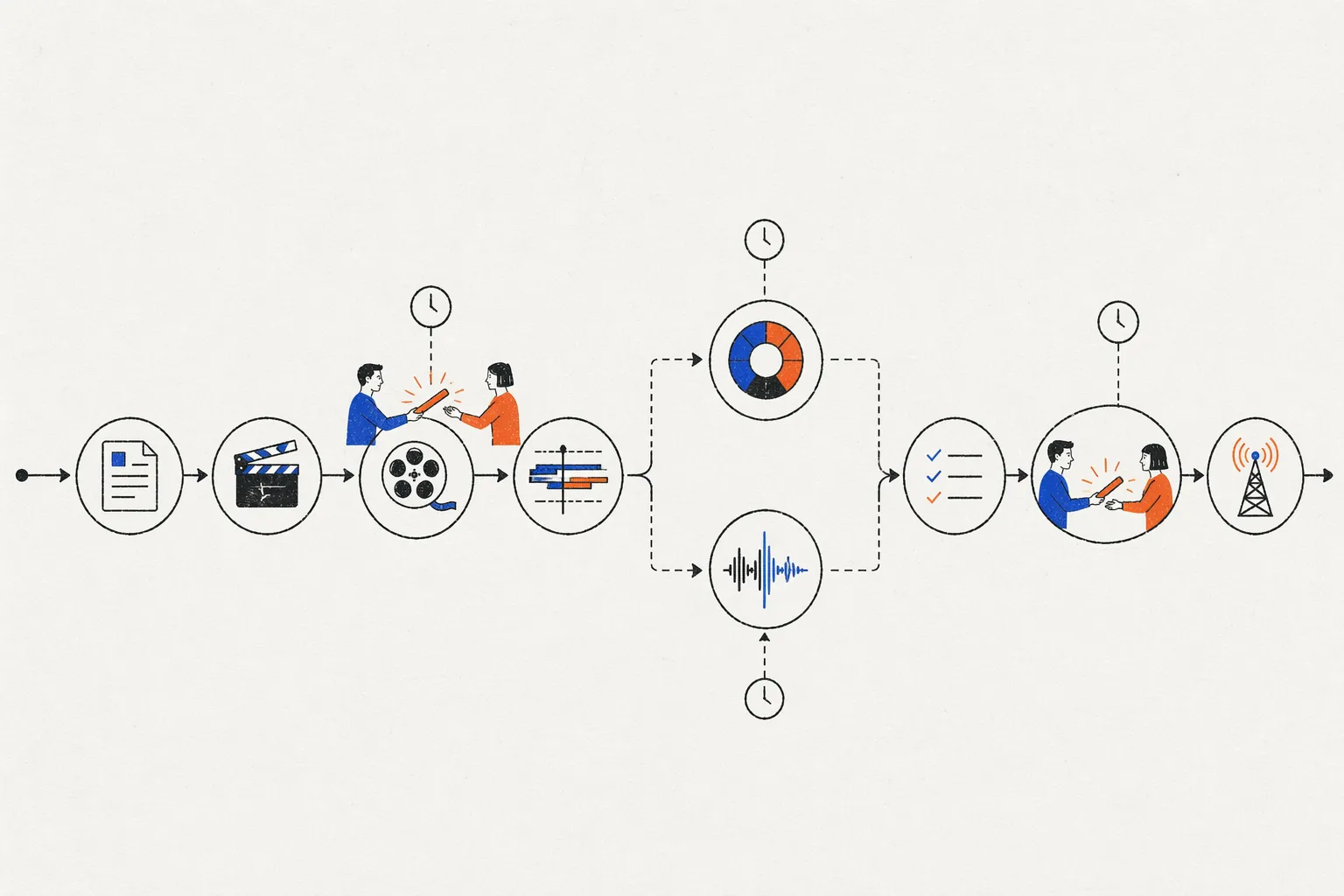
What is a Video Production Pipeline?
A video production pipeline is the structured sequence of steps a video goes through from initial concept to final distribution. It defines who does what, in what order, with what approval gates. Pipelines vary by production type (commercial, YouTube content, live streaming), but the general principle is the same: organize chaos. Without a pipeline, videos get stuck in limbo—waiting for someone to color grade, waiting for legal review, waiting for the client to make a decision.
A typical pipeline has 5-15 stages. ELBA’s pipeline—developed through managing 6 YouTube channels and 140+ campaigns annually—has 9 stages. This framework balances speed with quality.
Why Pipelines Matter
Problem: Undefined Process
Without a pipeline, production looks like this:
- Editor finishes rough cut. Sends it to… who? Creative director? Client? Someone else?
- Creative director watches, gives feedback. Editor revises. But when? By when?
- Days pass. Rough cut sits in email. No one knows the status.
- Producer pings “Is this done?” Editor: “Waiting on client feedback.”
- Client never reviewed because they didn’t know a review was needed.
- Publish date passes. Video is late.
Without a pipeline, 40% of your time is spent answering “where are we in the process?”
Solution: Clear Stages and Accountability
With a pipeline:
- Stage 1: Approval Gate (brief approved)
- Stage 2: Approval Gate (script approved)
- Stage 3: Approval Gate (dailies approved)
- …and so on.
Everyone knows: which stage are we in right now? Who owns this stage? When do they deliver?
Result: 30% faster timelines, less bottleneck confusion.
ELBA’s 9-Stage Video Production Pipeline
This pipeline was battle-tested across 6 YouTube channels and 140+ annual campaigns. It’s designed for teams of 3-20 people, with clear handoffs between stages.
Stage 1: Pre-Production Brief & Approval (Days 1-3)
What happens: Creative team and stakeholders align on concept, budget, timeline, and success metrics.
Inputs:
- Business objective (“Increase brand awareness in Gen Z demographic”)
- Content goals (“5M+ views, 10K+ comments”)
- Key message (“Product sustainability is a core value”)
- Audience profile
- Timeline and budget
Outputs:
- Approved brief document (1 page)
- Creative direction (mood board, reference videos, style guide)
- Approved by: Creative director, producer, client/stakeholder
Common pitfall: Vague brief. “Make it engaging” ≠ clear direction. Spend extra time here; it saves time later.
Duration: 2-3 days
Tools: Google Docs (brief), Figma/Pinterest (mood boards), Slack (sync)
Stage 2: Script/Storyboard Review & Approval (Days 4-7)
What happens: Copywriter drafts script. Creative director reviews. Client approves. Everyone agrees on the story before a penny is spent on production.
Inputs:
- Script draft (or storyboard for non-narrative content)
- Reference audio (music, voiceover sample)
- Talent list (if applicable)
Outputs:
- Approved script (signed by client)
- Final talent list
- Approved by: Copywriter, creative director, client, legal (for claims/disclaimers)
Quality gate: Script is approved before shoot begins. Prevents “we didn’t know we were supposed to film that” issues.
Duration: 3-4 days
Tools: Google Docs (script), Notion (feedback tracking), email (approvals)
Stage 3: Production / Shoot Review (Days 8-14)
What happens: Director shoots content. At end of each day, footage (dailies) is reviewed for quality. If problems are spotted, re-shoots happen immediately (not after post-production).
Inputs:
- Raw footage from set
- Director’s notes
- Crew feedback
Outputs:
- Approved dailies (footage that meets quality standard)
- Re-shoot list (if needed)
- Approved by: Director, DP (Director of Photography), producer
Quality gate: Catch technical issues on-set. Out-of-focus shots, bad audio, missing coverage—fix it now, not in post. Saves 1-2 weeks of rework.
Duration: Depends on shoot schedule (1-5 days typically)
Tools: YouViCo (or Frame.io) for dailies review, shared folder for footage transfer
Stage 4: Rough Cut Review & Approval (Days 15-18)
What happens: Editor assembles raw footage into a rough cut (no color, no sound design, just edits and pacing). This is the first time anyone sees the video in sequence.
Inputs:
- All approved dailies
- Approved script
- Editor’s creative choices on pacing, transitions, shot selection
Outputs:
- V1 Rough Cut
- Feedback from creative director, producer, and client (if appropriate at this stage)
- Approved by: Creative director (and client if they’re involved in editorial decisions)
Quality gate: Pacing and structure are locked before color/sound work begins. If major re-edits are needed, do them now (quick). Don’t waste colorist’s time on shots that will be removed.
Duration: 3-4 days (shooting to approval)
Tools: YouViCo (feedback), editing software like Premiere Pro or DaVinci Resolve (editing), Slack (async discussion)
Stage 5: Color Grade Review & Approval (Days 19-22)
What happens: Colorist takes approved rough cut and applies color correction and grading. This is when the video gets its mood and visual personality.
Inputs:
- Approved rough cut (locked edits)
- Color reference (mood board, reference footage, brand color guidelines)
- Creative direction (“cool, cinematic” vs. “warm, energetic”)
Outputs:
- V2 Color Grade
- Feedback from creative director and colorist
- Approved by: Creative director (and client, if color is part of approval)
Quality gate: Only color the approved rough cut. Don’t color shots that might get removed. Saves time and prevents re-coloring later.
Duration: 3-4 days (typically overlaps with rough cut review; colorist can start while rough cut is being finalized)
Tools: DaVinci Resolve (color), YouViCo (review), reference imagery
Stage 6: Sound Design & Mix Review (Days 23-26)
What happens: Sound designer adds music, SFX, dialogue enhancement, and overall mix. This stage is often underestimated—sound quality can make or break a video.
Inputs:
- Approved rough cut + approved color grade
- Music track (already selected, licensed)
- Sound effect library
- Voiceover/dialogue tracks
Outputs:
- V3 Sound Design & Mix
- Feedback from producer and creative director
- Approved by: Sound designer, creative director, producer
Quality gate: Clean, balanced audio mix. No clipping, no artifacts, dialogue clarity. Test on multiple playback systems (headphones, laptop speakers, TV).
Duration: 3-4 days (can overlap with color; both run in parallel after rough cut approval)
Tools: Premiere Pro or Final Cut Pro (mixing), Foley sound library, YouViCo (review)
Stage 7: Final Quality Control Review (Days 27-28)
What happens: Producer or dedicated QC lead watches the final cut and checks for technical issues: no audio dropouts, correct resolution, no color banding, correct frame rate, no temporal issues.
Inputs:
- Fully edited, colored, and sound-mixed video
- Export settings document (resolution, codec, color space)
Outputs:
- V4 Final QC Export
- Approval certification: “Video passes all technical specs”
- Approved by: QC lead or technical producer
Quality gate: Catch technical glitches before client sees them. Prevents embarrassing re-deliveries.
Duration: 1-2 days
Tools: Premiere Pro (export quality check), eyeballing test (watch on different devices)
Stage 8: Client Final Review & Approval (Days 29-31)
What happens: Client watches the final, fully produced video. If it matches the brief, they approve for publication. If they have minor feedback, it’s addressed in this stage (not earlier).
Inputs:
- Final QC-approved video
- Any client-specific deliverables (captions, alternative audio, different aspect ratios)
Outputs:
- Final Approved Master
- Approval documentation: “Client approved for publication on [date]”
- Approved by: Client stakeholder (legally binding approval)
Quality gate: This is the last content approval. Once approved here, the video is locked. No more creative changes.
Duration: 2-3 days (client review window)
Tools: YouViCo (secure guest link), email (approval confirmation)
Stage 9: Compliance Review & Distribution (Days 32-35)
What happens: If video is subject to regulations (healthcare claims, financial advice, alcohol/tobacco), legal/compliance team reviews for regulatory compliance. Once approved, video is exported to all required formats and distributed.
Inputs:
- Client-approved final video
- Regulatory checklist (for industry)
Outputs:
- Compliance certification: “Video meets all regulatory requirements”
- Master files in all required formats (YouTube, social, broadcast, etc.)
- Upload to distribution channels
Approved by: Compliance officer (if applicable), final project sign-off
Duration: 2-4 days
Tools: Legal/compliance review (internal or external counsel), encoding software (FFmpeg, Adobe Media Encoder), YouTube Studio (upload), social media scheduling tools
Total Timeline: 35 Days (5 Weeks)
This 9-stage pipeline takes approximately 5 weeks from brief to distribution. For lower-stakes content (internal comms, social media), stages can be compressed or combined. For high-stakes content (regulated claims, high-profile launch), stages may expand.
How to Adapt This Pipeline to Your Team
For Small Teams (3-5 people)
Combine stages:
- Stage 1-2: Brief + Script (same approval)
- Stage 3: Skip (your team is too small for dailies review; rely on director’s judgment)
- Stage 4-5: Rough cut + Color (editor + colorist review together)
- Stage 6: Sound (editor handles basic mix)
- Stage 7: QC (producer does it)
- Stage 8: Client review
- Stage 9: Distribution (no separate compliance; you’ve been compliant from the start)
Compressed timeline: 3-4 weeks
For Mid-Size Teams (8-15 people)
Follow the 9-stage framework as-is. It’s designed for this size.
Timeline: 5 weeks
For Large Organizations (20+ people)
Add more detail:
- Stage 1: Pre-production expands to include stakeholder interviews
- Stage 3: Dailies review gets more rigorous (multiple people, multiple viewings)
- Stage 7: QC is more comprehensive (multiple formats, multiple playback systems)
- Stage 9: Compliance expands (multiple departments, multiple rounds of review)
Timeline: 8-12 weeks (depending on approval complexity)
Stage Overlap Strategy: Running Faster
In the pipeline above, stages happen sequentially. But they can overlap:
- Stage 5 (Color) starts the moment Stage 4 (Rough Cut) is approved. Colorist doesn’t wait for rough cut feedback to be fully incorporated—they start grading while editor addresses feedback.
- Stage 6 (Sound) starts the moment Stage 4 (Rough Cut) is locked. Sound designer works in parallel with colorist.
This parallelization cuts the timeline from 35 days to 25-28 days.
Key: Stages can overlap IF they don’t depend on each other. Color and Sound both depend on the locked Rough Cut, so they can run in parallel. But QC depends on the finished mixed version, so it must come after.
Tools That Support Pipeline Workflows
| Stage | Tool |
|---|---|
| Brief/Planning | Notion, Google Docs, Asana |
| Dailies Review | DaVinci Resolve, Pomfort (dailies management) |
| Rough Cut Review | YouViCo, Frame.io |
| Color Grading | DaVinci Resolve, Premiere Pro |
| Sound Design | Premiere Pro, Final Cut Pro, Pro Tools |
| QC | VidChecker (automated), or manual review |
| Client Approval | YouViCo, Filestage (guest links) |
| Distribution | YouTube Studio, Slack, social media platforms |
YouViCo is particularly useful for Stages 4, 5, 6, and 8 (all the feedback/approval points).
Common Pipeline Bottlenecks
Bottleneck 1: Client Takes Forever to Approve
Solution: Set explicit deadline. “Client must approve by 5pm Friday or video publishes Monday with last approved version.”
Bottleneck 2: Waiting on External Vendor
Solution: Build buffer time. If colorist is external, add 2 days to timeline.
Bottleneck 3: Approval Criteria Aren’t Clear
Solution: Define what “approved” means at each stage before production starts.
Bottleneck 4: Feedback Loops Back to Earlier Stages
Solution: Lock stages once they’re approved. If client wants major changes after rough cut, treat it as a change order.
Bottleneck 5: Multiple Rounds of Revisions
Solution: Limit revision rounds. “2 revision rounds, then final version.” Prevents endless polish.
FAQ
Can we compress the 9-stage pipeline further? Yes, but quality suffers. 3 weeks is minimum for professional work with approval gates. Less than that and you’re rushing.
What if we skip the QC stage? You risk technical errors making it to the final video (audio dropout, color banding, wrong resolution). Skip at your own peril.
How do we handle urgent/rush videos? Run a compressed pipeline: Brief (1 day) → Script (1 day) → Shoot (1 day) → Edit (2 days) → Export → Publish. No color/sound stage. Quality is lower, timeline is 5-6 days.
Can we do parallel stages on the same software? Technically yes, but risky. If color grader and sound designer both try to export the sequence, you have conflicts. Better to do them sequentially or use separate copies of the project.
What if a stage reveals we need to re-shoot? Goes back to Stage 3. Plan for this risk in your timeline.
How often do we need to adjust the pipeline? Review quarterly. “Are stages taking longer than expected? Can we overlap more? Are we missing a stage?” Continuously improve.